
If you have a spare Raspberry Pi sitting around unused, it’s time to put it to work. While you can go all-out and build elaborate contraptions with Pis, here are five lightweight services that you can self-host on your spare (or aging) Pi without spending any extra cash on accessories.

- Brand
-
Raspberry Pi
- CPU
-
Cortex-A72 (ARM v8)
With the Raspberry Pi 4 Model B, you can create all kinds of fun projects, and upgrade gadgets around your home. Alternatively, install a full desktop OS and use it like a regular computer.
n8n
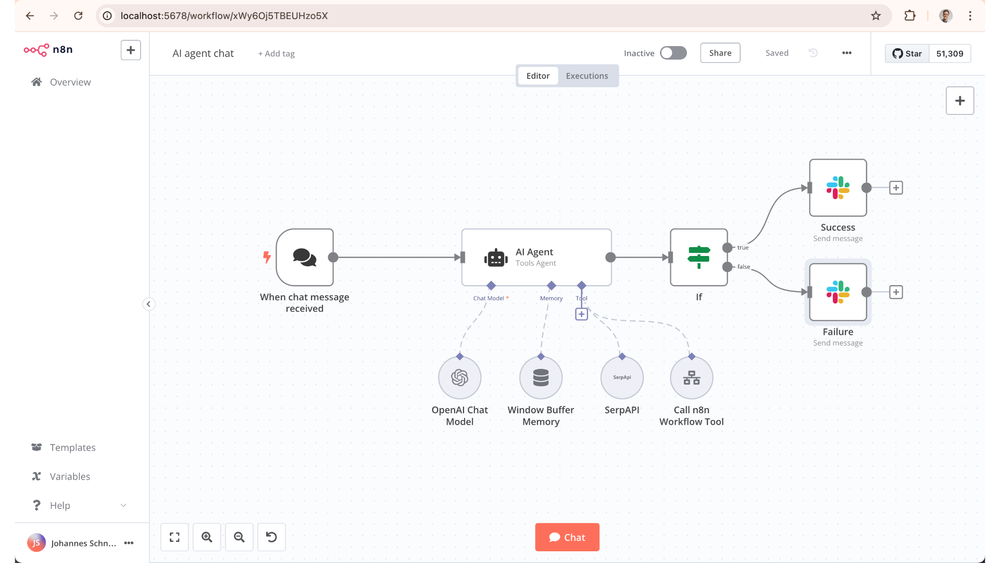
I’ll admit, I just recently discovered n8n, but it’s already revolutionized my workflow. This lightweight automation software can run on nearly anything, including a Raspberry Pi.
With n8n, you’re able to do all sorts of automations. It runs similar to Make or Zapier, but can be self-hosted. I’m currently using n8n to take new members of my Squarespace site who opt into email marketing and add them to my Kit email list for my small business. I also utilize n8n at my church to automatically download radio programs from an RSS feed and save them to our computer to play on our radio station.
That’s just scratching the surface of what n8n is capable of. One thing I plan to do is integrate it with Squarespace, Etsy, and Home Assistant, so when someone makes a purchase from my small business, smart lights in my office flash a certain color. The possibilities of what n8n can do are endless, and it’s definitely worth setting up on your Raspberry Pi.

- Supported Desktop Browsers
-
All
- Brand
-
n8n
n8n is an automation platform designed to simplify your life. From automating your email list to triggering Home Assistant from an Etsy sale, the possibilities of n8n are endless. Think of it like Zapier or Make, but self-hosted and free.

While RSS feeds aren’t nearly as mainstream as they used to be, they’re actually a great way to ditch social media and just consume the content that you want.
Almost every web publication on the internet still has an RSS feed. They’re somewhat standard in the publishing scene, and I haven’t come across a mainstream website without it as far as I can recall. With an RSS feed, you can easily parse through either a specific tag or a whole site to view the content they have published.
FreshRSS is a self-hosted RSS reader. Simply input the websites (or the XML RSS feeds if you have them), and FreshRSS will start parsing the articles right in your browser.
The best part of self-hosting FreshRSS on your Pi is the privacy that comes from it. Nobody else will see what you’re reading, and no other companies can data mine your browsing habits. You’re in full control of the experience and data collection.

- Supported Desktop Browsers
-
All
- Brand
-
FreshRSS
FreshRSS is a self-hosted RSS reader and aggregator to help you consume the content you want. Designed to be lightweight and run on your own hardware, that old Raspberry Pi sitting in your closet is the perfect candidate to run your new RSS reader.
Website

Hosting a website on a Raspberry Pi is actually pretty straightforward. Using a service like Docker, you’re able to easily spin up WordPress, Ghost, or even a Hugo website within just a few minutes. In fact, I’ve run numerous websites off of my Raspberry Pi in the past.
If you expect to get lots of traffic to the website, then a Raspberry Pi (at least, older ones) might not have enough power to handle the traffic adequately. However, if you’re just doing it for a personal blog, diary, or static landing page for your Minecraft server, then a Pi is more than enough.
Just the other day, I needed to spin up a website for a ministry at our church really fast and did so with WordPress and Docker in under 10 minutes using the Docker Compose template provided by WordPress.
Overall, deploying a website on your Pi is straightforward, and it still runs great even on older Pi models.
WireGuard VPN

If you ever need to VPN back into your home network for any reason, then having WireGuard running on a Pi is the perfect solution. With WireGuard, you’ll be able to browse as if you were on your home network from anywhere in the world.
WireGuard has both Android and iOS apps, as well as support for Windows, macOS, and Linux. I’ve VPN’d back into my home network from vacation and work trips to check on servers, reboot systems, or just to utilize my own network for privacy’s sake.
There are a number of reasons you’d want to VPN home—WireGuard on your Pi just makes it easy.

- Supported Desktop Browsers
-
All
- Brand
-
WireGuard
WireGuard is a self-hostable VPN that allows you to tunnel back into your home network. With support for all major smartphone platforms, as well as all major desktop operating systems, WireGuard is versatile, capable, and easy to use. You can even run the WireGuard server on a Raspberry Pi.
Joplin
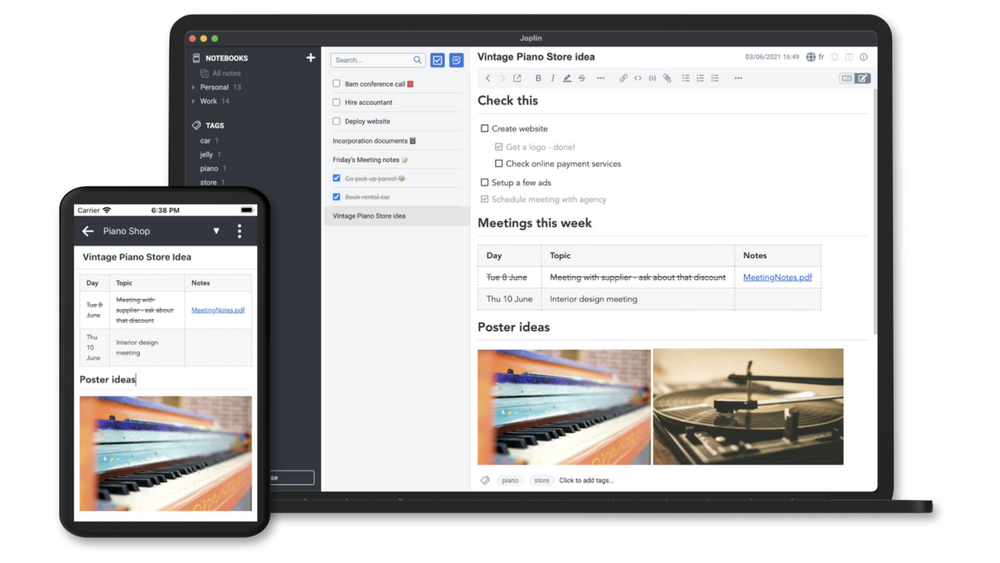
I love Notion, Todoist, Obsidian, and all the other productivity tools sweeping the internet. The problem with those tools is that many cost money, and all are hosted on someone else’s server (though you can host Obsidian yourself).
Joplin, however, is more than just a notes and task management app. It’s a full on productivity suite that resembles Notion, but hosted on your own system.
Hosting your productivity software at home gives you additional peace of mind on the security side of things, but also allows you to access all features without having to pay someone else. Your Raspberry Pi is already running, so why not put it to use managing your tasks and projects?
Joplin doesn’t just run as a website, however. There’s also an app on iPhone and Android for it, giving you a native experience for your self-hosted service—something that we don’t always see in the open-source community.

- Supported Desktop Browsers
-
All
- Brand
-
Joplin
Joplin is a self-hosted note, task, and project management platform. Designed to run on your own hardware—even a Raspberry Pi—Joplin is full-featured and even comes with native mobile applications for both iPhone and Android. With a robust feature set, you’ll find that Joplin can replace Notion, Obsidian, and many other apps in your productivity stack—all without costing a dime.
Are you looking for other things to do with your Pi? Instead of a lightweight service, like WireGuard or FreshRSS, consider building a smart mirror or RetroPie emulation station instead. These projects will take a little bit more time, and you might have to buy some extra components to complete them. But, the satisfaction of having a tabletop retro arcade at the end to show off to your friends? I’d say that’s priceless.


