Over the past year I’ve booted numerous Linux distributions, and seven of them I installed on bare metal and put to the test with daily use. Here are those seven distributions (also called distros) in order of worst to best experience.
I should preface this by admitting how this list is skewed and not very scientific. These distros have different use-cases. Some are meant for running servers, some for gaming, and some for daily driving and office work. Some are meant to be rock-solid, others are meant to be bleeding edge. Linux is diverse that way, and that diversity can make direct comparisons difficult.
The way I ranked them isn’t really about what I think everyone should be using. Instead, I give points for my specific workflow fitting the intended use-case and take points based on how anxious I was to distro-hop away from it. It can also be affected by simply what my interests have been lately. It’s a bit fuzzy and subjective, but again, that’s one of Linux’s strengths: you can always find your niche.
7
Fedora

You might be surprised to see Fedora Linux ranked so poorly on this list. Frankly, so am I. Fedora Linux is a well-established distro, a community fork of Red Hat Enterprise Linux. It’s very popular, and has the backing of Red Hat itself.
This is controversial, I know, but I didn’t find Fedora Linux to be a compelling distro. I didn’t like how slow dnf was, and I was encountering daily app crashes. I couldn’t figure out what was causing the crashes, and I decided I’d rather move onto another distro than try to solve the issue.
You might be judging me for not working harder to resolve the issue myself, but I knew from experience other distros didn’t give me this much trouble right off the bat. It could easily have been a conflict with my hardware, and at that point it’s best to just move on.
6
openSUSE Tumbleweed

openSUSE is one of the oldest Linux distros still being developed, which is one of the reasons I wanted to give it a try. It has a very well-developed ecosystem and a corporate backing while still feeling more cutting-edge than Canonical’s Ubuntu.
However, I found YaST to be overwhelming. There were multiple package management tools, and it was hard to settle in, so to speak. The screen-locking system had some kind of graphical issue I couldn’t resolve. While it was interesting to spend some time with such a pillar of the Linux, I didn’t think it was quite the right fit for me and my desktop PC.
5
EndeavourOS

If you hang around the “I run Arch, BTW” crowd, you probably know EndeavourOS. It’s an Arch-based distro that comes with a graphical installer to get you a basic desktop setup, but that’s it. The rest of the Arch experience is up to you to figure out.
This is probably the most loosely placed entry on this list. I haven’t spent that much time with endeavourOS as I think it demands more time. I was curious to find out what the developers meant when they called it a “terminal-centric” distro. The minimal desktop has been a challenge to figure out, but I’m certainly learning a lot that way. I recommend it if you’re familiar with Arch but want to get better at managing your operating system from the terminal.
4
DietPi

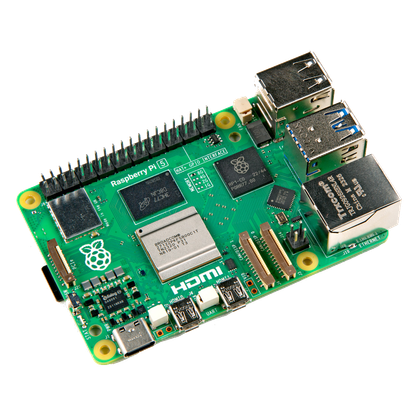
The DietPi operating system is an alternative to Raspberry Pi OS for single board computers (SBCs) like the Raspberry Pi. It’s designed to be lightweight while using scripts to simplify the configuration experience and the process of installing software.
I have a few SBCs, and I was very excited to find such a lightweight operating system that made it so easy to get software I wanted. While Raspberry Pi OS might be a good introduction to using SBCs, I think DietPi is better for SBC owners like myself who know what they want.
- Brand
-
Raspberry Pi
- Storage
-
8GB
It’s only recommended for tech-savvy users, but the Raspberry Pi 5 is a tinkerer’s dream. Cheap, highly customizable, and with great onboard specs, it’s a solid base for your next mini PC.
3
Garuda Linux

Garuda Linux is distro that’s meant for power users and folks who have modern computing hardware and want a modern computing experience. It’s based on Arch Linux and includes access to the AUR by default, so it puts you on the cutting edge of software advancements in the Linux world too.
I’ve hopped on and off of Garuda two or three times in my life, and it’s been rare that I find a distro that fits my advanced desktop computing needs while also making management a breeze. The cutting edge aspect is also hard to walk away from, and it didn’t feel as unstable as other rolling release distros on this list.
2
Kubuntu

Kubuntu Linux is an official flavor of Ubuntu. Instead of using GNOME as the desktop environment, it uses KDE Plasma. The Plasma environment is known for its advanced productivity tools and endlessly configurable
I run this distro on a Kubuntu Focus laptop. Kubuntu has proven to be truly reliable as an operating system. Crashes are rare, and most software I need to test will run on it without much hassle. The software in the repos isn’t as bleeding edge as Garuda, but when it comes down to the line, I need stability to get my job done.
1
Bazzite

I’m putting Bazzite at number one on this list just because it was probably the most exciting distro for me to try out and play with. “Play” is the crucial term here because Bazzite is a gaming-focused Linux distro. It’s meant to be an alternative to SteamOS, which runs on Steam Decks and some other gaming handhelds, plus regular desktops and HTPCs.
I installed the HTPC version of Bazzite on a mini PC and set it up in my living room with a mini keyboard and a gamepad. Now I can game on the mini PC like it’s a console in my living room. There was a bit of configuration involved to optimize the HTPC setup, but once I got there, it was a ton of fun to try out. I recommend it if you want to see everything gaming on Linux has to offer without buying a SteamOS-compatible device.
With seven put to the test in the past year, I’ve in reality barely scratched the surface. There are hundreds of actively maintained distros out there, and I’ll continue trying them out. If you’ve never run one of these alternative operating systems, you can see our guide to installing Linux. If you don’t want to commit, there are several ways to try Linux without fully installing it.