ChatGPT is smarter now that it’s learned to forget – a huge memory upgrade is coming


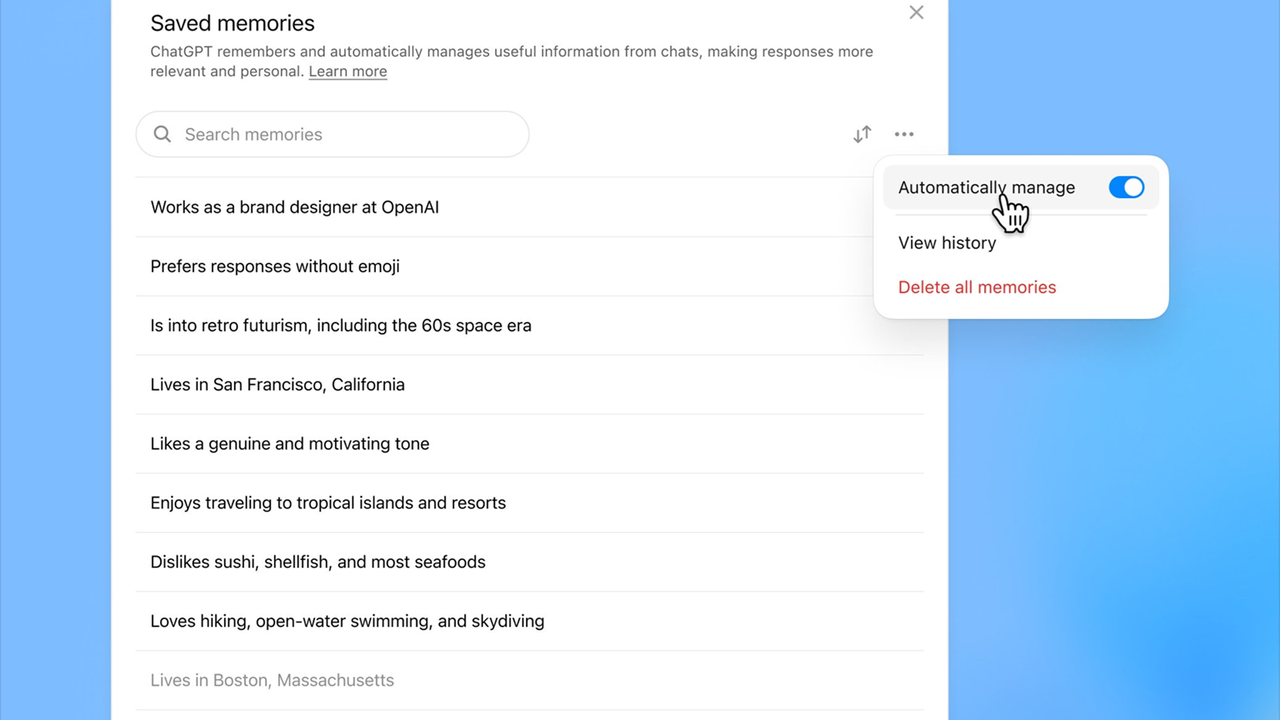
ChatGPT’s memory feature transformed the AI chatbot by allowing it to remember facts shared during conversations, allowing users to have a somewhat personalized version that knows their name, preferences, and even their coffee order if they want. Now, OpenAI brings a powerful improvement to ChatGPT’s memory: the ability to forget.
But even though ChatGPT accumulated user data, either added manually or that the model considered important, it had fundamental problems. Managing, reviewing and deleting memories manually if necessary is tedious enough, but failing to do so would mean running into an annoying “memory full” message.
This is why the new automatic memory prioritization deployed for ChatGPT is so intriguing. Giving the model the ability to decide which memories are still relevant, what can take a back seat, and how to keep your conversations useful is potentially huge.
ChatGPT decides what stays “top of mind” based on how often and how often you mentioned something. It’s a bit like how your own brain filters what you should focus on at any given moment. ChatGPT does not delete anything; it’s simply about learning to weigh information in a way that feels more natural.
If you’ve spent the last week asking questions about toddler sleep schedules, this will come flooding back. If you haven’t mentioned your sourdough since June, it’s quietly moving further down the list. All of this happens without you having to prune anything manually, which is good news for those of us who treat digital settings menus the same way we treat device manuals: with vague respect and active avoidance.
ChatGPT can now automatically manage your saved memories: no more “full memory”. You can also search and sort memories by recency and choose which ones to re-prioritize in settings. Rolling out to Plus and Pro users on the web worldwide starting today. https://t.co/T1vSNH5289 pic.twitter.com/xRHLFTu2AmOctober 15, 2025
This rethinking of memory is deceptively simple in concept but radical in its implications. Without much fanfare, OpenAI taught ChatGPT to self-sort. And that takes it from a reactive tool to something better designed for the long term.
You still have full control over ChatGPT’s memory, it must be said. You can scroll through your memories, see what ChatGPT considers “a priority” and adjust it like you would edit a playlist.
You may regain a memory of your dietary restrictions, downgrade your brief but intense obsession with medieval cheese trivia, or simply erase things altogether. You can even restore memories from previous versions.
AI Memory Banks
But the biggest change isn’t in what you can do, but in what you no longer have to do. Until now, the memory system has been one of the most maintenance-intensive aspects of ChatGPT. Power users could get a lot out of it, but it required you to keep things tidy, like a digital closet. The more you used it, the more you had to manage it.
This is great if you’re the type to keep your office files color-coded and your email inbox zeroed. But for the average person who just wants their chatbot to remember that they like their iced coffee and polite emails, the old system was too much work.
Now, at least in theory, ChatGPT treats your preferences less like a static list of facts and more like a shared digital document that you both edit. In this sense, it is not just a technical update. It’s a social issue.
It’s worth saying that manually checking ChatGPT memories is probably still a good idea, as the AI can mess things up there just as much as in its responses to prompts, but that’s where it seems OpenAI is trying to strike a balance.
The memory system is automatic, but not opaque. You can see exactly what is stored. You can reprioritize. You can delete. You can even turn it off completely. But memory is not just a luxury accessory. For any AI assistant worthy of the name, this will become fundamental.
Because without memory, and ideally a memory full of actually relevant information, most AI tools have a ceiling of usefulness. They can answer questions and think, but lack the continuity that allows for better tools in the long term. It’s not flashy, but automated memory management is ultimately a pretty memorable idea for a feature.
And of course you can too follow TechRadar on TikTok for news, reviews, unboxings in video form and receive regular updates from us on WhatsApp Also.
You may also like


