Unlock Termux’s full potential: 5 essential setup steps


Technically you can start using the Termux Console straight away, but there is a checklist that I follow after a fresh install. It streamlines everything, allowing you to avoid configuring the app later.
Upgrade Packages
By default, Termux repositories are not updated with the latest packages, so the first command you should run is for a full upgrade. Termux uses the PKG package manager, which takes the “update” and “upgrade” flags to synchronize repositories and upgrade packages.
Run this command to update the package list.
pkg update
Then run this command to upgrade the available packages. For example, my Termux offers 16 package upgrades.
pkg upgrade
Alternatively, you can concatenate the two commands like this and skip the interaction to install the upgrades directly.
pkg update && pkg upgrade -y
It’s also a good idea to clear the cache after an upgrade. Try this command to do so.
pkg autoclean

Configure storage access
Termux, by default, runs in a sandbox that cannot touch the rest of the Android file system. If you want Termux to access Android storage, you will need to explicitly grant this permission. This comes in handy when trying to work with scripts, download or convert files, or manage backups with Termux.
Type and enter the following command to open the storage access settings for Termux.
termux-setup-storage
Scroll down to Termux, tap it, and enable “All File Access” for the app. If you run the “ls” command now, it will expose the Android file system.
ls
ls storage

You can check by trying to ‘cd’ into one of these directories to make sure you have access to them.
Install terminal essentials
Depending on how you use Termux, your essentials will vary. There are tools that everyone should have on their Termux.
Python
I always install Python on Termux, which also gives me access to the Termux-patched version of “pipx”.
pkg install python
You can verify the pip installation with the following command:
pip --version
Microphone
By default, Termux comes with “nano” for editing text files. I hate using the Nano editor on desktop, and it’s downright unusable on mobile. That’s why I always install “micro” to edit text files in Termux. It’s not perfect, but it’s better than “nano”.
pkg install micro
Simply add “micro” before the name of a text file to open it with Micro.
Yt-dlp
Yt-dlp is the best way to download media files from the Internet. It supports over 700 websites including YouTube, Facebook, Instagram and Twitter. It can also download files in specific formats with the best quality available. It even lets you manage metadata, thumbnails, and subtitles.
pkg install yt-dlp
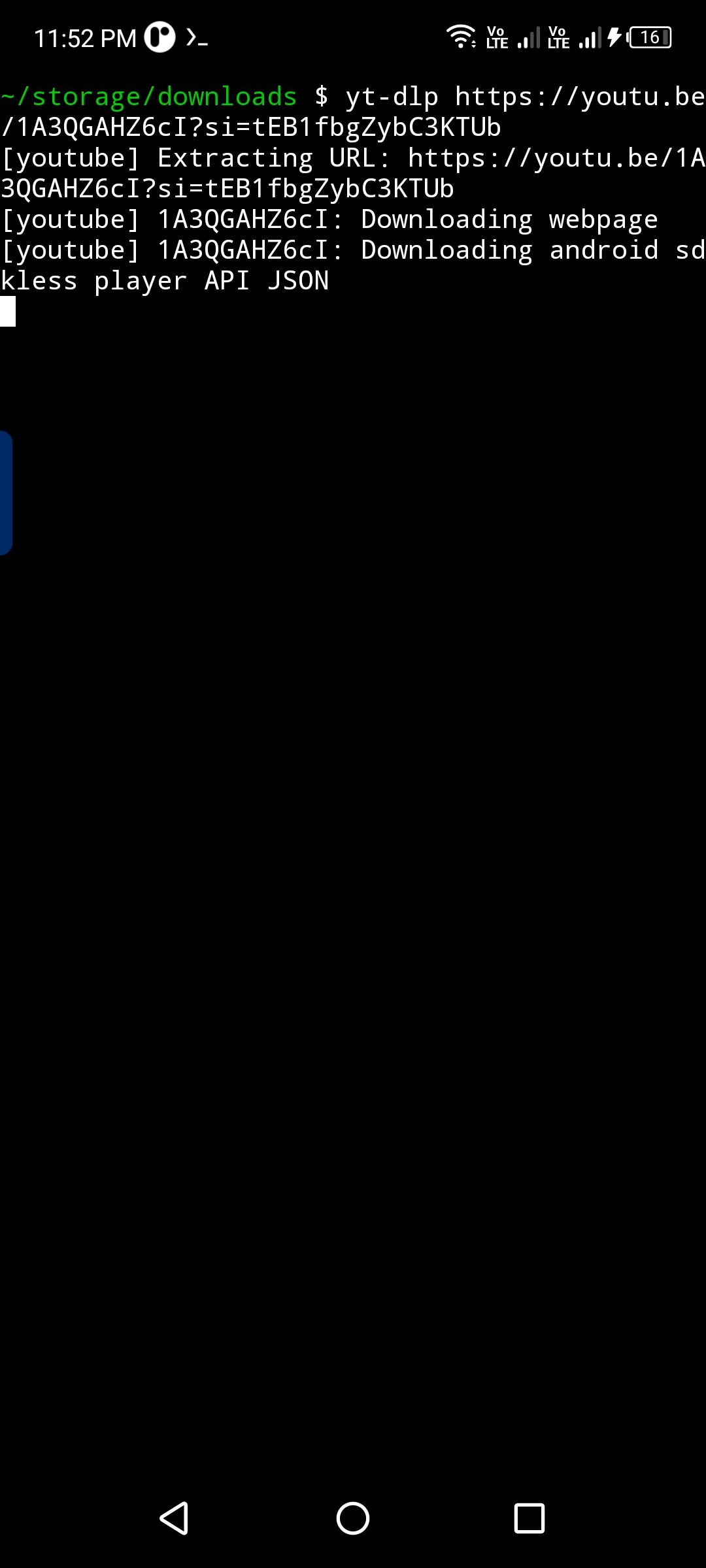
You can upload a video with this tool by typing “yt-dlp, followed” followed by the video URL.
yt-dlp https://www.youtube.com/watch?v=dQw4w9WgXcQ
 FFmpeg
FFmpeg is the most powerful tool for converting and processing audio, video and GIF files.
pkg install ffmpeg
Make sure to enable storage access for FFmpeg to work with your local files.

Ouvresh
A good reason to keep Termux on your phone is to SSH into your desktop. You can install an SSH client like OpenSSH.
pkg install openssh

Git
You’ll also want to install Git, even if you’re not a developer. Git comes in handy when trying to clone repositories from GitHub.
pkg install git

Fast recovery
It’s not strictly an “essential”, but I consider it one. It’s so satisfying to run Fastfetch on your phone, and I think you should definitely try it.
pkg install fastfetch

Grant access to the Termux API
By default, Termux is isolated and sandboxed, so it cannot directly access the hardware or sensors. So, if you want to run automations or use Android APIs for location, SMS, clipboard, notifications or camera, you need to enable API access for Termux.
You can either install the Termux:API app from F-droid or run the following command.
pkg install termux-api
Regardless of the method, you will need to manually disable battery optimization and grant access to Termux to use other apps.
To verify that this works, run the following command:
termux-battery-status

Beautify Termux
As powerful as Termux is, it is downright ugly by default. The font is just awful and barely readable. The developer has a companion application for styling Termux, but it is paid. However, there is a free script that allows you to install custom themes on Termux.
If you haven’t installed git yet, do so now. We will run a script that will allow us to customize the font, theme and colors of our Termux terminal. Enter this command to download the repository.
git clone https://github.com/adi1090x/termux-style

Then ‘cd’ in.
cd termux-style

Now let’s install and load the script:
./install
Here you can select fonts, themes and colors by making selections with numbers. There is also a random picker that automatically selects a theme for you. Enter “F” to choose from a list of 20 fonts and “C” to select a color scheme. The script gives you a selection of around 100 themes, so I’m sure you’ll find something to your liking.
Once you complete this checklist, your Termux is ready to do awesome and practical things.


