I still use my 15-year-old dumb TV thanks to these modern accessories


We all have at least one TV that’s gathering dust after an upgrade. If you’re like me, you probably have a few older sets stashed around your house.
But just because they lack modern features doesn’t mean they can’t still be used in the modern age of streaming. Here’s how I continue to get the most out of a decade-plus-old TV with these accessories.
Why I still use my old TV
Unlike phones, you probably don’t upgrade your TVs as often. Most upgrades happen when your TV breaks or you want a better picture.

Even so, you probably don’t upgrade it every two or three years. Our living room TV, which was the central TV in the house, was only replaced in 2020 after being purchased in 2010 – a ten year gap – and it is still in use today.
At 47 inches, it’s still a nice-looking TV, but unlike current models, it’s not smart. To put its age in perspective, it was released when networks, such as Disney, aired separate channels for standard definition and high definition programming.

Even though it is old, I combined it with several accessories to bring it into the modern era. This approach allows me to save money by avoiding purchasing a new TV while adding features and capabilities that often rival, or even exceed, those of a new model.
1
Streaming box or stick

One of the best ways to turn a dumb TV into a smart TV is to connect a streaming stick or box to it. These generally inexpensive add-ons allow you to access various streaming platforms and cast your device to your TV.
When we first bought the TV, we only had our cable box and a DVD player connected, but three years later we added a streaming stick, which was a Google Chromecast. This was the first generation of streaming stick, so it lacked a remote control and functioned primarily as a streaming device rather than a full streaming platform with Google TV.

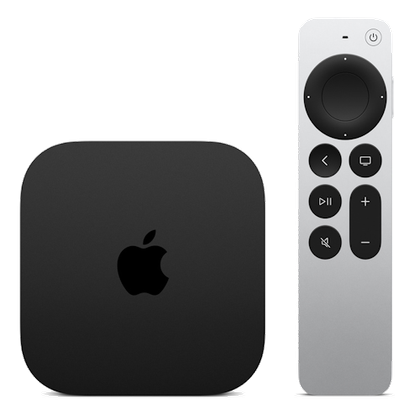
Once we got a smart TV and moved it downstairs to my office, where it currently resides, I added an Apple TV 4K. Since the TV only supports high definition and not 4K, I knew I wouldn’t get the full benefits of Apple’s latest streaming box.
However, it still does everything I need it to do. It lets me listen to music, follow Apple Fitness+ workouts, and calibrate the TV’s color balance using Apple TV and my iPhone.
-
- Operating system
-
tvOS
- Resolution
-
4K
- Audio codecs
-
Dolby Atmos
- RAM/storage
-
64 GB or 128 GB
- Connectivity
-
Wi-Fi or Wi-Fi and Ethernet
Immerse yourself in stunning 4K HDR with Apple TV 4K. Stream your favorite content with exceptional clarity and color, powered by the A15 Bionic chip. Enjoy seamless access to apps, games, and Apple Originals, all with the convenience of Siri voice control and personalized recommendations.
-
- Dimensions
-
6.4 inches x 3 inches x 1 inches
- Wi-Fi
-
Yes
- Ethernet
-
Yes
- Ports
-
HDMI
- Operating system
-
Google TV
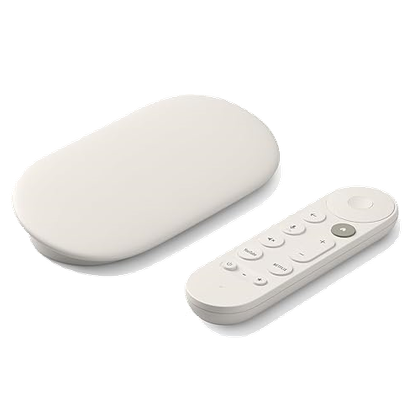
Enjoy stunning 4K streaming with Google TV Streamer. Enjoy seamless access to your favorite apps, shows, and movies with a powerful, easy-to-use interface. Enhance your entertainment with voice control, personalized recommendations and smooth performance in vibrant Ultra HD.


No matter which streaming device you choose for an older TV, it’s now easier and more cost-effective to make it smart. Additionally, if your TV does not have the supported connection port (most often HDMI), you can purchase an adapter to connect the devices.
2
External speaker

Even though my TV already has a built-in speaker, it has become dull and less powerful over the years. This led me to connect an external speaker to it for better sound volume.
Since I have an Apple TV hooked up, I opted to use the HomePod mini in my office as an external speaker. This allows me to adjust the volume, while playing or pausing media content, with my voice.

Plus, if I had another HomePod mini, I could combine the two and make a stereo pair. It would improve my listening experience, but for now I’m OK with whichever one I use my TV for.
The HomePod was an easy choice as an audio source since I already had it, but before doing so I was using an external speaker I found on Amazon. It wasn’t anything fancy, just something that sounded good and fit the aesthetic of my setup.
Since my TV is from 2010, plugging in an external speaker had many audio benefits. For example, the TV speakers are located at the back, not facing me, so having the sound ultimately directed in my direction made a big difference.
Additionally, the external speaker helped make the sound fuller, the dialogue clearer, and the overall audio more balanced. This is a significant improvement over the built-in TV speakers of 15 years ago.

You can still buy expensive speakers, but there are plenty of good-sounding ones for under $100. Just like you can make your TV smart, you can also dramatically improve its sound without breaking the bank.
3
IR Launcher

Depending on the age of your TV, CEC may or may not be built in. This allows one remote to control multiple devices.
You’ll probably notice it when you turn on a streaming stick or box, and it also turns on your TV. Remotes control both the streaming device and the TV it’s connected to.

My TV, however, doesn’t have this feature built in, and while it’s not a game-changer, it is useful. This is especially evident when all of my other TVs in the house have this feature, given that they are much newer than my 2010 TV.
The problem is that I can’t just add CEC to my TV, because that involves internal wiring through the HDMI port. To solve this problem, I used a smart infrared transmitter to turn my TV on and off.


7/10
- Size
-
3.15 x 2.76 x 0.91 inches (8 x 7 x 2.3 cm)
- Relationships
-
WiFi 802.11 (2.4 GHz only) and Bluetooth 4.2
There are several IR blasters available, but I use the SwitchBot Hub 2, which has the technology built in. I recorded every function in the app, like turning the TV on and off. Next, I created Siri Shortcuts to make these functions easier to use, primarily through my HomePod.
Creating shortcuts helps me get everything ready before I go down to work out, like turning on the TV, waking up the Apple TV, and opening the Fitness app. It also allows me to add these functions to automations and control the TV’s power using just my voice.

Infrared emitters are an effective way to make an older TV smart, allowing you to control it remotely even when you’re not in the same room or on the same floor. Since older TVs lack complex functions, using an infrared transmitter to handle basic controls works exceptionally well.
Just because your TV is old and showing its age doesn’t mean it should be thrown in the trash. There are different ways to revitalize it and bring it on par with, or even beyond, current smart TVs.
While adding a streaming device, new speaker, and IR blaster certainly helps achieve this modernization, I also added some less essential accessories that are still useful. This includes a MagSafe adhesive arm to place my iPhone during FaceTime calls and various USB charging cables for charging multiple devices from the TV, like the Siri Remote.

Regardless of which option you choose, there are plenty of ways to upgrade an older TV, even if it’s more than a decade old. Before you buy a new TV, consider whether it makes more sense to upgrade it with external accessories. The answer may be yes.