
At a glance
Expert’s Rating
Pros
- Great performance
- Beautiful display
- Lots of RAM and storage
- Excellent trackpad
Cons
- Middling battery life
- Pen doesn’t work on the screen
- Glossy display prone to reflections
- Webcam, mic, and speakers don’t impress
Our Verdict
The Acer Swift X 14 AI delivers high-end performance, a premium display, and an incredible trackpad. But the rest of the machine doesn’t feel quite as premium.
Price When Reviewed
This value will show the geolocated pricing text for product undefined
Best Pricing Today
Best Prices Today: Acer Swift X 14 AI
$1,682.15
The Acer Swift X 14 AI is a creator-focused 14-inch laptop. If you want a machine with capable hardware for creator-focused tasks (not gaming), this is a good fit. It delivers excellent internals with a Copilot+ PC-capable AMD Ryzen AI 7 processor, Nvidia RTX 5060 GPU, 32GB of RAM, and a 1TB SSD. The beautiful 14.5-inch OLED screen and large haptic trackpad round out the experience.
I’ve reviewed quite a few Acer laptops. Acer provides solid hardware for the price. While the $1,699 Acer Swift X 14 AI is more expensive than the average Acer laptop I review, it offers a more premium experience.
But it’s not a completely premium experience. For the price, I pause — there are some real downsides here around the battery life, pen experience, and other components that make this laptop feel not quite as premium as I’d like. But the performance is excellent, and the display is gorgeous.
Acer Swift X 14 AI: Specs
Foundry / Chris Hoffman
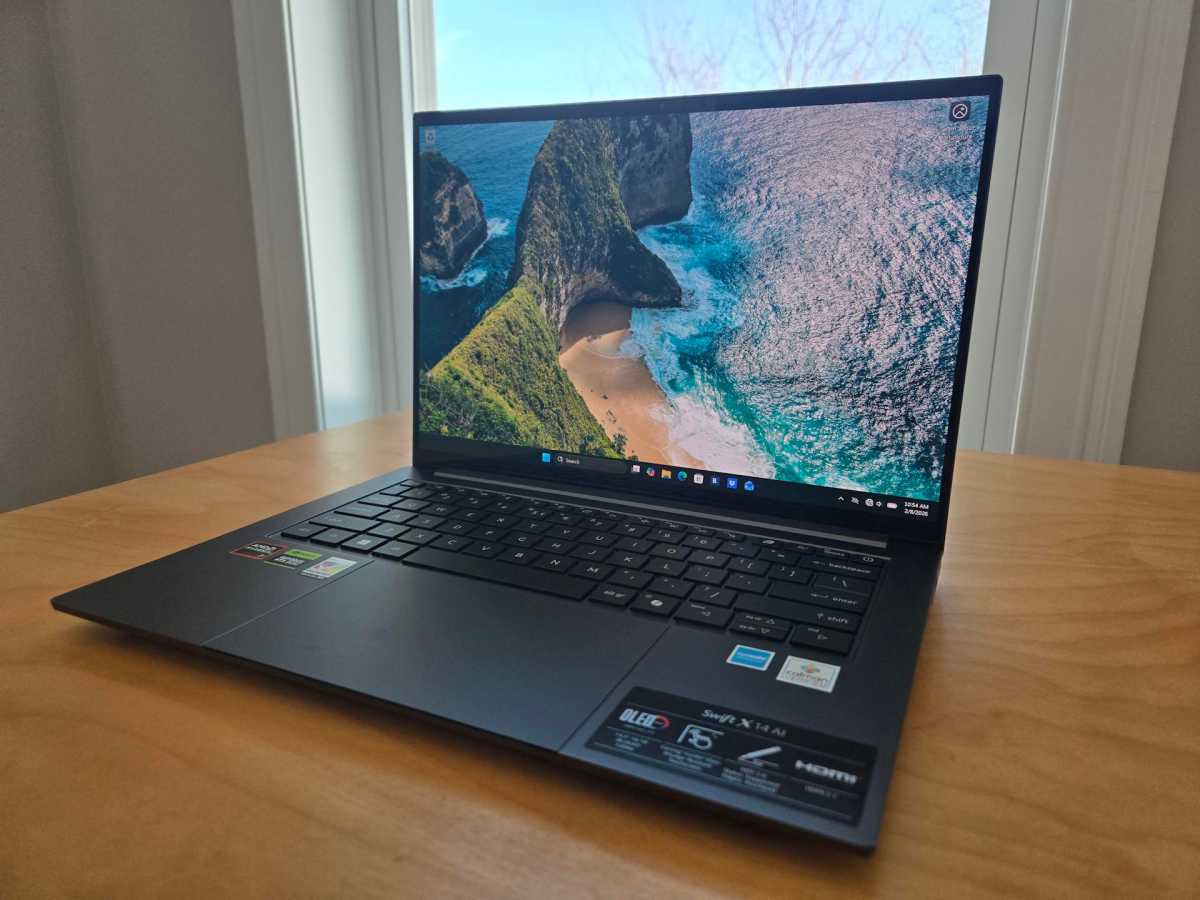
The Acer Swift X 14 AI includes an eight-core AMD Ryzen AI 7 350 processor. That’s AMD’s “Kraken Point” hardware, and it comes with AMD Radeon 860M graphics. But Acer also includes Nvidia GeForce RTX 5060 discrete graphics. This is an Nvidia RTX Studio laptop intended for creative applications — 3D rendering, video editing, and perhaps local AI applications rather than gaming.
This is a capable hardware package, and the 32GB of RAM and 1TB SSD are excellent to see when RAM and storage are becoming so expensive.
Acer went out of its way to put “AI” in this laptop’s name, and this machine does have an NPU capable of running Windows 11’s Copilot+ PC features. However, with just 8GB of VRAM in the RTX 5060, the GPU here isn’t ideal for serious local AI tasks. You’d want a GPU with 16GB of VRAM if local AI was a focus.
- Model: SFX14-61G-R1HV
- CPU: AMD Ryzen AI 7 350
- Memory: 32GB LPDDR5X RAM (7500 MT/s)
- Graphics/GPU: Nvidia GeForce RTX 5060 and AMD Radeon 860M
- NPU: AMD Ryzen AI (up to 50 TOPS)
- Display: 14.5-inch 2880×1800 OLED display with 120Hz refresh rate
- Storage: 1TB PCIe Gen4 SSD (and a second empty SSD slot)
- Webcam: 1080p camera
- Connectivity: 2xUSB Type-C (USB4), 2x USB Type-A (USB 3.2 Gen2), 1x HDMI 2.1 out, 1x combo audio jack, 1x microSD card reader
- Networking: Wi-Fi 6E, Bluetooth 5.4
- Biometrics: IR camera for facial recognition
- Battery capacity: 76 Watt-hours
- Dimensions: 12.69 x 8.95 x 0.71 inches
- Weight: 3.4 pounds
- MSRP: $1,699 as tested
The Acer Swift X 14 AI’s display is one of its best features. It has a beautiful 14.5-inch OLED panel with a resolution of 2880×1800 and a 120Hz refresh rate.
Acer Swift X 14 AI: Design and build quality
Foundry / Chris Hoffman
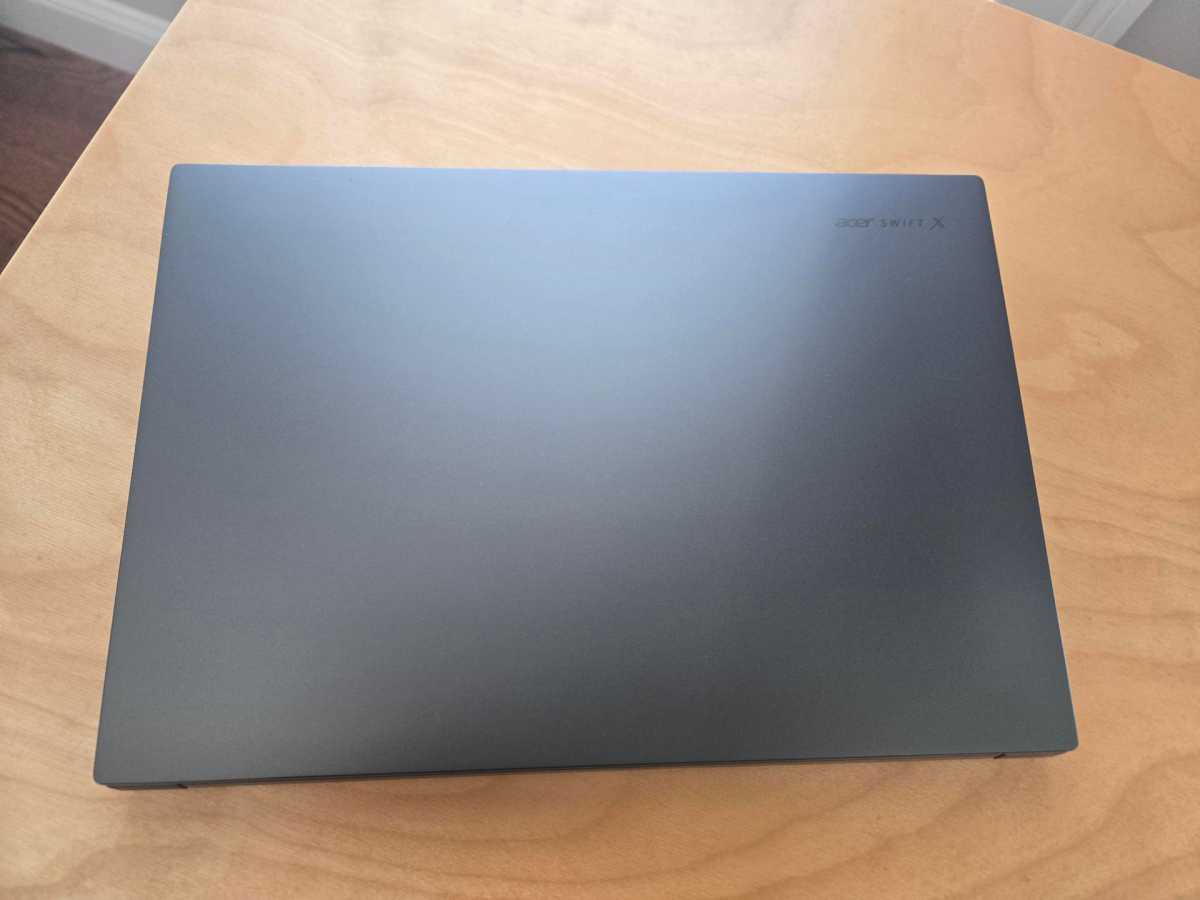
The Acer Swift X 14 AI has an aluminum chassis and palm rest. The bezel surrounding the display is made of plastic, and the excellent haptic touchpad’s surface is made from Corning Gorilla Glass. At 3.4 pounds, it’s a good weight for a machine with a discrete GPU.
In “Titanium Gray” with black keys and a black bezel around the display, this machine is unassuming, especially when closed. It looks sleek and modern without any flashy extra elements. Even the “Acer Swift X” logo on the lid is restrained. The flashiest visual element is that big haptic trackpad near the keyboard, which makes the laptop look luxurious in a very utilitarian way.
The build quality is good. The hinge is solid and doesn’t shake as you type. The machine is easy to open with a single hand, and it closes with a pleasing, solid feel. It’s an all-around nice design.
As a creator laptop, the biggest downside is the pen experience. Many competing creator-focused laptops that emphasize active pen support (like the Asus ProArt PX13) have 360-degree hinges, making them more flexible for pen input on the display. This machine has a hinge that can only open to 180 degrees. More importantly, the pen doesn’t work on the display at all, only on the trackpad. It’s an odd choice, and it means this isn’t the typical active pen experience you’ll find on a pen-enabled creator-focused laptop.
Acer Swift X 14 AI: Keyboard, trackpad, and pen
Foundry / Chris Hoffman
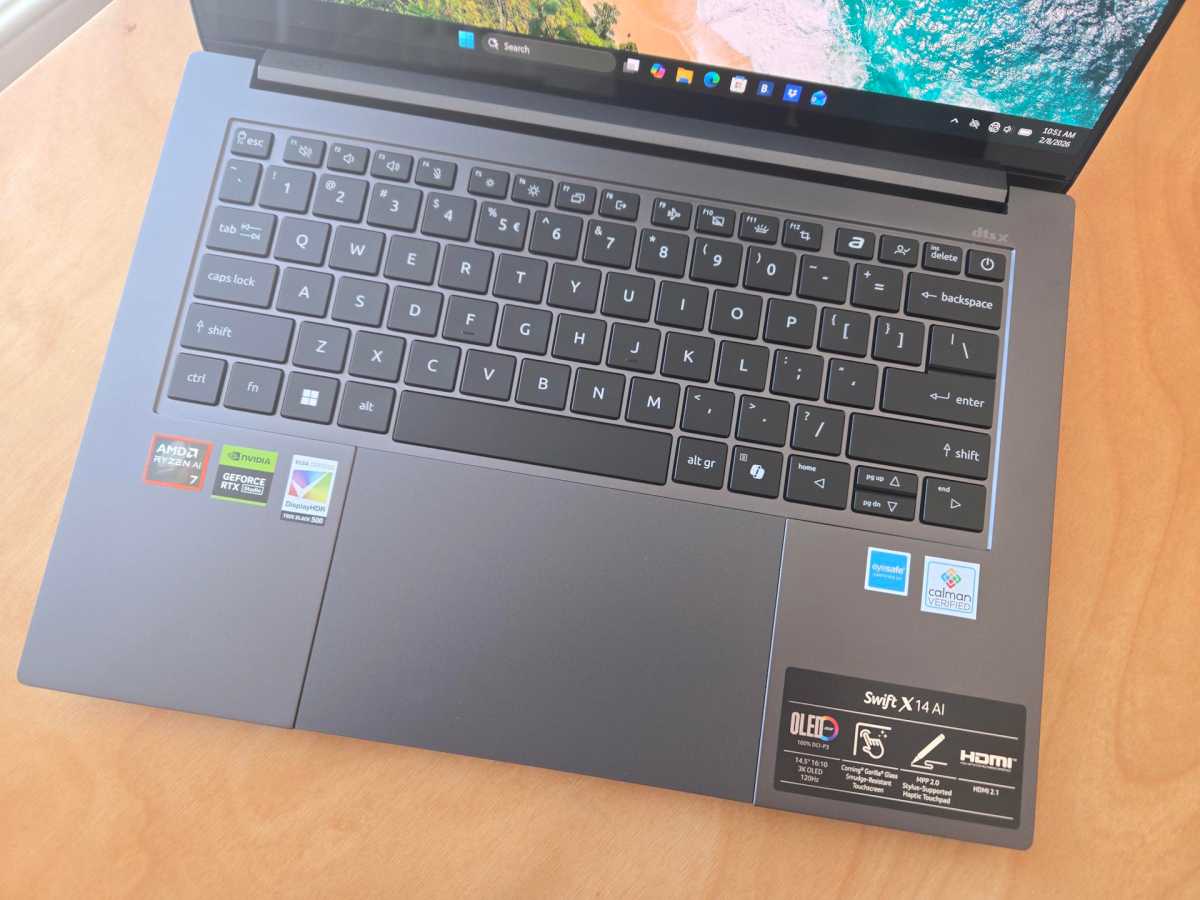
The Acer Swift X 14 AI has a decent keyboard. It’s spacious, and there’s enough key travel. But, while it’s comfortable enough, the action feels a tad soft when you press a key. It’s fine to type on, but for a premium creator laptop, the keyboard just doesn’t feel as high-end as the display and trackpad do. If you do a lot of typing and want the snappiest keyboard experience, you may want to look for another machine.
The trackpad here is excellent. It’s unusually large, and it’s a haptic trackpad, so you can “click” at any point on the pad. It’s nice and responsive thanks to the glass surface, too.
The trackpad works with active pen input, so you can use the pen on the trackpad to draw, edit, and write. When you hover the pen over the touchpad, you can see the position of the “cursor” where it will draw on the screen. This is nice to have, but I can’t imagine using this for fine graphical touches or writing notes by hand — an experience where you write directly on the screen feels much better to me.
However, the included Acer Active Pen only works with the trackpad: You can’t write or draw directly on the laptop’s touch screen using the pen. While the digitizer on the trackpad works well, this feels like a huge omission. Competing creator-focused laptops with pens and big OLED touchscreens have digitizers built into the screen.
Acer Swift X 14 AI: Display and speakers
Foundry / Chris Hoffman
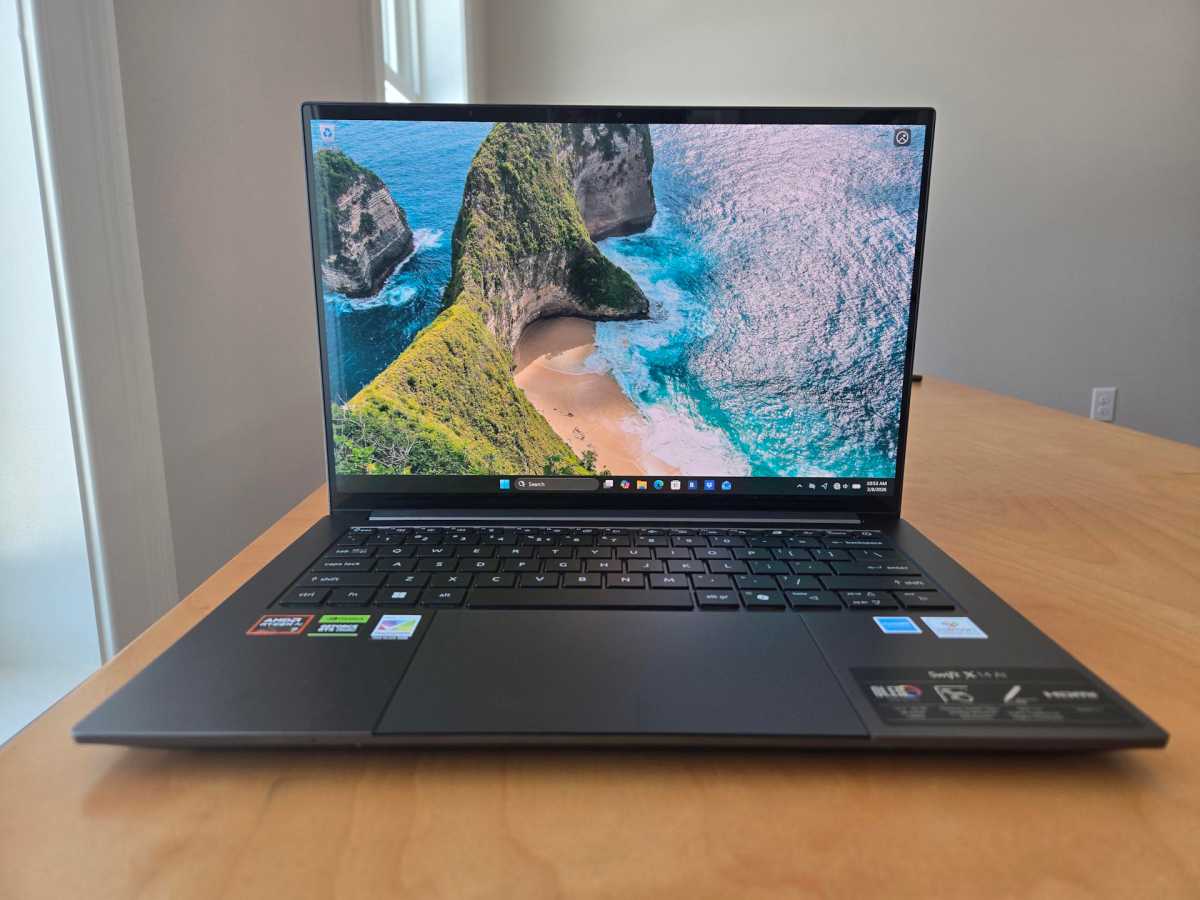
The Acer Swift X 14 AI’s display is one of its best features. It has a beautiful 14.5-inch OLED panel with a resolution of 2880×1800 and a 120Hz refresh rate. Its colors are vivid and its contrast is sharp — this is just a beautiful machine to look at. For a creator-focused laptop, this is exactly what I’d hope to see.
Brightness is one downside. Acer says this is a “340+ nit” display, and that’s on the dim side. While the panel does support HDR, the HDR experience isn’t particularly impressive without more maximum brightness to work with. Additionally, this is a glossy touchscreen display, and that leads to more reflections coming off the display. With a glossy display and lower-end brightness, reflections can be a real problem in challenging lighting conditions like in a brightly lit office with sun streaming through the window. Glossy displays always struggle with reflections, and higher brightness help make them more readable.
But, downsides aside, this is an absolutely beautiful panel that’s a real pleasure to look at.
The speakers aren’t as impressive as the display. They have a decent amount of volume, but music can be a little grating at the high end, and there’s not a lot of bass. You’ll want to use headphones for the best audio experience here.
Acer Swift X 14 AI: Webcam, microphone, biometrics
The Acer Swift X 14 AI includes a 1080p webcam and three microphones. The webcam image looks middle-of-the-road. The image quality is reasonable, but it’s a little grainy. The colors look cool and flat, despite the daylight coming in through my office window as I type this.
The Swift X 14 AI has “three microphones,” and the triple-array microphone setup wasn’t particularly impressive, either. It did a fine job of canceling out the background noise of the computer fans in my office. However, the audio it captured was on the quiet side, and the audio quality wasn’t particularly crisp.
For a built-in laptop webcam and microphone setup, this is fine. You can get through video meetings and look and sound okay. However, I wouldn’t use this to record videos or do anything else where you want to show off impressive camera quality.
This machine has an IR camera for Windows Hello, so you can sign into Windows with facial recognition. It worked well.
Acer Swift X 14 AI: Connectivity
Foundry / Chris Hoffman
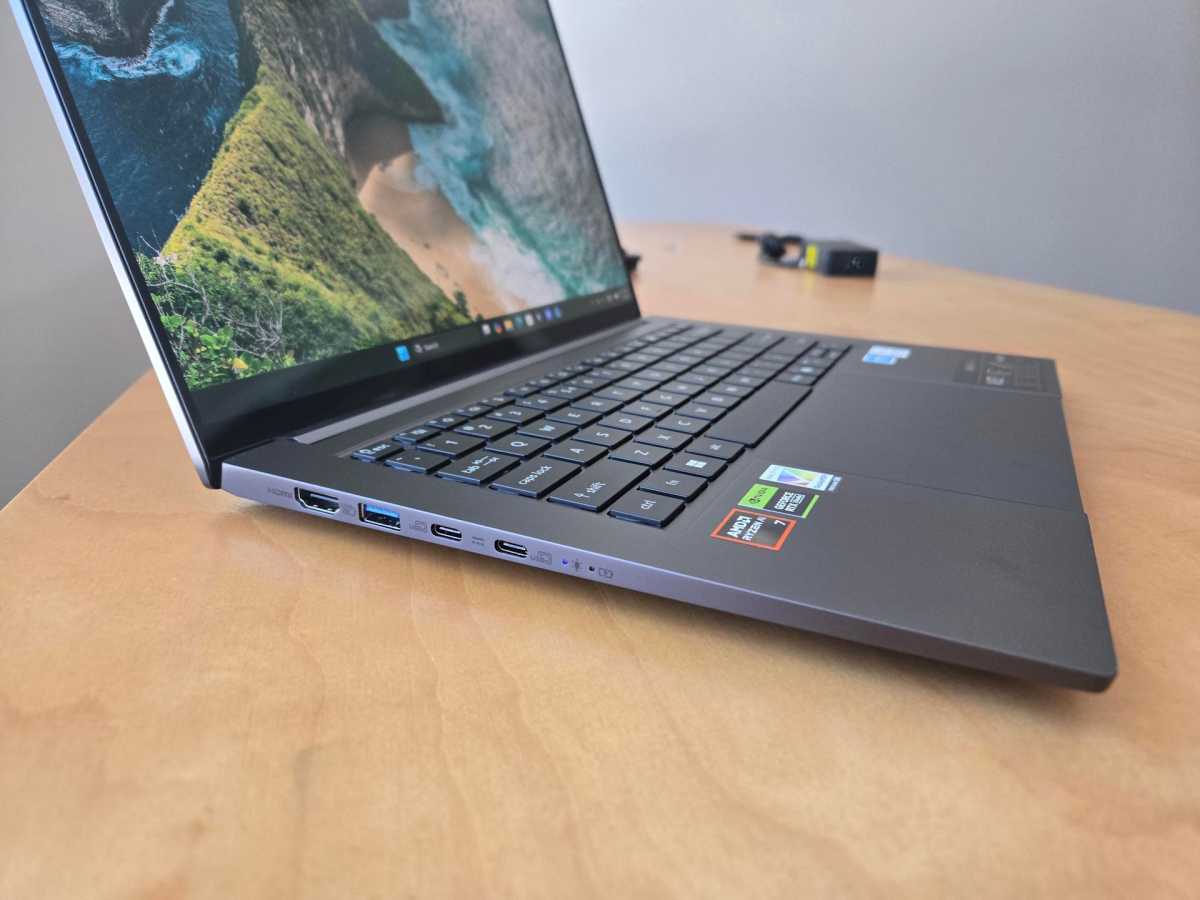
The Acer Swift X 14 AI features a good loadout of ports. On the left side, it has two USB Type-C (USB4) ports, a USB Type-A port (USB 3.2 Gen 2), and an HDMI 2.1 out port.
This machine charges via USB-C, so you’ll be plugging in the charger cable to the left side of the machine and using one of those USB4 ports while charging.
Foundry / Chris Hoffman
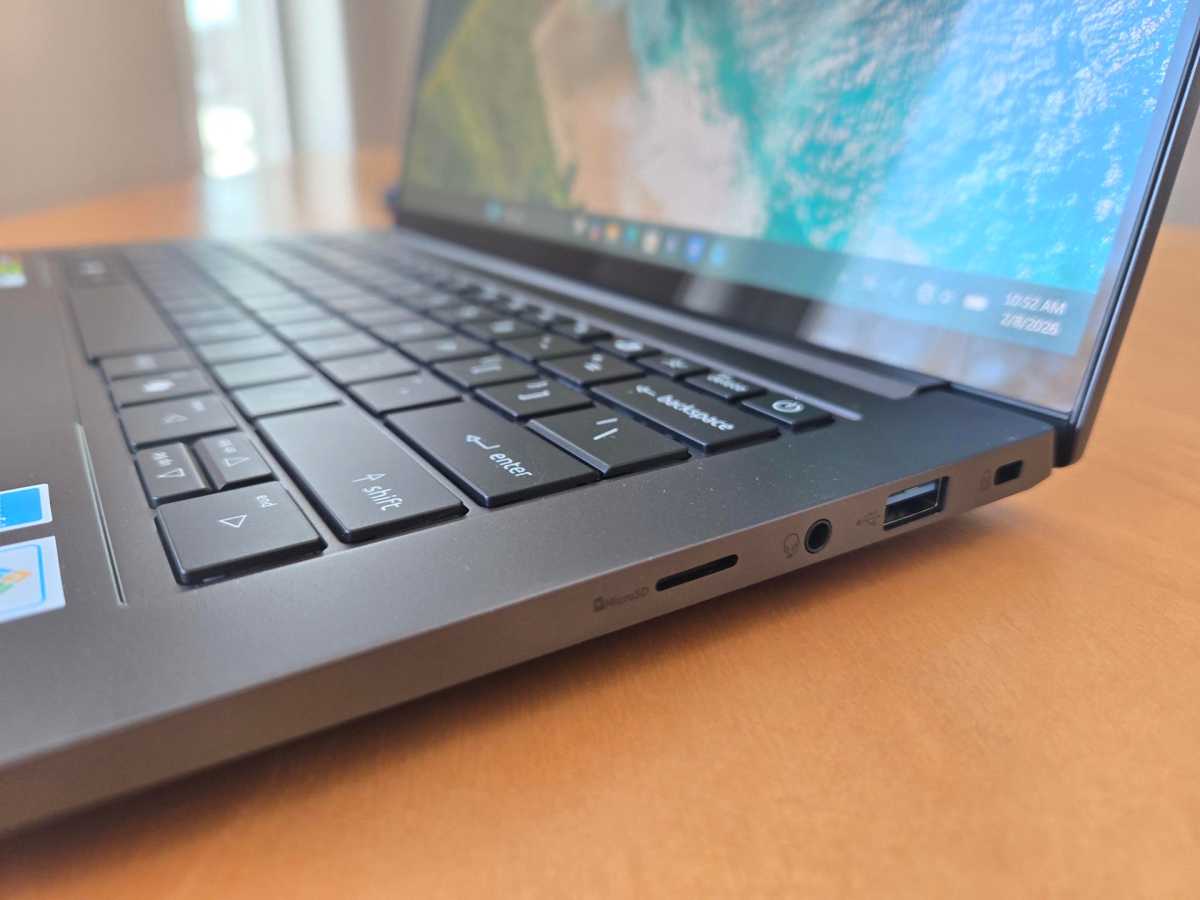
On the right side, it has a second USB Type-A port (USB 3.2 Gen2), a combo audio jack, and a microSD card reader. There’s a Kensington lock slot here, too. This is a great selection of ports.
The Acer Swift X 14 AI supports Wi-Fi 6E and Bluetooth 5.4. It would’ve been nice to see Wi-Fi 7 support, considering this is a more premium machine. Wi-Fi 7 launched a few years ago, and it’s becoming more widespread.
Acer Swift X 14 AI: Performance
The Acer Swift X 14 AI delivered excellent performance thanks to its AMD Ryzen AI 7 350 processor, Nvidia GeForce RTX 5060 graphics, 32GB of RAM, and 1TB SSD. Desktop use and professional apps were snappy.
As always, we ran the Acer Swift X 14 AI through our standard benchmarks to quantify the performance.
Foundry / Chris Hoffman
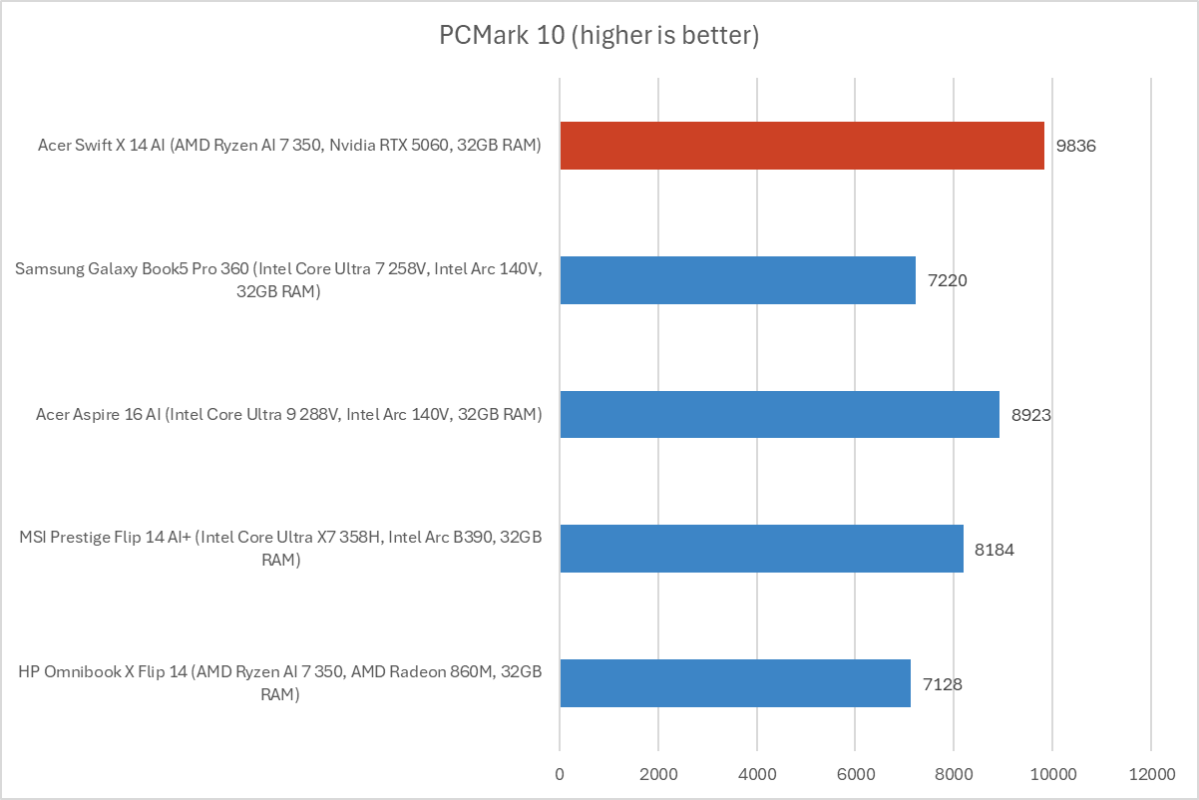
First, we run PCMark 10 to get an idea of overall system performance. This is an overall system benchmark, but CPU performance is particularly important. With an overall PCMark 10 score of 9,836, the Acer Swift X 14 AI powered ahead of many competing creator-focused laptops.
Foundry / Chris Hoffman
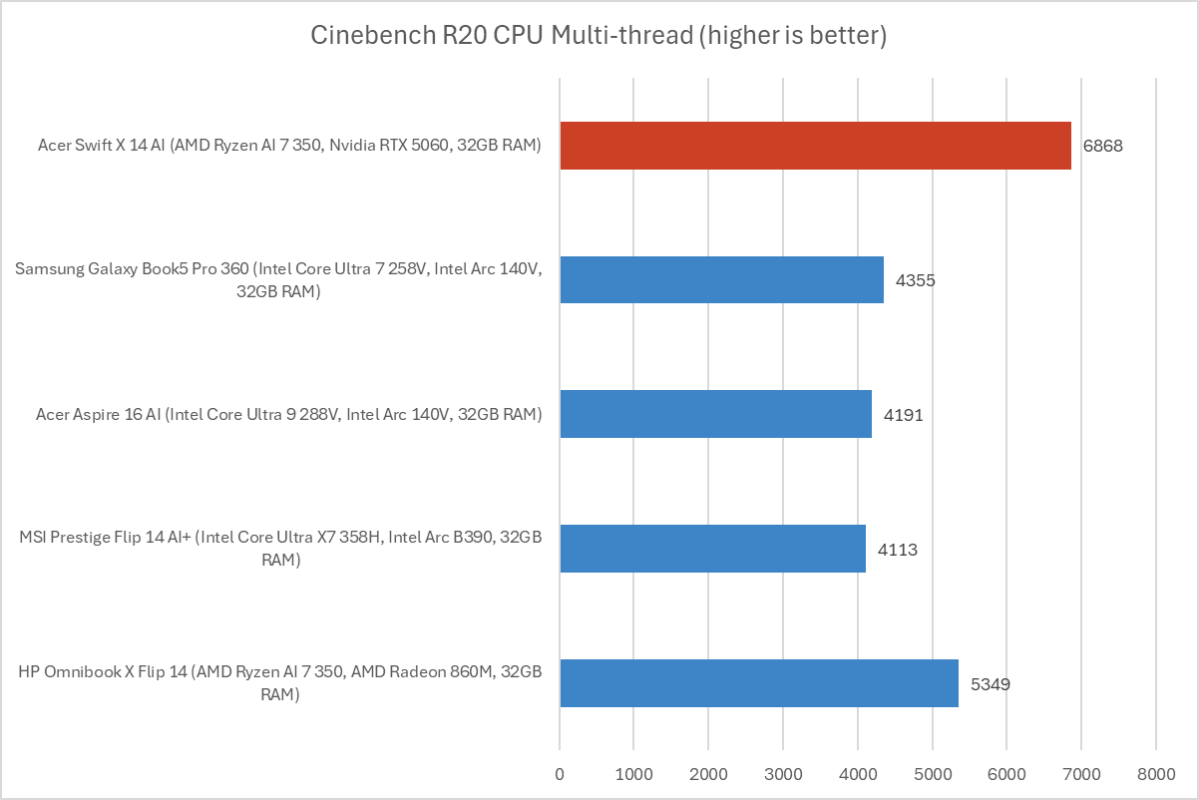
Next, we run Cinebench R20. This is a heavily multithreaded benchmark that focuses on overall CPU performance. It’s a quick benchmark, so cooling under extended workloads isn’t a factor. But, since it’s heavily multithreaded, CPUs with more cores have a huge advantage.
The Acer Swift X 14 AI hit a Cinebench R20 multithreaded score of 6,868, delivering excellent multithreaded CPU performance. The PCMark and Cinebench scores show this machine’s cooling doing an excellent job.
Foundry / Chris Hoffman
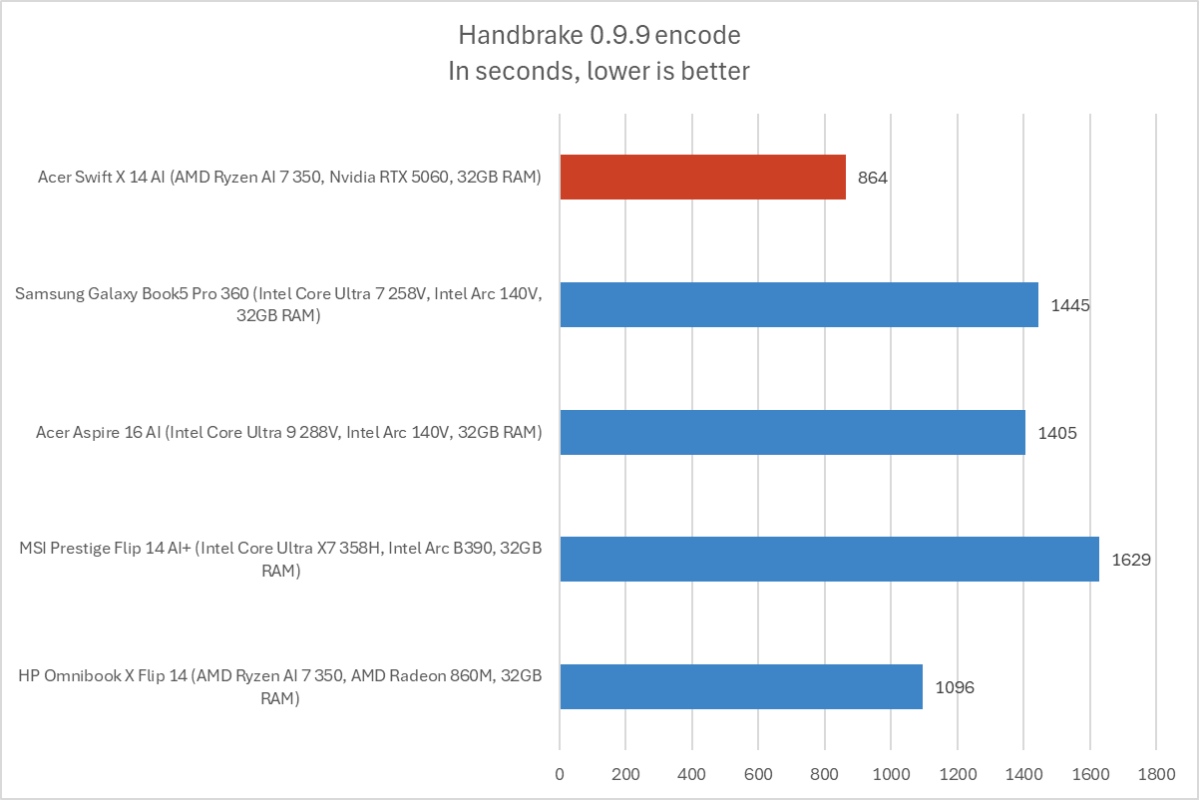
We also run an encode with Handbrake. This is another heavily multithreaded benchmark, but it runs over an extended time. This demands the laptop’s cooling kick in, and many laptops will throttle and slow down under load.
The Acer Swift X 14 AI completed the encode process in an average of 864 seconds — that’s about 14 and a half minutes. It’s an excellent score. While this machine has audible fans when it’s running full tilt, those fans are on the quiet and soft side. They’re not the loud fans I often hear in gaming laptops.
Foundry / Chris Hoffman
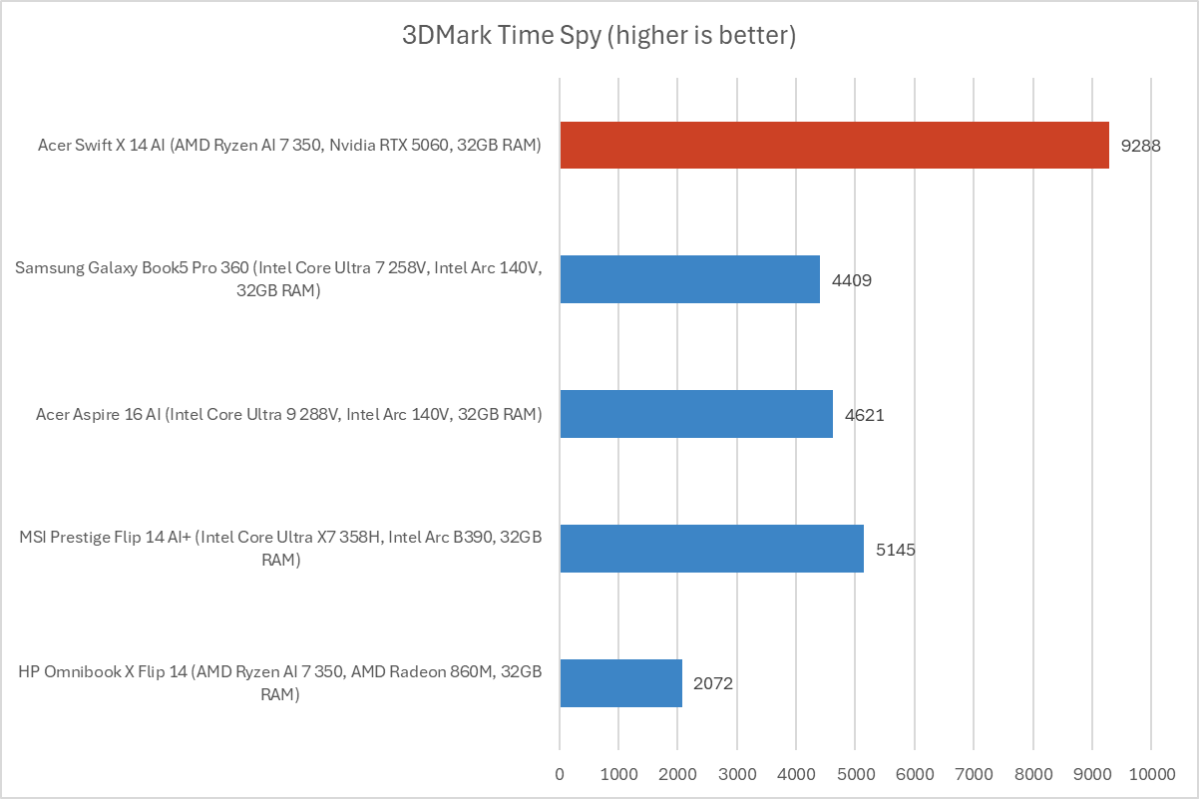
Next, we run a graphical benchmark. This isn’t a gaming laptop, but it has an Nvidia GeForce RTX 5060 GPU. While that GPU is intended for professional apps, you can still play games on this machine. We run 3DMark Time Spy, a graphical benchmark that focuses on GPU performance.
With a 3DMark Time Spy score of 9,288, the Acer Swift X 14 AI demonstrates how discrete GPUs still deliver superior performance. Intel’s Arc B390 is an improvement, but even it pales in comparison to the RTX 5060 here.
Overall, the Acer Swift X 14 AI delivered excellent performance. The cooling system worked extremely well, ensuring the machine doesn’t throttle performance under extended workloads. The keyboard stayed comfortable (not too warm) and the fans weren’t obnoxious. This is great, high-performing hardware with an excellent cooling setup.
Acer Swift X 14 AI: Battery life
The Acer Swift X 14 AI has a 76 Watt-hour battery. It offers middle-of-the-road battery life for a modern laptop, and there’s a good chance you won’t get through a full workday on battery with this machine. However, you’ll need to plug it in to get that high performance, anyway: Machines like this are meant to be used at an outlet for the best experience.
Foundry / Chris Hoffman
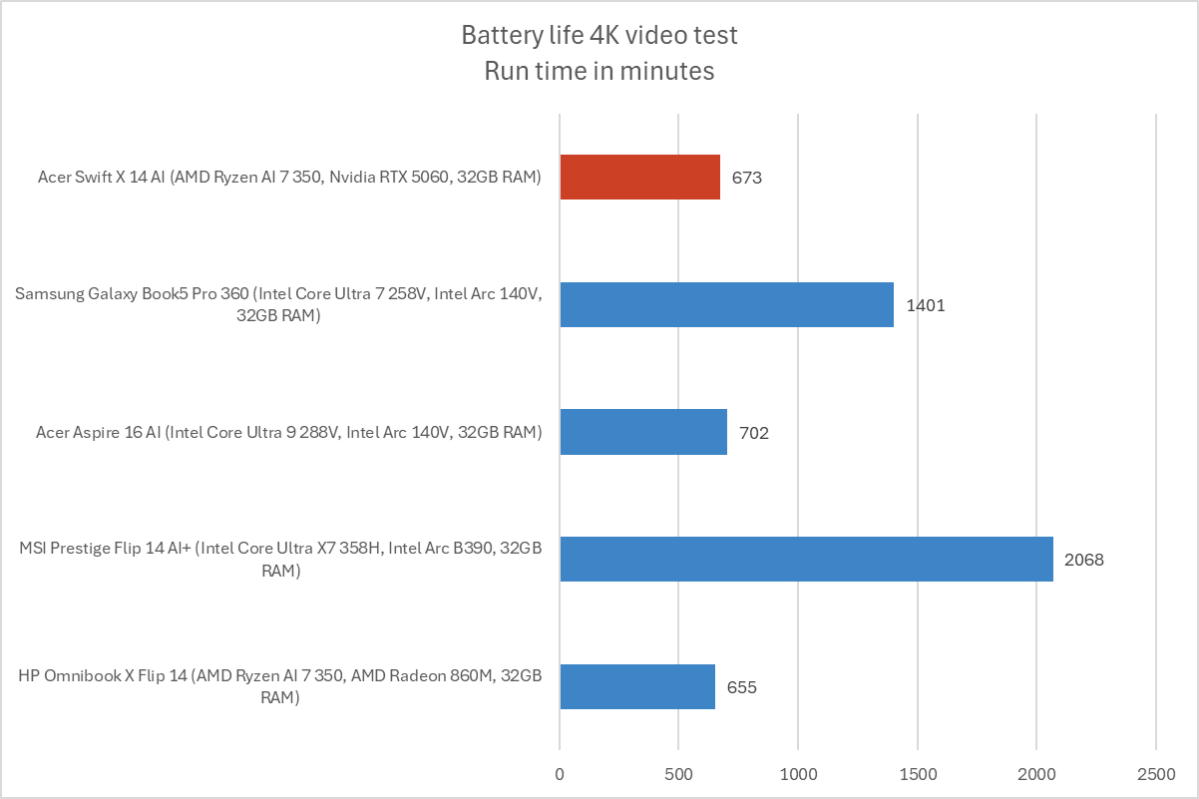
To benchmark the battery life, we play a 4K copy of Tears of Steel on repeat on Windows 11 with airplane mode enabled until the laptop suspends itself. We set the screen to 250 nits of brightness for our battery benchmarks. This is a best-case scenario for any laptop since local video playback is so efficient, and real battery life in day-to-day use is always going to be less than this.
The Acer Swift X 14 AI lasted for an average of 673 minutes in our rundown test — that’s just over 11 hours. The new MSI Prestige Flip 14 AI+, which uses Intel Panther Lake hardware (but doesn’t match this machine’s performance) delivered three times as much battery life.
Battery life is one of the big trade-offs with this machine. It’s fine, but competitors are outpacing it.
Acer Swift X 14 AI: Conclusion
The Acer Swift X 14 AI is a capable machine with some real trade-offs. It delivers excellent performance, but battery life suffers compared to competitors. It has a beautiful screen, but it’s glossy and prone to reflections. The trackpad is beautiful, but the active pen only works on the trackpad, not the touchscreen. And components like the camera, microphone, and speakers don’t feel like they’re as premium as the rest of the machine.
If those trade-offs sound good to you, this machine could be compelling. The combination of raw performance and that beautiful display is tough to argue with, and I’m in love with that trackpad. And, in early 2026 with component prices spiking, the 32GB of RAM and 1TB SSD here feel generous. There are a lot of great laptops in the $1,699 price range, however, so you may want to look around.


