
SSDs are both wildly expensive and filled with some of the most important data we own. They’re quite literally the backbone of every PC. So why do we all insist on mistreating them so much?
I’m not calling you out. I’m guilty of some of these, too. But if you want your SSD to stay healthy and your data to stay intact, I seriously recommend unlearning these harmful habits.
Your SSD may be tougher than it looks, but it’s not immortal
Some SSD issues are myths, but they still hold a grain of truth
A lot of SSD advice bounces between two extremes. People will either tell you that you can do just about anything with an SSD and it’ll live, or they’ll tell you that SSDs are super fragile and will die at the drop of a hat. The truth is somewhere in the middle: It’s not that easy to kill an SSD, but you can absolutely make it underperform or eventually die with bad habits.
Whether it means exposing the drive to too much heat, handling it carelessly, or creating conditions that are prime for data loss scenarios, it’s true that an SSD’s lifespan and performance aren’t entirely up to chance. Some warnings are just exaggeration, but some make a lot of sense.
Fortunately, the habits I’m about to introduce are all kind of easy to shake … emphasis on “kind of.”
6 real-world habits that are slowly killing your SSD
Avoiding this is a recipe for a healthy SSD

I wouldn’t call SSDs high maintenance; not exactly. But they’re also not “zero maintenance,” which is what many people tend to believe. It’s too easy to mistreat them and either shorten their lifespan or straight-up kill them.
Here are the habits that you might be guilty of, but you should avoid.
1. Holding down the power button too often
Unsafe shutdowns, which happen when you hold down the power button to turn off your PC or when it crashes, aren’t great for your SSD.
A force shutdown is sometimes unavoidable, but it shouldn’t be your go-to fix every time your PC hangs for a few seconds. Cutting power while your SSD is actively writing data can increase the risk of corruption, so if your system freezes often, start troubleshooting to avoid these shutdowns.
2. Routinely suffocating your laptop
I love keeping my laptop in my lap just as much as the next person. Preferably, as I’m sitting in bed with a thick blanket, or with the heating on, or on a pillow. But that sort of behavior is murder to any laptop, and the SSD that lives inside it won’t be happy, either.
Using a laptop on fabric or your lap for long stretches absolutely chokes airflow. The heat affects the whole system, and sustained high temperatures are not something you want any storage drive to be dealing with on a regular basis.
Which brings me to my third point …
3. Letting your external SSD fall victim to high temperatures
Your external SSD can travel with you just about anywhere, but please keep it far away from the sun. Don’t leave one in a hot car, near a radiator, in the sun, or even in an overheated backpack. Doing this can absolutely kill the drive or result in data loss.
4. Immediately powering on a freezing cold PC
At the other end of that spectrum is trying to use a laptop or an external SSD that’s been sitting in the cold for hours. Bringing either one inside and trying to power it on straight away is a bad idea. Rapid temperature changes can create condensation, and moisture plus electronics is a mix you never want to test.

- Item Form
-
Compressed Air Can
- Specific Uses
-
Dusting
A simple can of compressed air is all that it takes to keep your PC dust-free, and that goes a long way toward keeping your SSD healthy.
5. Neglecting dust removal
Regularly cleaning your PC is the ultimate hack that costs exactly zero dollars. Conversely, a dusty PC is a great way to kill off your SSD (if that’s your goal, for whatever reason). Dust clogs vents, filters, and heatsinks. Your entire PC runs hotter, as does your SSD. This can lead to anything from a crash and data loss to a full-on game over for the drive.
6. Running the drive nearly full while feeding it constant junk writes
So, filling up your drive to 90%-100% won’t exactly kill it, but your SSD won’t thank you. An SSD that’s packed to the brim and constantly dealing with downloads, temp files, caches, and other disposable files has a much harder job without any breathing room. Using 100% of your capacity will cause performance drops at best and data loss at worst.
None of this means your SSD is super fragile
It’s more that it deserves some level of care

While an unpowered SSD can be a ticking time bomb, SSDs in general make for the best consumer storage out there. Whether you use yours for backups or for day-to-day workloads, it can last for years without breaking down.
Provided you take good care of it, that is.
The cost of a mistreated SSD can be data loss
I jumped on the SSD early on with SATA drives back in the day, and I’ve only had a couple of drives straight-up break down. SSDs aren’t incredibly fragile, but if yours is forced to struggle for months on end, it’ll eventually start showing … and it’ll be your data that pays the price.

7/10
- Storage capacity
-
1TB, 2TB, 4TB, 8TB
- Hardware Interface
-
M.2 NVMe
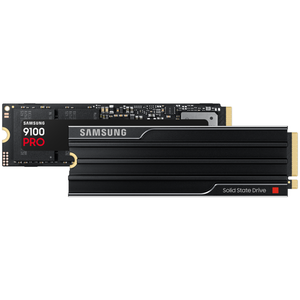
If your current SSD has been through too much and is showing signs of aging, it might be a good idea to replace it. I recommend the Samsung 9100 Pro as one of the best drives to buy right now.


