Portable, professional and plenty of polish

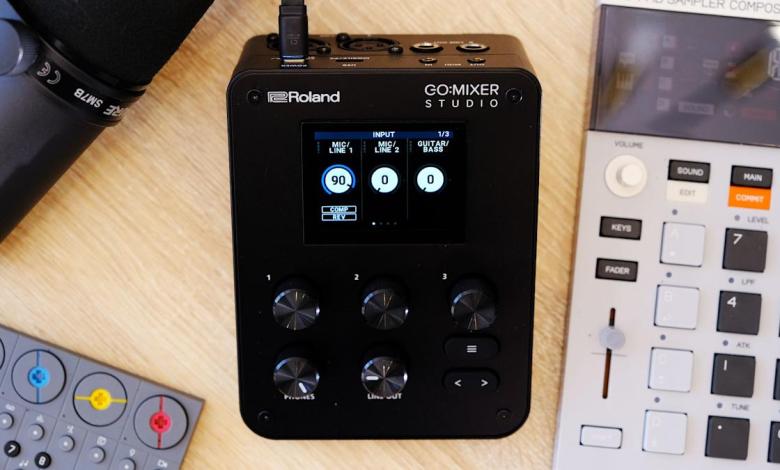
In 2017, Roland carved out a small niche for itself with the introduction of the Go:Mixer line. Small, portable audio interfaces provide a convenient way to connect a mic and multiple musical instruments (or audio sources) to your phone for more professional public performances or recording on the go. At this year’s NAMM show, the company revealed the newest addition to the family, the Go:Mixer Studio, and it’s the most premium version yet.
The Studio adds a screen, multitrack output and onboard effects as well as a much more luxurious design. At $300, there’s also a much more luxurious price point. The Go:Mixer Pro-X was already a capable option, and competing products from Mackie and Zoom are also competing for your hard-earned music dollars. So the big question is: can the Studio hold its own at this high price point?

Roland/Engadget
Roland’s latest portable mixer for musicians is a step forward for those looking for a more premium option to take with them on the go. The fact that it’s a good desktop interface extends its usefulness significantly, which helps justify the $300 price tag.
- On-board display
- Excellent connectivity
- Easy menu navigation
- Useful companion apps
- No storage on board
- Apps lack streaming options
Right off the bat, in terms of utility, the Studio is a solid step up from the Pro-X thanks to the addition of a second XLR port. So if your group is a duo, or you simply need two microphones, each artist can now have their own. This also opens the Studio to basic podcast situations. Technically, you can still connect more microphones via other inputs, but you can now do so without adapters or additional hardware like preamps. The rest of the connectivity remains similar with ¼-inch line and guitar input ports, headset mic support, 3.5mm auxiliary input, and USB-C for audio from your phone and connecting to the app.
Other major improvements include a much higher maximum sample rate of 24-bit/192kHz (the Pro-X capped at 16-bit/48kHz) and MIDI connectivity for the first time in the Go:Mixer series. New effects include a compressor, EQ and reverb. EQ and compression are available at the channel level, allowing good creative control over your mix, while reverb is global. There’s also a decent selection of different reverb types, with enough controls to configure them to your liking. I found some of them a bit robotic or unmusical, but others sounded more traditional and appropriate for my voice and synthesizers.
The Go:Mixer series has worked just fine without a screen until now, but the benefits of having one are immediately clear. On the Pro-X, the only visual feedback of your levels was a solitary LED that indicated your audio was in the red. If you had multiple inputs, you might not even know which one was too strong. The first advantage of the Studio screen therefore lies in the visible VU meters. They’re not huge, and the screen only shows information for three tracks at a time. This means you might have to scroll through a few screens to see the one you want, but it’s infinitely more useful than before.
The next obvious advantage of the screen is being able to control the device settings via a menu. Navigation is intuitive, with the screen divided into three sections, corresponding to the three buttons just below. The default screen displays for example the Mic 1, Mic 2 and Guitar/Bass channels. Turn the first knob clockwise to change the gain of mic 1. The second knob for mic 2 and so on. Click a button and, if applicable, you’ll enter a submenu where these three dials control whatever is displayed above them. This dynamic system works quite well and took a few seconds to feel natural.
The main limitation is that you can only see three of the mixer’s channels at a time on screen and there’s no way to rearrange them manually. If you have a microphone connected and USB audio playing at the same time, you can’t see levels or control both from the same screen. You have to keep paging screens back and forth.
The good news is that Roland’s Go:Mixer Cam mobile app do offers a visual mixer that lets you see more or less all channels on screen at once and quickly adjust levels that way. It’s primarily designed for creating videos of your performance, but it also serves as a remote mixer if needed. There is one caveat with the app though, which is that you won’t be able to use your phone as a USB audio source, such as for backing tracks, if you want to record video with the Go:Mixer Cam app. This is something to be aware of.

Roland’s Go:Mixer Studio features a screen for the first time in the series (James Trew for Engadget)
The app has a cool feature, which might also save your life: you can edit the “mix” after recording. If you record a performance but find that your vocals are a little weak or your synth is too high in the mix, you can adjust the levels and re-export it with better balance. You have options to export only as video or audio, so you can share one to YouTube and then a version for Soundcloud, all from the same app. Small detail, but if you want to use the app and set the mixer sample rate to anything other than 48kHz, it will warn you that it needs to go back to 48kHz and restart the device before you can continue.
If you prefer to record to the desktop, there is also a GoMixer Editor app for Windows and Mac. It’s actually a much easier way to change settings and see what’s happening thanks to the extra visual space. The EQ section for each channel is like a typical software EQ where you increase or decrease points in a frequency table. The compressor also has visual feedback indicating when it is active, which is missing on the device itself. Obviously, the Studio is mobile-focused, but the desktop app has two main selling points.
Firstly, if you prefer to set your mix levels, compression level, etc. At home you can do it more easily with the desktop app and then save it to a memory location. You can then quickly recall this “scene” on the device during a concert. The second is that, for the first time in the series (at least in my opinion), the Studio is a viable mixer and audio interface for the desktop. The build quality is solid and heavy, unlike the lightweight plastic of previous models. It feels premium and this could just as easily be used at home for streaming and podcasting as much as on the go. The desktop app makes it even more useful in this scenario.
As for what’s missing, it could be very specific to a use case. I like to use it for electronic music production or pseudo DJ type performances. As such, I’d like to see at least a fader rather than just buttons, but this is true for all models to date. I also wish there was a way to see all channels at once on the device screen. I know it would be a bit cramped and there wouldn’t be an easy way to adjust the mix at the same time, but as an overview you could look at, it might be handy. And if we’re here wishing for any Studio Pro model, an SD card slot for native recording would really increase the portability element so you don’t need to connect a phone, just a power bank.

The Go:Mixer Studio has two XLR inputs (James Trew for Engadget)
Roland has a few competitors in this area, notably IK Multemida which makes a few portable interfaces. The iRig Pro Duo and Quattro are perhaps the most similar. The Duo is a little cheaper than the Studio, at around $235, but lacks display and build quality. Personally, I also find IK Multimedia’s applications, although functional, less user-friendly. Mackie has the M Caster Studio ($200) which adds Bluetooth connectivity but has fewer physical ports – this one is also a bit older. Zoom’s interfaces often focus on their ability to record directly to the device, but are more focused on speech and speech. The H5 Studio ($299) has a display, built-in mic, and built-in recording, but its mixing functionality and outputs for live performances are secondary features.
For music artists, Roland continues to dominate this niche, and Go:Mixer Studio is clearly the company’s most refined interface to date. Connectivity covers most use cases, even podcasting, and the dial layout makes it easy to use in live environments. The screen is a welcome addition that goes a long way towards making this aspect both more useful and more premium. Perhaps the biggest selling point this time around is that the Studio no longer feels like an extra interface you carry with you to live gigs. It can also easily be your primary desktop audio interface, making that $300 price suddenly a lot more palatable.


