A surprising amount of power for its impossibly light design


The ASUS Zenbook A16 (2026) is so close to perfection that I’d buy one tomorrow and tell all my friends to do the same. Not only does it pack fantastic power into a feather-light chassis, but it also boasts a gorgeous OLED screen, AI features, and an impressive speaker system.


9/10
- Operating System
-
Windows 11 Home
- CPU
-
Qualcomm Snapdragon X2 Elite Extreme
- GPU
-
Qualcomm Adreno
- RAM
-
48GB
The ASUS Zenbook A16 (2026) has a lot going on under the hood, like the Snapdragon X2 Elite Extreme CPU, powerful integrated AI features, and a stunning 3K OLED display. Despite some incredibly powerful specs, it’s ultraportable, weighing just 2.65lbs.
- Amazing 3K OLED display
- Powerful processing from the Snapdragon X2 Elite Extreme chip
- Six speaker system performs very well
- Super thin and lightweight
- Integrated GPU struggles with demanding tasks
- Disappointing noise-cancelling performance on mic array

How We Test and Review Products at How-To Geek
We go hands-on with every product to ensure it’s worth your time and money.
Price and Availability
The ASUS Zenbook A16 (2026) is available now from retailers like Best Buy in the same configuration that I reviewed (UX3607OA) in Zabriskie Beige. It sells for $1,699.99 and includes 1TB of storage, 48GB of RAM, a 3K OLED touchscreen display, the Snapdragon X2 Elite Extreme 2026 CPU, Wi-Fi 7 and Bluetooth 5.4, a 130W adapter, and six speakers.
Sometime in the second quarter, ASUS will release the same model online with Windows 11 Pro and a higher single-core performance (5GHz vs 4.7GHz) for $1,999.99. Note that the ASUS iteration will not have a touchscreen like the one sold at Best Buy.
- Operating System
-
Windows 11 Home
- CPU
-
Qualcomm Snapdragon X2 Elite Extreme
- GPU
-
Qualcomm Adreno
- RAM
-
48GB
- Storage
-
1TB (1000GB)
- Display (Size, Resolution)
-
16in, 2880 x 1800 (3K)
- Camera
-
FHD camera with IR function (Windows Hello support)
- Speakers
-
Six super-linear speaker system with Dolby Atmos
- Colors
-
Iceland Gray and Zabriskie Beige
- Ports
-
1 x USB-A 3.2, 2 x USB-C 4 ports with full-range charging (5–20V), 1 x HDMI 2.1 port, 1 x 3.5mm headphone/microphone jack,
- Dimensions
-
13.92 x 9.54 x 0.54in (353.55 x 242.45 x 13.8-16.5mm)
- Weight
-
2.65lbs (1.2kg)
- Brand
-
ASUS
- Model
-
UX3607OA
- Adaptor and Battery
-
Type-C 130W Adapter; 70WH Li-ion battery
- Keyboard
-
Chiclet-style keyboard with backlighting, 19.05mm pitch, 1.3mm key travel, and 0.1mm dish-shape
- Display type
-
OLED
- Connectivity
-
Wi-Fi 7(802.11be) (Triple band) 2*2; Bluetooth 5.4
An Unbelievably Lightweight Design
I have to admit that I am personally not a fan of the Zabriskie Beige color (nor the Iceland Gray color that will be available outside the U.S.). But aside from personal bias toward its color, I’m a big fan of how ASUS designed this laptop overall. The entire chassis has a stone-like texture thanks to the brand’s “Ceraluminum,” which blends the strength and pliability of aluminum and ceramic’s durability. ASUS has now upgraded that material to include magnesium, resulting in a lighter weight. The brand claims Ceraluminum is 30% lighter and 3X stronger than ordinary aluminum.
This combination is the reason why ASUS was able to create a 16-inch laptop that comes in at a starting weight of 2.42lbs (1.1kg). (The weight varies depending on your model’s configuration.) This material also boasts exceptional scratch and shock resistance, but I wouldn’t recommend testing this yourself. For all its strength, the lid feels like it has slightly more flex than some competitors. While I don’t think the bending is excessive, I would recommend people purchasing this to be mindful of taking extra care with the lid, just in case.
My review laptop weighs 2.87lbs, which is incredibly light considering it has a 16-inch display and has a CPU with 18 cores and 18 threads. For reference, this is lighter than the MacBook Air M5 and the MacBook Pro 16.
So many ports for a slim laptop
For its lightweight size and slim profile, the ASUS Zenbook A16 (2026) actually has a decent variety of ports. If you haven’t followed a lot of the thin laptops out there, this is a rarity. The left side houses its two USB-C ports, both of which offer full-range charging from 5 to 20V. Above the USB-C ports is an HDMI 2.1 port, and below them is the 3.5mm combo audio jack for microphone and headphone connections.
The right side has one USB-A (3.2Gen) port and one SD 4.0 card reader.
Where so many companies are choosing to omit USB-A ports on their slim laptops, ASUS is listening to the call from people who get tired of having to haul around USB-C hubs as a necessary sidekick.
A variety of great inputs, from the keyboard to the touchscreen

While I typically prefer to use my own peripherals, like my Keychron Q6 Pro and a USB mouse, I was perfectly content with the inputs on the Zenbook A16 (2026). ASUS gave this keyboard a comfortable full-size desktop feel, thanks to a 19.5mm pitch, so nothing feels cramped when typing on it. Each key also has a 0.1mm dish-shaped indentation, which made it feel like my fingers naturally wanted to stay central to the keys rather than drift to the edges. This kept my typing more accurate. The key travel was also a nice 1.3mm, so they didn’t feel too easy to press down and still had a nice spring to them.
What I think I noticed about this keyboard first, however, was its excimer coating, which gave the keys a really smooth, matte feel that also felt slightly grippy. This isn’t just a comfortable feature, though; it also prevents fingerprint smudge marks on the keys.
The overall layout of the keyboard and touchpad is comfortably spacious, and I greatly appreciated the large size of the touchpad, which measures nearly six inches in length and about four inches in height. The touchpad also incorporates Smart Gestures, so I can perform a variety of swipes along the edges and corners to adjust the volume, screen brightness, and video playback. Despite how large it is, I didn’t experience any accidental swipes or touches while typing.
My review laptop has a touchscreen OLED display, which was super responsive for scrolling, tapping, and dragging anything on the screen.
The vibrant, beautiful 3K OLED display delivers incredible graphics

The only bad thing I have to say about the ASUS Zenbook A16 (2026) laptop’s display is that, since it’s a glossy OLED, it has a terrible glare. That said, most people are okay sacrificing this for the stunning trade-offs. Its large 16-inch panel has a 2,880 by 1,800p resolution in a 16:10 ratio and offers a refresh rate of up to 120Hz. It also has a Dynamic Refresh Rate setting you can turn on when you select 120Hz.
In testing across various forms of media (gaming, videos, photo editing, etc.), I was more than satisfied with the color spectrum, contrast, brightness, and accuracy. ASUS claims the brightness reaches up to 1,110 nits. Comparing this display to others I use regularly, I certainly didn’t see it reach above 500nits in my estimation. That brightness level, however, was more than enough, and most days I had the panel set to one level or two below 100% brightness.
In every form of media, I saw brilliant color contrast, very black blacks, and rich, accurate shades, which gave me confidence that the up to 100% DCI-P3 color gamut rating is in line with the display’s performance. One of the things that struck me was the level of detail the display depicts. YouTube videos in 4K looked sharp. I could even see individual pores on the creators’ faces and easily make out individual leaves in trees and foliage. The black shades were discernible, even in very shadowy videos, and looked accurate across different variations of black (such as the blue tones of my tortie kitten’s fur). When HDR is enabled, content looks even more stunning.
On the graphics side, those are handled by the integrated Snapdragon Qualcomm Adreno GPU (the Adreno X2-90). While this GPU seems better than the integrated Adreno GPU I tested on the Dell Inspiron 14 Plus 7441 back in August 2024, I’m not going to say Qualcomm has made leaps and bounds of progress in terms of how this GPU handles resource-heavy tasks. However, I’ll touch on that a bit later.
That said, I did see a marked improvement in 3DMark’s Steel Nomad scores (the number is hovering around 1,200), and that other Qualcomm Adreno GPU I tested scored 322 on the same test. At this rate, the Adreno X2-90 sits closer to an integrated Intel GPU’s performance rather than a GPU you’d really want for demanding gaming.
What the GPU does do well is handle everyday rendering with gorgeous results, and it performs remarkably well for tasks like photo editing with Photoshop, streaming, and casual gaming.
A strong CPU performance that blew me away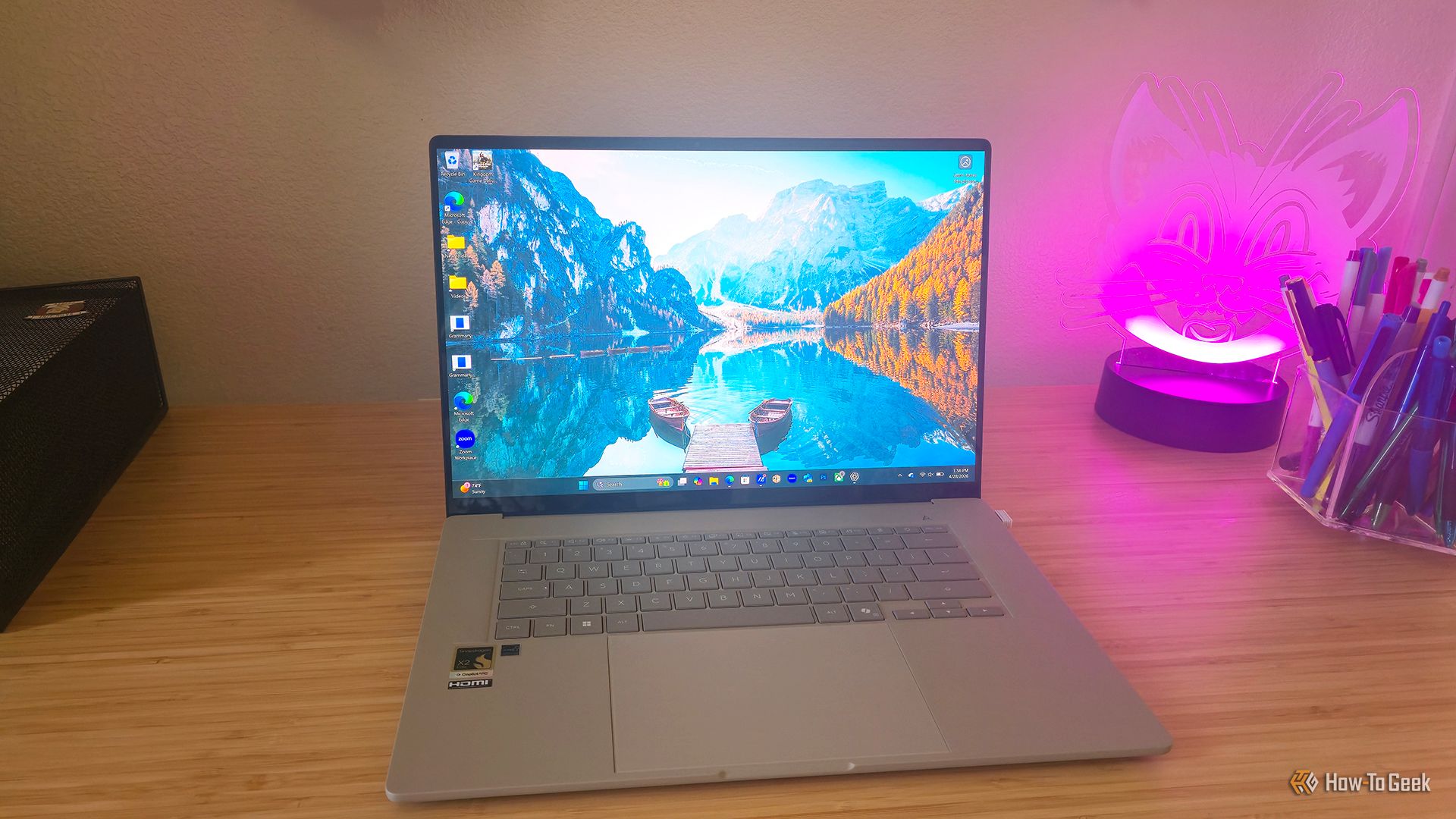
As I wasn’t super thrilled with the last ARM-based laptop I tested a year and a half ago, I wasn’t expecting such a marked change in the compatibility expansion that’s happened since then. But the improvement is significant. Microsoft’s Prism layer (which is the translator system needed so ARM-based laptops can run apps and programs created for Intel and AMD processors) is now translating advanced x86 instructions like AVX/AVX2. Basically, what this means is that suddenly a lot more apps, games, and creative programs are running on ARM compared to a year ago.
My previous experience with a Snapdragon CPU was that I kept running into incompatible programs. Now, the improvement in its translation layers and the recent push for developers to build native support means I’d actively recommend an ARM-based laptop to someone, whereas I wouldn’t have done so a couple of years ago.
Now, what really sold the Zenbook A16 (2026) for me was the powerhouse Snapdragon X2 Elite Extreme CPU (X2E-94-100). This CPU packs a punch with 18 cores (12 prime and 6 performance cores) and 18 logical processors.
The CPU has a system-in-package IC that provides a memory bandwidth of up to 228 GB/s, lower latency, and fast integrated AI processing. The chip has a 3nm process, which means it provides a longer battery life, increased performance per watt, and higher energy efficiency. This architecture also includes the Hexagon NPU 6, which delivers up to 80 TOPs of AI processing power. Not to mention, those clock speeds of up to 5GHz. All of this is geek-speak for: this CPU is kind of awesome, and it can handle a lot of multitasking without a hitch.

This CPU, in tandem with the 48GB of RAM, meant I could go through every single work task on my list and multitask like no tomorrow without worrying about leaving programs open.
A few benchmarks I ran aligned with the reported scores from ASUS, if only slightly lower. Scores included:
- The Cinebench 2024 Multi Core (tested at 1,649; ASUS at 1,661)
- The Cinebench 2024 Single Core (tested at 139; ASUS at 151)
- The 7Zip (GIPS) compression and decompression at the default 32MB dictionary size were tested at 142.12 and 96.63, respectively.
Comparing GeekBench 6 CPU scores also shows that the X2E-94-100 outpaces CPUs like the MacBook Pro M3 Max and is only slightly outdone by the Apple M4 Max.
During the nearly two weeks of reviewing this laptop, I pushed its multitasking power by editing photos in Photoshop, running a YouTube video simultaneously with Spotify, downloading large files and games, and switching between over 30 browser tabs and other background apps. In essence, I never had to close programs to increase speeds. Its performance felt snappy in every circumstance.
As for AI performance, this was smooth as well. The 80 TOPS NPU offloads AI tasks from the CPU and GPU, keeping performance snappy. I especially noticed how quickly AI edits went in Photoshop, tasks that sometimes drag slightly on my home laptop. Since it’s a Co-Pilot+ PC, it also has plenty of those integrated AI features like Live Captions, Recall, Cocreator, Restyle Image, Image Creator, Improved Windows search functions, and more.
This isn’t ideal for gamers

If you’re a casual gamer and don’t plan to use the Zenbook A16 (2026) for heavy gaming, then the Qualcomm Adreno GPU will give you enough juice to work with for all of those casuals and indies. Thankfully, the Xbox app is now available on Windows 11 PCs with Snapdragon (unlike my previous testing experience). You can also game through Steam, the Microsoft Store, and other go-to gaming apps, but be aware that some games may still be unavailable. That said, more than 85% of Xbox’s Game Pass catalog is now compatible, so pretty much any game I wanted to download and play was at my fingertips. According to ASUS, Microsoft is also actively working with gaming partners to further expand game support.
I can’t say that I enjoyed playing resource-heavy AAA titles on this laptop, but it is possible if you lower the graphics settings. Comparing my game benchmarks with ASUS’s claims, my FPS averages were equal in some instances and lower than their projections in others. With the same settings as ASUS used for testing (a Balanced power mode and Performance mode for the laptop’s fans, game set to medium, FHD resolution, frame generation off), Kingdom Come Deliverance II hit about 40-45fps (ASUS’s bench was 45 average). When I upgraded that graphics quality by increasing the sharpness by 5-10% and setting the graphics to high, plus putting the fan mode to standard, I hit 30 to 38fps. Not great. Some of those frame rates were more dismal during cut scenes, dropping to 23 to 27fps. Oddly enough, I didn’t notice many stutters or freezes that disrupted gameplay, but it wasn’t as smooth as butter and dragged more than I would like.
The same scores continued across other games, with most I tested pulling into the low 20s to mid 30s, including Shadow of the Tomb Raider. I had to significantly lower my graphics settings to low quality for these resource-heavy games, and I don’t think most people want to play AAA games at an FHD resolution if they can help it. Nonetheless, I did get about 108fps out of Dead by Daylight (close to the average 119.9 frame rate ASUS quoted). When I played with the regular graphics settings (not tweaking anything after launch), it went down to about 50fps. When I played A Plague Tale: Requiem with default settings on launch, I hit around 40 to 45fps.
If you don’t mind playing AAAs at extremely low settings, it’s doable to play them. The games that I did enjoy playing most on this rig were little casuals and indies like A Place for the Unwilling and Summer in Mara.
As far as the laptop’s heat levels when gaming, I did notice the laptop was running slightly hot when I had the laptop plugged in. It felt a bit uncomfortable to rest my hands on the keyboard, so I started monitoring the temperatures. It remained around an average of 73 degrees Celsius (163.4 degrees Fahrenheit), so the fans were performing fairly well to keep it within an expected range.
The Speakers, Camera, and Microphones

I love the six-speaker system on the Zenbook A16, which delivers impressively loud volume—especially when I have the laptop on a desk. These give a mostly balanced sound across highs, mids, and lows in music, game audio, and video narration. As a rule, when I’ve used this laptop, I’ve skipped external headphones because the speakers have a great balance of volume and sound quality to feel immersive. However, because they’re all down-firing, if I play a game with the laptop on my lap, the audio sounds slightly squashed.
Most music was a pleasure to listen to. I listened to everything from Mulan’s “I’ll Make a Man Out of You” to Metallica’s “Master of Puppets.” In heavier rock songs, there was a bit of sibilance from drum cymbals and higher guitar notes at higher volumes, but this went away when I lowered the volume to a more mid-range percentage. This, and what could be more bass, are the only faults I found with these speakers.
The FHD IR camera also works well, with an average performance that’s nothing to write home about but is good enough to skip buying an external webcam. It does include some cool AI features, like onlooker detection, hand gestures, and adaptive dimming.
The microphone system sounds crisp and clear, and I think the array does a fantastic job of keeping the speaker’s voice central. However, the integrated AI noise-cancellation, which includes a 360 Recording Mode and a Multi-Presenter Mode, does not quite do the trick. Background noise still slips through quite a lot when noise cancellation is on.
Excellent all-day battery life
While I’d normally be skeptical that the Zenbook A16 could achieve over 21 hours of offline video playback like ASUS’s benchmark, if you tried it with its specific settings (150nits of brightness, no keyboard backlight, Wi-Fi disconnected, Balanced power, earbuds connected at an unspecified default volume), it could yield close to that.
I say that could be achievable because I experienced pretty stellar battery life with this laptop, though I never tested it at unrealistic lab settings. On average, the battery drained at a rate of 0.16% per minute (sans when I was gaming) when kept in Balanced mode at a fluctuating level of 80 to 100% brightness. That’s about 9.6% per hour, which means I often got an average of a full workday (8 to 10 hours) of battery life without plugging in. I also once left it on sleep for 18 hours, and it dropped just 10% during that time.
Charging time came in at an average speed of 38.4% gain per hour.
Should you buy the ASUS Zenbook A16?
I’d wholeheartedly recommend the ASUS Zenbook A16 (2026) laptop to anyone who wants a lightweight laptop that doesn’t sacrifice power for portability. While it’s not a strong choice for gamers, it’s well-suited for professionals, content creators, and people who regularly multitask across apps. If you’re hoping for a true desktop replacement, I’d look elsewhere. But if you need a travel companion, its outstanding AI integration, 18-core CPU, and full-day battery life make this a standout in the slim laptop category.
9/10
- Operating System
-
Windows 11 Home
- CPU
-
Qualcomm Snapdragon X2 Elite Extreme
- GPU
-
Qualcomm Adreno
- RAM
-
48GB
The ASUS Zenbook A16 (2026) has a lot going on under the hood, like the Snapdragon X2 Elite Extreme CPU, powerful integrated AI features, and a stunning 3K OLED display. Despite some incredibly powerful specs, it’s ultraportable, weighing just 2.65lbs.


