
Ugreen started out as a charger company, but quickly took the NAS world by storm a few years ago when it started releasing NAS units. Now, its moving from entry-level and mid-range storage servers to professional units. The Ugreen iDX6011 Pro is the first truly pro-grade NAS from Ugreen, and I was quite surprised with just how great it worked for me.

9/10
- Brand
-
UGREEN
- CPU
-
Intel Core Ultra 7 255H
- Memory
-
64GB LPDDR5/x
- Drive Bays
-
6
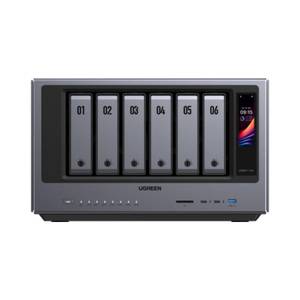
The Ugreen iDX 6011 Pro AI NAS is one of the most powerful NAS servers in the Ugreen lineup. With Intel’s Core Ultra 7 255H 16-core processor and 64GB of LPDDR5/x RAM onboard, there’s more than enough power to handle anything you can throw at this system. Add to that dual Thunderbolt 4 ports, dual 10GbE LAN ports, an OCuLink expansion port, and more, and you have a very solid network attached storage system.
- Core Ultra 7 and 64GB of LPDDR5x RAM
- PCIe expansion slot with two PCIe NVMe M.2 slots
- Built-in 10GbE networking
- No simple way to run your own local AI models

How We Test and Review Products at How-To Geek
We go hands-on with every product to ensure it’s worth your time and money.
Price and availability
The Ugreen iDX6011 Pro will be available through Kickstarter soon. The suggested retail price of the unit is $2,599 once all pre-launch promotions have ended.
- Brand
-
UGREEN
- CPU
-
Intel Core Ultra 7 255H
- Memory
-
64GB LPDDR5/x
- Drive Bays
-
6
- Expansion
-
OCuLink
- Ports
-
Thunderbolt 4, USB3, USB2, HDMI, SD
- OS
-
UGOS
- Price
-
$2,599
- LAN Ports
-
Dual 10GbE
This NAS has a lot of power
A Core Ultra 7 and 64GB of RAM doesn’t come cheap

Normally, when I think of a NAS, I think of a fairly low-powered system that can handle a few hard drives and some basic services—the Ugreen iDX6011 Pro is anything but that.
With a Core Ultra 7 255H 16-core processor and 64GB of LPDDR5x RAM, this NAS packs a punch. That doesn’t come cheap, however, with this NAS costing nearly $2,600. For comparison, a laptop with the same specs at Best Buy costs $1,700 and doesn’t include room for six hard drives or a full-size PCIe card or the networking capabilities that Ugreen has built-in here. A similarly specced desktop costs $1,400.
The thing to remember is, this NAS isn’t your typical under-powered NAS—it’s a monster with the specs it has to offer. I actually transferred all of my resource-intensive applications and software from my i9-13900K desktop with 96GB of RAM to the iDX6011 Pro, including multiple Minecraft servers, Plex, and even some local LLMs, and it hasn’t skipped a beat.

My favorite part of the NAS is the fact that it doesn’t have an Arm processor. The Core Ultra 7 CPU in the iDX6011 Pro delivers not just ample power, but also a native NPU and industry-leading transcoding support with the Intel Arc 140T GPU. Leveraging this iGPU allows for fantastic transcoding performance for Plex or Jellyfin, both of which are easy to install on the system.
Since moving my Plex server to the iDX6011 Pro, I haven’t noticed a single hiccup. Movies and TV shows start playing faster, transcoding happens seamlessly, and the experience is just leaps and bounds above what it used to be when I ran it on a less powerful system.
With the 64GB of LPDDR5x RAM available here, I also have more than enough memory to handle both storage and self-hosted app tasks, like running Minecraft servers, software like GitLab, and much more.
Typically, when I get a new NAS, I use it for storage only, and leave the running of my self-hosted services to the other systems in my homelab. But, with the iDX6011 Pro, I immediately moved about a dozen Docker containers to it and haven’t noticed any slowdowns anywhere with it. I’ve been very pleasantly surprised with its performance.
Ugreen thought of everything with the hardware here
Dual 10GbE networking and PCIe expansion?!

While the processor and RAM are fantastic already, Ugreen really knocked it out of the park with the rest of the hardware on this NAS. Instead of requiring tools and screws to secure hard drives, Ugreen is using a simple toolless sled design that makes installing drives extremely simple.
There’s also ample I/O all around the NAS. On the front, there are two Thunderbolt 4 ports, both rated at 40Gb/s thanks to the Core Ultra 7 processor. Flanking that on either side is a SD 4.0 slot and a USB 3.2 port on the other side. There’s even a touchscreen on the front to check the current IP, the status of drives, and more.
Around back you’ll find dual 10Gb Ethernet ports, meaning this NAS is ready for multi-gig networking out of the box—something that I would expect to find on a NAS like this, but it’s still nice to see. As I run a 2.5Gb/s network in my home, I loved that I didn’t have to add any extra hardware to get multi-gig networking working. Since it’s a 10Gb/s Ethernet port though, I’m even good to go for future upgrades if I wanted to add 10Gb/s switches in my home without having to swap out any extra gear.
Then, next to the Ethernet ports are two USB 2.0 and one USB 3.2 ports, as well as an 8K HDMI port and an OCuLink hookup. If you’ve never heard of OCuLink, it’s a PCIe-based port that allows you to hook up devices like graphics cards to systems where they can’t fit internally. This means that the Ugreen iDX6011 Pro NAS is ready to connect to any graphics card you want for adding GPU acceleration to the NAS through OCuLink.
That’s not the only PCIe expansion this NAS has, though. Inside, there’s a PCIe 4.0 x8 lane where you can slot in any other type of PCIe device you want. Need more NVMe storage? Works perfectly! How about faster networking? Absolutely. Even low-profile graphics cards that are bus-powered could go there—the choice is yours. I’m not entirely sure what I will use this PCIe lane for, but I think it could be extremely valuable for adding extra capability to the NAS down the road.
Outside of the PCIe 4.0 x8 expansion slot, there are also two PCIe 4.0 x4 M.2 NVMe drive bays inside the NAS for either cache or storage, however you decide to set it up. I’m using my NVMe drives as fast storage for video and photo editing, as well as the storage for my Docker containers. Each night the NAS backs up the NVMe drives to the RAID array for redundancy too, so I’m not worried about losing any data if the NVMe drives fail.
UGOS Pro is actually fairly solid
I was surprised at how feature-packed it is
As an unapologetic Unraid and Synology fan, I wasn’t sure what I was going to think of UGOS Pro. While it’s missing the non-striped parity storage configurations that I love about Unraid and Synology, the overall experience with UGOS Pro has been pretty great.
Right out of the box you can install Docker, which opens the doors to just about any piece of software you might want to run on the NAS. The native app store is pretty lacking, and I wish it had Docker integration there, but it does offer some basics like Jellyfin and a few other applications.
As far as drive management goes, UGOS Pro allows for the standard RAID modes you’d expect as well as JBOD. I really do wish there was a way to mix-and-match drive sizes like Synology’s SHR or Unraid, but sadly, there’s not.

The only thing that I really felt was missing from UGOS Pro is the ability to mount remote NFS/SMB file shares on the NAS. This is a pretty core feature, I think, and is one I expected to see. At least Ugreen gives SSH access to the NAS, which made it easy to edit the fstab so I could manually mount my NFS and SMB shares to it.
One of the best parts of UGOS Pro is it gets out of the way and just lets me do what I need. I don’t feel like I’m fighting the operating system to get simple tasks done. The Docker implementation is pretty solid, and you can even add the system to Portainer if you want.
Plus, if you end up not liking UGOS Pro, it’s relatively easy to install your own operating system on the NAS. Something I’m definitely considering doing in the future is replacing UGOS Pro with Unraid, but I want to use the NAS as it comes for now, and it’s been a surprisingly good experience so far.
The marketing is AI-focused, but this NAS is great for everything
Built-in local AI is nice, but it doesn’t get in the way, which is even nicer

Almost all of Ugreen’s marketing surrounding this NAS is focused on AI. Ugreen centers its marketing campaign around the 96 TOPS CPU, which can be used for local large language models on the system. The photos app on the iDX6011 Pro integrates with the local LLM to enable machine learning-enabled searches of your photos. This also works with files and videos, too. In fact, you can even turn voice recordings into text transcripts using the local models.
However, I found that, in my day to day workflow, I just didn’t use that functionality of the NAS all that often. It’s nice to have the NPU available, but I wish it was easier to leverage it with your own software. I wasn’t able to get any Docker containers to actually talk to the NPU of the NAS, but I did get it working with the GPU.
If you’re wanting to run your own Ollama instance, it likely won’t work. The NAS already runs Ollama for its onboard LLM, which makes running a secondary instance a pretty big pain. Sadly, the native AI app doesn’t let you choose your own models, either, making it pretty restrictive.
The best part of the AI on the Ugreen iDX6011 Pro NAS is that it doesn’t get in the way. I’m not getting popups all over asking if I want to do AI this or AI that. It’s there, running in the background, but not forcing itself on my, and that’s my favorite part.
Should you buy the Ugreen iDX6011 Pro AI NAS?

The Ugreen iDX6011 Pro AI NAS is definitely a premium piece of hardware. With the $2,599 price tag, this isn’t a cheap NAS. Comparing it to other systems, you could get an 8-bay Synology DS1823xs+ for $2,050 instead. However, Synology’s NAS only offers 8GB of DDR4 RAM (with a max of 32GB), and it has an AMD Ryzen V1780B 4-core 8-thread processor in it, which offers far less power than the Ugreen model for just a few hundred more.
I think the iDX6011 Pro is ideal for content creators who need a powerful and fast NAS that has high-end networking built-in, plenty of storage capacity, and expansion possibilities thanks to the PCIe 4.0 x8 lane and the OCuLink port on the back.
At the end of the day, Ugreen’s iDX6011 Pro is a fantastic NAS if you have the cash to drop on it. It’s very capable and powerful, has lots of expansion possibilities, and is even a quiet NAS to boot (which I didn’t expect).
9/10
- Brand
-
UGREEN
- CPU
-
Intel Core Ultra 7 255H
- Memory
-
64GB LPDDR5/x
- Drive Bays
-
6
The Ugreen iDX 6011 Pro AI NAS is one of the most powerful NAS servers in the Ugreen lineup. With Intel’s Core Ultra 7 255H 16-core processor and 64GB of LPDDR5/x RAM onboard, there’s more than enough power to handle anything you can throw at this system. Add to that dual Thunderbolt 4 ports, dual 10GbE LAN ports, an OCuLink expansion port, and more, and you have a very solid network attached storage system.


