
This article was originally featured on The Conversation.
People have been celebrating the summer solstice with elaborate rituals since prehistoric times. But humans aren’t the only species to take mark June 21 as a special time. Studies are showing the summer solstice is an important cue for plants too.
Recent studies, including one of my own, have proposed that trees may use the longest day of the year as a key marker for their growth and reproductive cycles. The solstice seems to act like a calendar reminder for trees.
For example, at the solstice, trees growing in cold places slow down the creation of new wood cells and focus their energy on finishing already formed but still incomplete cells. This ensures trees have time to complete cell construction before winter hits. Incomplete cells are damaged by freezing winter temperatures, rendering them useless for water transport the following year.
Along similar lines, trees use the solstice to fine-tune the “winding down”, or senescence, of their leaves in preparation for autumn. Senescence allows the tree to reabsorb critical nutrients from the leaves before they fall. This process is timed to balance missing out on sunlight from “winding down” too early, against leaving it too late and losing nutrients if still-green leaves are killed by autumn frosts.
Satellite observations of forests, and controlled experiments in greenhouses, reveal that warmer temperatures immediately prior to the solstice cause the onset of leaf browning to start earlier that autumn. In contrast, warmer temperatures just after the solstice slow down the senescence process.
This means a longer transition period from green to fully brown leaves. This fine-tuning enables trees to extend the period of photosynthesis in years when temperatures stay warmer for longer, so they don’t miss out on these favourable conditions.
But not all scientists are convinced. From an evolutionary perspective, the solstice may not be the best seasonal marker for timing these transitions. For example, in forests in the far north, leaves do not appear until early June, only days before the solstice, and the growing season can extend late into October. In these forests, using the solstice to initiate the winding down process makes little sense for trees that have only just started growing for the year.
Nevertheless, there is more consensus about plants using the solstice to synchronise reproduction.
In many plants, especially trees from the temperate mid-latitudes, the number of seeds they produce varies dramatically year on year, known as masting. A large European beech tree can produce hundreds of thousands of seeds in a bumper year (a “mast event”) and forgo reproduction altogether in other years.
Beech trees vary their annual seed production in step, often on a continental scale. They do this to increase the efficiency of their reproduction.
A small moth, Cydia fagiglandana, lays its eggs in beech flowers. When the grubs hatch, they eat and destroy the developing seeds. Cycles of famine and bumper years help protect their seeds from these moths.
UK beech trees typically lose less than 5% of their seeds to Cydia because the cycles starve the moths into low numbers ready for masting years. But when trees are out of sync, seed loss can increase to over 40%.
For decades we have known that beech mast events happen in the year after a warm summer. These warmer temperatures trigger an increase in the formation of flower buds. More flower buds usually lead to a greater crop of seeds that autumn.
Scientists have long puzzled over how beech trees across Europe seem to use the same seasonal window to control mast events. Their seed production is determined by temperatures in late June and early July, irrespective of where they grow in Europe. But how can a beech tree know the date?
In my team’s 2024 study, we showed that they use the solstice as a seasonal marker. As soon as the days start to shorten after the solstice, beech trees across Europe seem to simultaneously sense the temperature.
Anywhere temperatures are above average in the weeks following the solstice can expect to have a mast event the next year. Weather conditions in the weeks before the solstice, by contrast, seem to be irrelevant. As seen on weather maps, warm and cool spells tend to occur simultaneously over large areas.
This allows beech trees to maximise the synchrony of their reproduction, whether that is investing in a mast year (warm temperatures), or forgoing reproduction for a year (low temperatures). Using a fixed marker like the solstice is the key to achieving this synchrony, and the benefits that come from it.
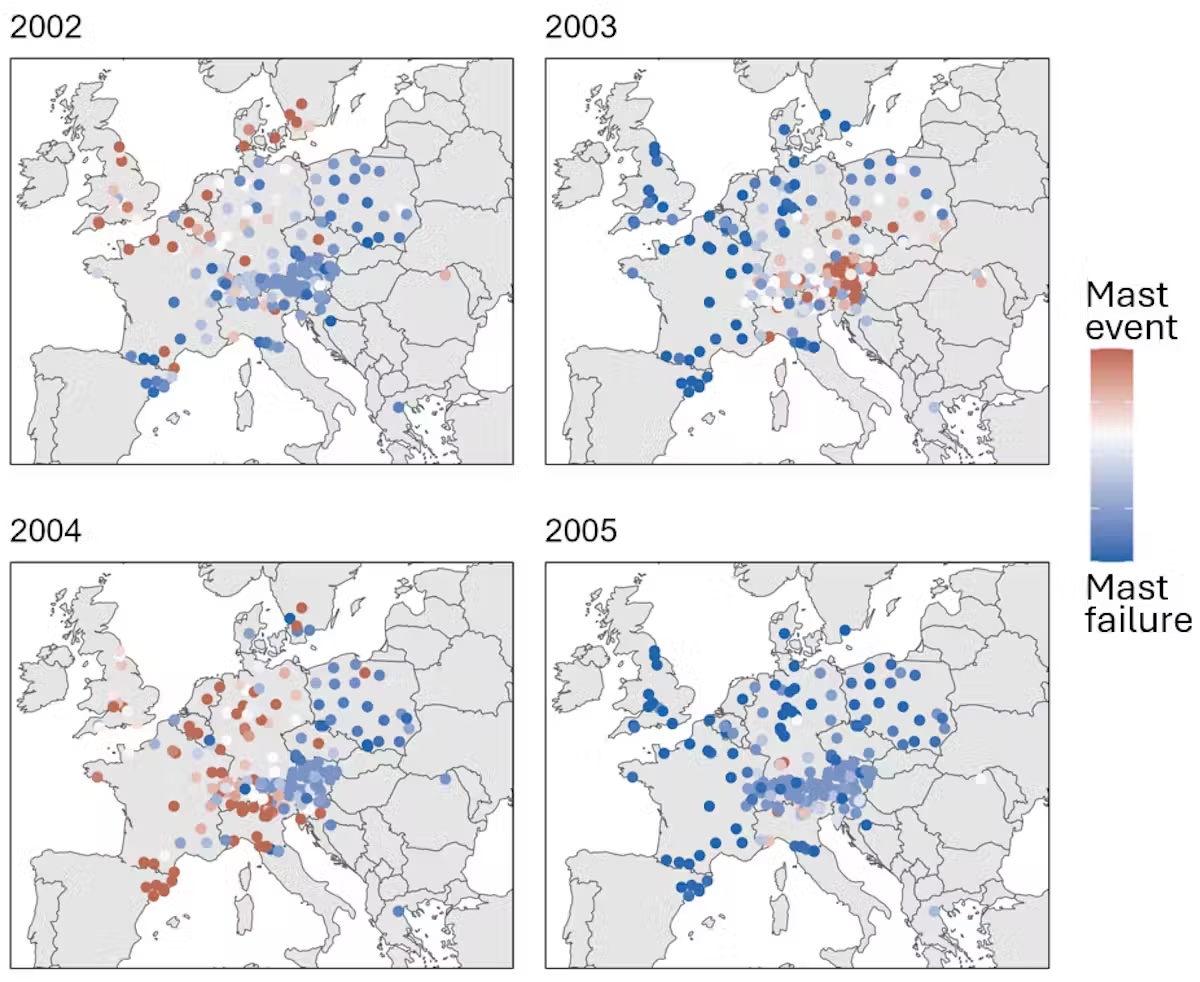
The evidence for this phenomenon has come from observations across dozens of forests across Europe. However, my research group is collaborating with about a dozen other groups in Europe to test this effect by manipulating the temperature of beech branches before and after the solstice at different sites. Ongoing research I am involved with seems to show flowering genes are activated at the summer solstice.
Also, studies into the circadian rhythms of plants show they have mechanisms in their molecules that allow them to detect and respond to tiny changes in day length. This is the basis for that extraordinary scale of synchronised reproduction.
If the weather is warm over the next month or so, then there is a good chance that beech trees in your local area will have heavy seed crops next autumn. What’s more, trees across the UK and into northern and central Europe will probably be doing the same.

More deals, reviews, and buying guides


