Older Windows 11 PCs need a Secure Boot fix ASAP


Microsoft recently began replacing expiring Secure Boot certificates on eligible Windows 11 systems running 24H2 and 25H2, according to a report from BleepingComputer. Update: On February 10, Microsoft confirmed plans to update Secure Boot certificates through the usual Windows update process.
Secure Boot is an important security feature that prevents malware from running during system startup. It is part of Windows UEFI/BIOS and compares digital signatures of software with specific keys stored in the system.
Microsoft warned in November that Secure Boot certificates for most Windows devices currently in use would expire in June 2026. IT administrators in particular should therefore act quickly to avoid problems with affected devices.
“Without updates, Windows devices with Secure Boot enabled run the risk of not receiving security updates or not trusting new bootloaders, compromising both maintainability and security,” Microsoft explains.
Who is affected?
According to Microsoft, devices manufactured before 2024 are particularly affected. Newer Windows PCs already have the most recent certificates.

Additionally, only users whose devices also boot into Secure Boot mode are affected. If not, there will be no problem. You can test if your PC boots with Secure Boot by enabling Win + Rby entering “msinfo32“, and checking the value of Secure Boot State. If it says Onsecure boot is active.
What you can do
To check the status of the certificate currently in use, follow these steps:
- Open Windows Powershell with administrator rights.
- Enter the following command: [System.Text.Encoding]::ASCII. GetString((Get-SecureBootUEFI db).bytes)
- Ideally you should see at least one current certificate with timestamp 2023, for example MicrosoftUEFICertificateAuthority_2023.cer
- Tip: with the addition -match ‘Windows UEFI CA 2023’you can also directly filter the certificate you are looking for and receive True or false as an answer.
On the other hand, if the certificates are older, it is very likely that problems will arise no later than June. You must therefore install the new certificates first.
If that doesn’t work, you can open Windows Registry Editor and check under HKEY_LOCAL_MACHINE\SYSTEM\CurrentControlSet\Control\SecureBoot\Servicing. WindowsUEFICA2023Capable must not have the value 0 here, otherwise the certificate is not available.
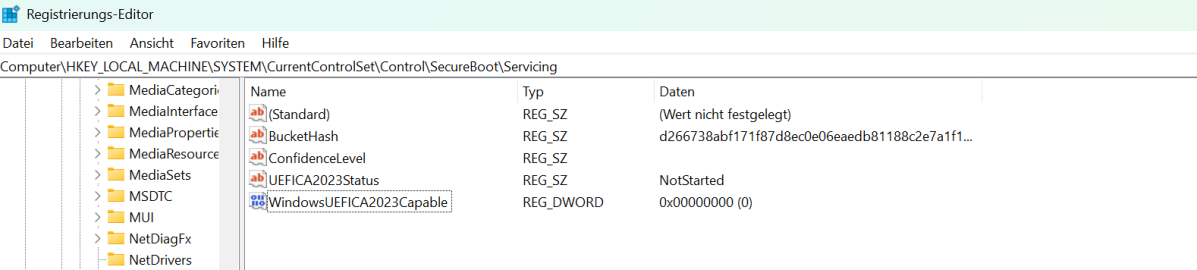
According to Microsoft, installing a series of quality Windows updates should be enough. Once enough “successful update signals” have been sent, Microsoft can “ensure a secure and gradual rollout.” You must also enable your PC to send diagnostic data to Microsoft.
Businesses can also obtain Secure Boot certificates using special registry keys or Windows Configuration System (WinCS). For more information, please refer to the official Microsoft guide.