How to share your Google account after you die


Inevitably, we’ll need someone to manage our affairs and for most people, their email account serves as the linchpin for your entire life. Bank accounts, subscriptions, utilities and much more.
The most direct method is to share your email password with your loved ones, for example via emergency access in a password manager. But as a precaution or backup (or if you don’t want to share all the data housed in your email account, since a Google and Apple account is often associated with file storage), you can also set up legacy access to your email account.
Google allows this through its inactive account manager. Here’s how to configure it.
What to Know About Google’s Inactive Account Manager
- You can select specific information to make available to your contact, such as only your Gmail data. You can also add other Google products (e.g. Drive, Photos, Calendar, etc.).
- When the inactivity period takes effect, your contacts can only access your data for 3 months. They should download it so that they can save it for future reference, if necessary.
- You will receive several notifications before access is granted to others.
Example: You stop using your Google account. After the period of total inactivity you specify (e.g. 3 months) across all platforms, your designated contacts will receive a notification with a link to a download of the data you have granted access to. Three months after this notification date, they lose access to the data. Your account will then be deleted, in accordance with Google policy.
How to configure an inactive account manager
PCWorld
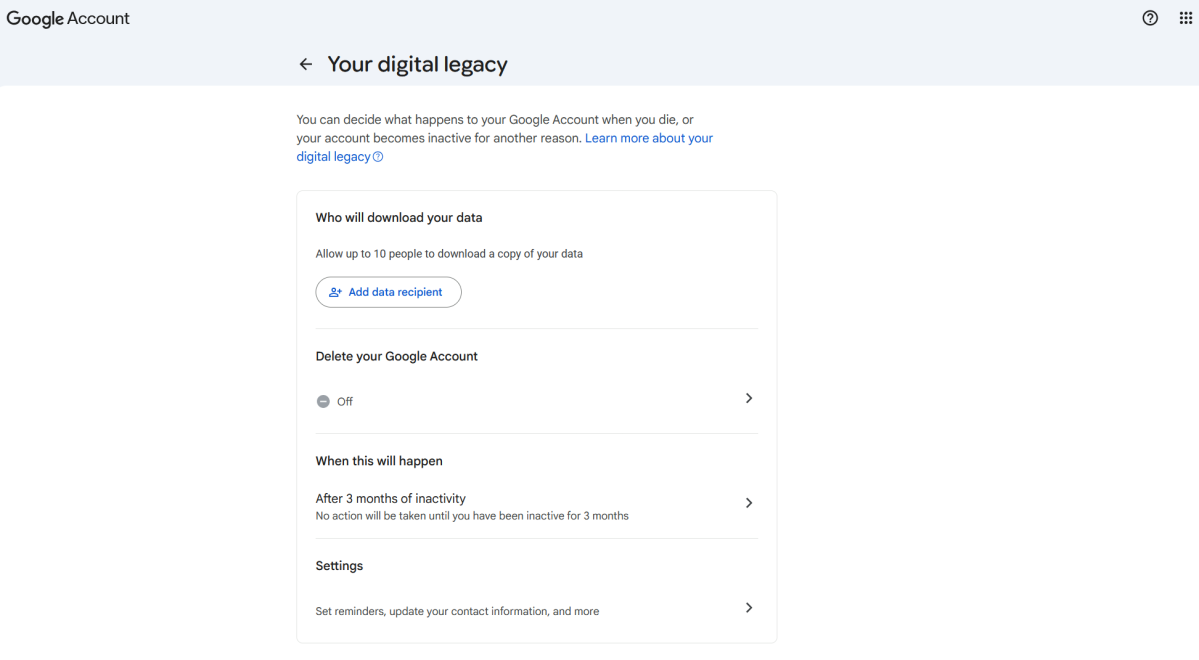
Go to this webpage: https://myaccount.google.com/inactive
Here you can customize the following settings:
- Choose your contacts and the data they have: You can configure up to 10 people who can access the selected data. You can modify this information later, if you need to adjust it.
- Set an automatic reply: You can set the message for an automatic reply sent to any incoming email once your account is marked as inactive.
- Receive email notifications: Receive periodic reminders that this feature is active.
- Inactivity period: Choose between 3, 6, 12 or 18 months before access is granted to those you have designated as contacts.
- Contact details: You will be contacted several times before the inactive account manager grants your contacts access to your data. You can set a phone number, in addition to your email address and your registered recovery email.
- Automatically delete your account: If you don’t set an inactive account manager contact, Google has a standard two-year deletion policy for inactive personal accounts. But you can set your account to automatically delete itself sooner.
Don’t ever want your account deleted?
This advice may not hold true indefinitely, as Google’s policies are constantly changing. But currently, you can save your loved ones extra time without enabling the Inactive Account Manager feature.
You will need to follow these two steps to give access to your loved ones and keep your account alive indefinitely:
- Share your password securely (ideally through a password manager).
- Add a gift card with a balance or purchase a digital item through the account: this currently guarantees that your account will not be deleted.
That said, digital data can be dangerous if it can be retained indefinitely. If you truly are no longer able or available to manage the account, eventually letting it disappear isn’t a bad idea.


