NotebookLM turning your notes into spreadsheets after this Gemini 3 upgrade


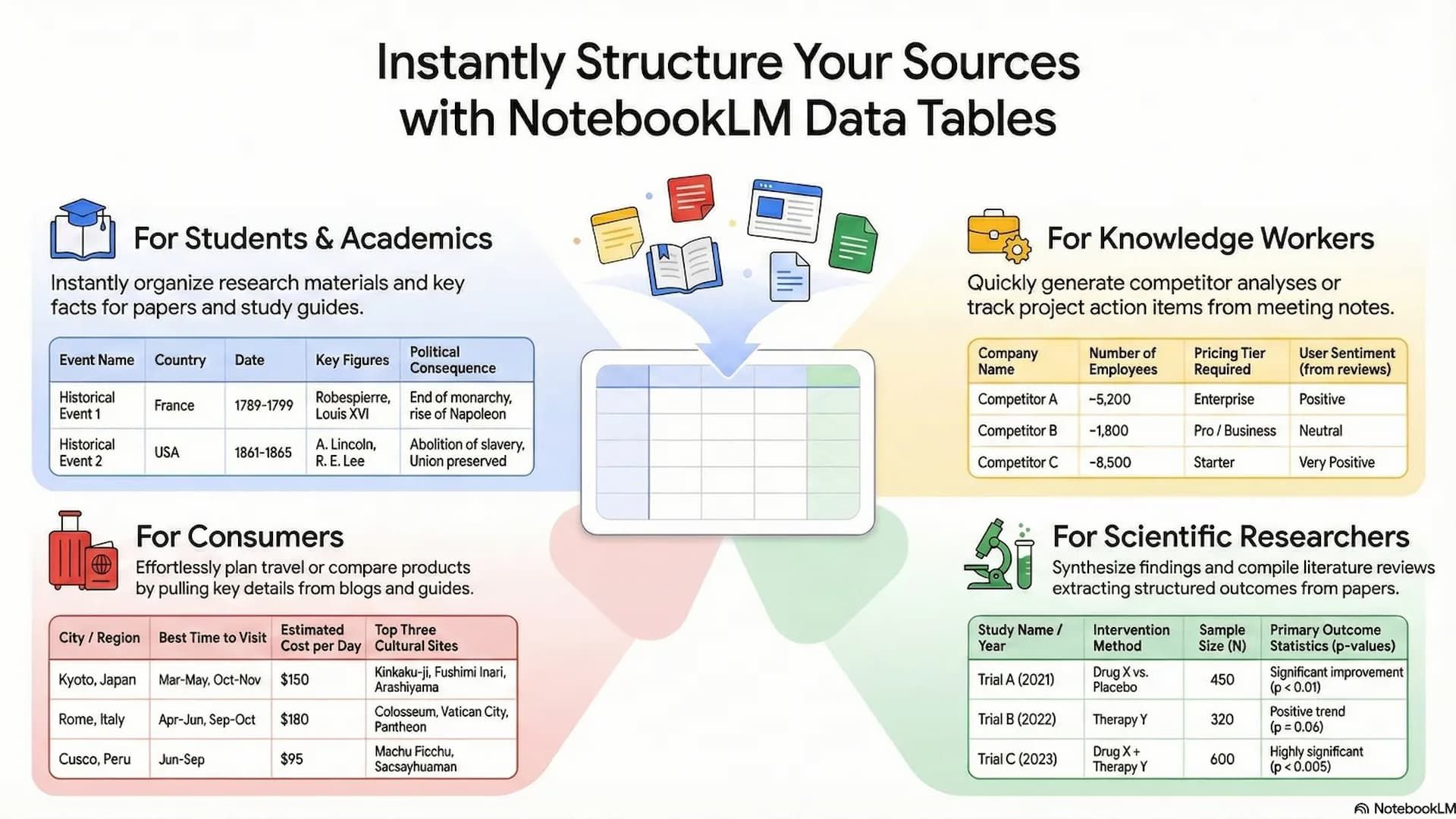
NotebookLM officially upgrades to Gemini 3, bringing significant improvements to its processing power alongside the introduction of data tables. Google said the ability to summarize information into structured tables was by far the most requested feature.
Valuable information is rarely easy to work with, especially when you have key information scattered throughout meeting transcripts, clinical articles, or lengthy study guides. Manual compilation is always tedious, and that’s where the new Data Tables feature comes in. The tool takes information from your sources and converts it into organized spreadsheets that you can send directly to Google Sheets. This organizes the raw data into a structure you would need for serious research or planning.
I would say the biggest problem with working from raw notes is the wasted time involved in standardization. This new tool completely eliminates this problem for certain tasks. Business owners can instantly turn audio from a disorganized meeting into a structured checklist that assigns tasks to specific employees based on urgency.
If you are a student or researcher, the tool is just as useful. Researchers can compare data from various medical studies, such as number of participants or dates, without manually going through each document. If you’re preparing for exams, for example, you can create study guides for history classes that categorize events based on when they happened, the main people involved, and the possible outcomes.
The platform has also upgraded to Gemini 3. Google said the upgrade brings significant improvements to NotebookLM’s reasoning and multimodal understanding. Google hasn’t confirmed exactly which version of Gemini 3 is running under the hood, but previous iterations of the software relied on the Flash version.
Ultimately, these AI tools are only as good as the data you feed them, but the improved reasoning capabilities certainly suggest that the tool will be much better at understanding the context of messy, disorganized notes. Whether you’re generating a table or a briefing document, you can now tap the overflow menu next to your study guides, briefing documents, or saved notes to export the resulting text to Google Docs or Sheets.
Data Tables are the latest addition to NotebookLM’s growing collection of Studio outputs. It joins existing features like audio presentation, video presentation, mind map, reports, flashcards, quiz, infographic and slide deck.
In addition to the new board release, Google also made official how you can integrate your laptops directly into the main Gemini app interface. This is available on the web today, but it will come to mobile next year. This integration allows you to combine multiple notebooks, which is extremely useful if you have segmented your research by topic.
Google claims that this will help you generate images or even apps inspired by the contents of your notebooks, which may be true because it can help you keep so much information together in an easy-to-access way. You can also build on existing notes using online searches from the largest Gemini platform.
As for availability, if you are a Google AI Pro or Ultra subscriber, you can start using Data Tables today. For all other users of the free version of NotebookLM, the feature will arrive in the coming weeks.
Source: Google (1), Google (2)


:max_bytes(150000):strip_icc()/Health-GettyImages-2165530356-61314174340c4aba87daf8b6bc16af33.jpg?w=390&resize=390,220&ssl=1 "4 Potentially Serious Side Effects of Ashwagandha")