
Do you have old hard drives lying around in a drawer doing nothing? I did—until I found a purpose for them. Here’s how I rescued my old hard drives and gave them a new lease on life.
An old hard drive can still have life left to live
Just please test it before deploying.

You might think that hard drives have a shelf life—and that’s partially the case. However, an old hard drive probably has a lot more life left in it than you think. I have hard drives that are over 10 years old still deployed and working well.
The trick with using an old hard drive in any scenario is to realize that drives do wear out over time, and you need to know approximately how much life is left in the drive before deploying it. I normally use software like CrystalDiskInfo to check my drive’s S.M.A.R.T. status, which tells me information like power on hours, read errors, start/stop count, reallocated sectors, and more.

How Old Is Your Hard Drive? Here’s How to Check
Guess your drive’s birthday.
Once I know what the S.M.A.R.T. status is of the drive, I determine if it’s worth using or not. Chances are, there’s still plenty of life left in the drive, even if it’s on the older side. For me, so long as the reallocated sector count is extremely low, I’m fine deploying the drive into my server—which is exactly where all my old hard drives go.
My NAS was the perfect home for unused hard drives
Redundancy might not be backup, but it’s enough for me.
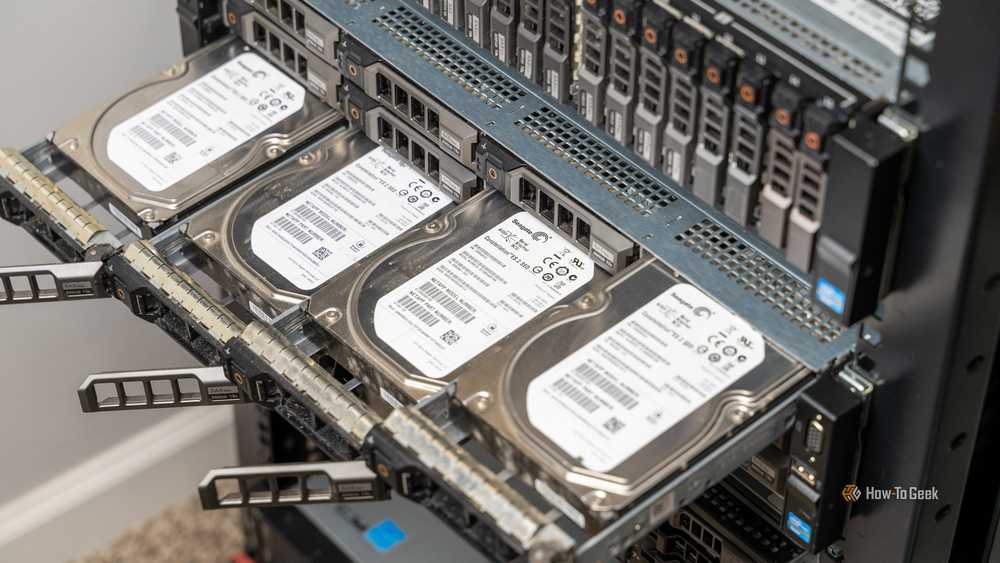
As I started to gather unused drives from old computer builds that I had lying around, I realized throwing them in my NAS (network attached storage server) was the perfect solution. My NAS can withstand a single drive failure, meaning if a drive goes out, I can easily replace it without losing any data.
This allows me to have some peace of mind that if a drive does eventually die, I won’t lose anything that was stored on it. I use Unraid for my NAS, which means I can use various drive sizes in my storage array. My current server has drives ranging from 4TB up to 12TB. I used to have some 3TB drives in the array, but after about 15 years, they finally went from pre-failure (which just means it’s an old drive and watch out for possible failure) to failed.

4 Reasons to Run Your Homelab Storage on Unraid (and 4 Reasons Not To)
Storage freedom > RAID.
In Unraid (and most other NAS operating systems), when a drive fails it becomes “emulated,” meaning any data on it is still available and is being constructed from the other drives. Since Unraid isn’t like traditional RAID, and each drive is independent of the other (held together by the parity drive), it gives you access to all the files on that specific failed drive, instead of just keeping the array going.
When one of my drives failed, I didn’t even have to buy a new one. I had enough space on the other drives to redistribute the files across the array and just remove the failed drive from the array entirely. This saved me money from having to buy a replacement drive, and also kept my redundant array happy.
Any time I do buy a new (or refurbished) drive, I always make sure it’s NAS-rated. At this point in time, all the consumer drives I used in my NAS are long gone because they’ve simply failed under the extra stress that a NAS puts on hard drives. They served their purpose, but I’ll never buy a desktop-rated hard drive for my NAS again.
While redundancy is not a proper backup solution, I’m satisfied with the security it offers and will happily use old drives in my NAS for many years to come.
The drives now live out their days storing movies, photos, and documents
It’s better than keeping it in a drawer.

Instead of that hard drive sitting in a drawer rotting away, it has actual use in my setup now. I don’t use traditional mechanical hard drives in my main desktops at all anymore, so without my storage server, I’d have no use for traditional hard drives and they’d likely become e-waste.
Because of my storage server, though, I’m able to not only make use of old tech I already paid for, but also cancel many services that I used to pay for as well. My storage server houses my Plex media, backs up my photography library, and even houses documents that I don’t care to store on my desktop anymore. It’s really nice having a storage server at home, and it’s the foundation of my homelab.

How to Prolong the Life of Your Hard Drive
Get a top-notch drive and handle it with care!
In an age where RAM prices are volatile, reusing old tech is essential to saving money. So, that’s the main reason for repurposing old hard drives. Sure, I’d love to fill my 12-bay server with 24TB drives and have 240TB of storage with a two drive redundancy—but I’m just not in a place to do that. So, until I am, I’ll be reusing old drives that I pick up online or find around the house in my storage server.


