How to turn on hypertension alerts on Apple Watch

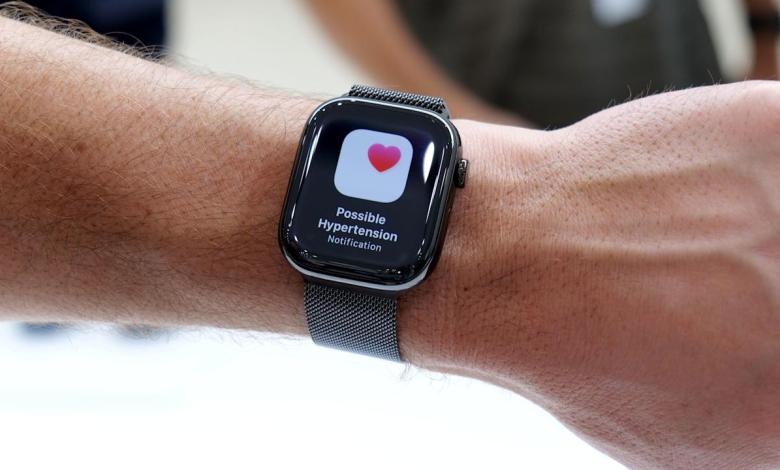
Apple has gradually expanded the Apple Watch’s health monitoring features over the years, moving beyond fitness tracking to areas that can offer early insight into potential medical issues. One of the most recent additions is high blood pressure alerts, designed to notify users when their blood pressure trends high over time. Although Apple Watches can’t directly measure blood pressure, this feature can still play a useful role in highlighting trends that are worth discussing with your doctor. Here we will explain what hypertension alerts are for, how they work and how to activate and manage them on the Apple Watch.
What are hypertension alerts for?
Hypertension alerts are designed to identify long-term trends that may indicate high blood pressure. Instead of relying on a traditional armband measurement, Apple Watch analyzes a combination of health data collected over a 30-day period, including heart rate, movement patterns, and other contextual information stored in the Health app. Using this data, the system looks for lasting changes that match patterns typically associated with hypertension.
If your Apple Watch detects a pattern suggesting high blood pressure over an extended period of time, it will send you a notification. These alerts are not intended to diagnose hypertension or replace medical testing. Instead, they are an early signal that something may have changed and you may want to seek further monitoring or professional advice.
Apple emphasizes that hypertension alerts are designed for users who have not yet been diagnosed with high blood pressure. Instead, they aim to raise awareness rather than confirm a condition.
Who can use hypertension alerts
Hypertension alerts require a compatible Apple Watch model (Apple Watch Series 9 or later, or Apple Watch Ultra 2 or later) paired with a supported iPhone (iPhone 11 or later). The feature also depends on recent versions of watchOS and iOS, as it relies on updated health algorithms and basic data analysis. To use hypertension alerts, you must be 22 years of age or older, not pregnant, and not have been diagnosed with hypertension. You should also make sure that your Apple Watch Wrist detection the function is activated.
To receive meaningful alerts, your Apple Watch needs enough data. This means wearing the watch regularly, including while sleeping if sleep tracking is enabled, and keeping health information such as age, gender, height and weight up to date in the Health app. The system uses long-term trends, so alerts will not appear immediately after enabling the feature.
How to enable high blood pressure alerts
Hypertension alerts are managed via the Health app on the paired iPhone. The feature cannot be activated directly from the watch itself. During setup, the Health app will ask for confirmation that the user has not been diagnosed with hypertension. It may also prompt consideration of health details such as date of birth and biological sex, as this information helps improve the accuracy of trend analysis.
To get started, open the Health app on the iPhone associated with the Apple Watch. From the main Health screen, tap your profile in the top corner. Select Health Checklist among the available Features. Then you will have to press Hypertension notificationsconfirm your age and whether you have ever been diagnosed with hypertension. Faucet Continue and follow the on-screen prompts for information on how notifications work. Once you’ve done that, tap Do and you will be ready.
Once enabled, the feature runs automatically in the background. There is no need to manually start monitoring or interact with the feature on a daily basis.

The new Apple Watch Series 11 can help identify hypertension (Apple)
Management of notifications and alerts
When high blood pressure alerts are turned on, notifications appear on both the Apple Watch and the paired iPhone. These alerts typically explain that a long-term trend suggesting high blood pressure has been detected, along with advice on next steps.
Users can manage how and when these notifications appear by adjusting the notification settings for the Health app. This includes choosing whether alerts appear on the lock screen, in Notification Center, or as urgent notifications on Apple Watch.
Health data related to hypertension alerts can be viewed at any time in the Health app. Although Apple Watch does not display a specific blood pressure number, users can view contextual information and educational materials explaining what the alert means and what actions may be appropriate.
How High Blood Pressure Alerts Can Help
Hypertension often develops gradually and may not cause visible symptoms in its early stages. For this reason, many people are unaware of high blood pressure until it is identified during a routine medical exam.
Hypertension alerts can notify you of subtle changes that might otherwise have gone unnoticed. For some users, an alert may prompt earlier conversations with a doctor, additional blood pressure monitoring at home, or lifestyle changes such as adjustments to diet, activity, or sleep habits.
It is important to treat these notifications as informative rather than diagnostic. Apple Watch does not provide specific blood pressure measurements and cannot confirm hypertension on its own.
What to do if you receive an alert
Receiving a high blood pressure alert does not mean there is an immediate medical emergency. Apple recommends using the alert to encourage you to pay more attention to your cardiovascular health.
Many users choose to follow up by measuring blood pressure using a traditional cuff at home or by scheduling a check-up with a healthcare professional. A doctor can provide appropriate testing, diagnosis and advice based on clinical measurements and individual risk factors.
It is also worth considering lifestyle factors that can influence blood pressure, such as physical activity levels, sleep quality, stress and diet. Apple Watch can already help track many of these areas, which can provide useful context when discussing health concerns with a professional.
Limitations to keep in mind
Hypertension alerts are not available in all regions and may be subject to regulatory approval. The feature also requires consistent use of the Apple Watch over time to generate reliable trend data.
More importantly, the Apple Watch doesn’t measure blood pressure directly. Alerts are based on correlations and trends rather than direct readings, which means they should not be used as a substitute for medical equipment or professional care.


