MSI DataMag 40Gbps review: Shiny, magnetic USB4 storage


At a glance
Expert rating
Benefits
- Beautiful design
- Magnetic mounting to any suitable surface
- Transfers up to 4 GB/s
Disadvantages
- Slowest USB4 SSD we tested
- 10Gbps speeds during long writes
Our verdict
The MSI DataMag 40 Gbps offers a sleek design, magnetic attachment, and solid construction. But it’s just a good USB4 performer, not fantastic.
Price when reviewed
This value will display geotagged pricing text for the undefined product
Best price today
Best prices today: MSI DataMag 40 Gbps USB4 SSD
Check
Magnetically attached SSDs can be handy, especially fast 40Gbps models such as the 40Gbps MSI DataMag reviewed here. They can be attached to any suitable metal surface. Alas, that doesn’t include my aluminum Macs, but it does include the router right next to them.
What are the features of the DataMag 40Gbps?
Well, the name and intro give away part of the story: the magnetic ring on the back of the device (see below) and the fact that the drive is 40GB USB4. It measures just over 2.5 inches in diameter either way, is just under 0.5 inch thick, and has a lanyard opening on the top right. The weight is 2.8 ounces, which makes for a nice solid heft.
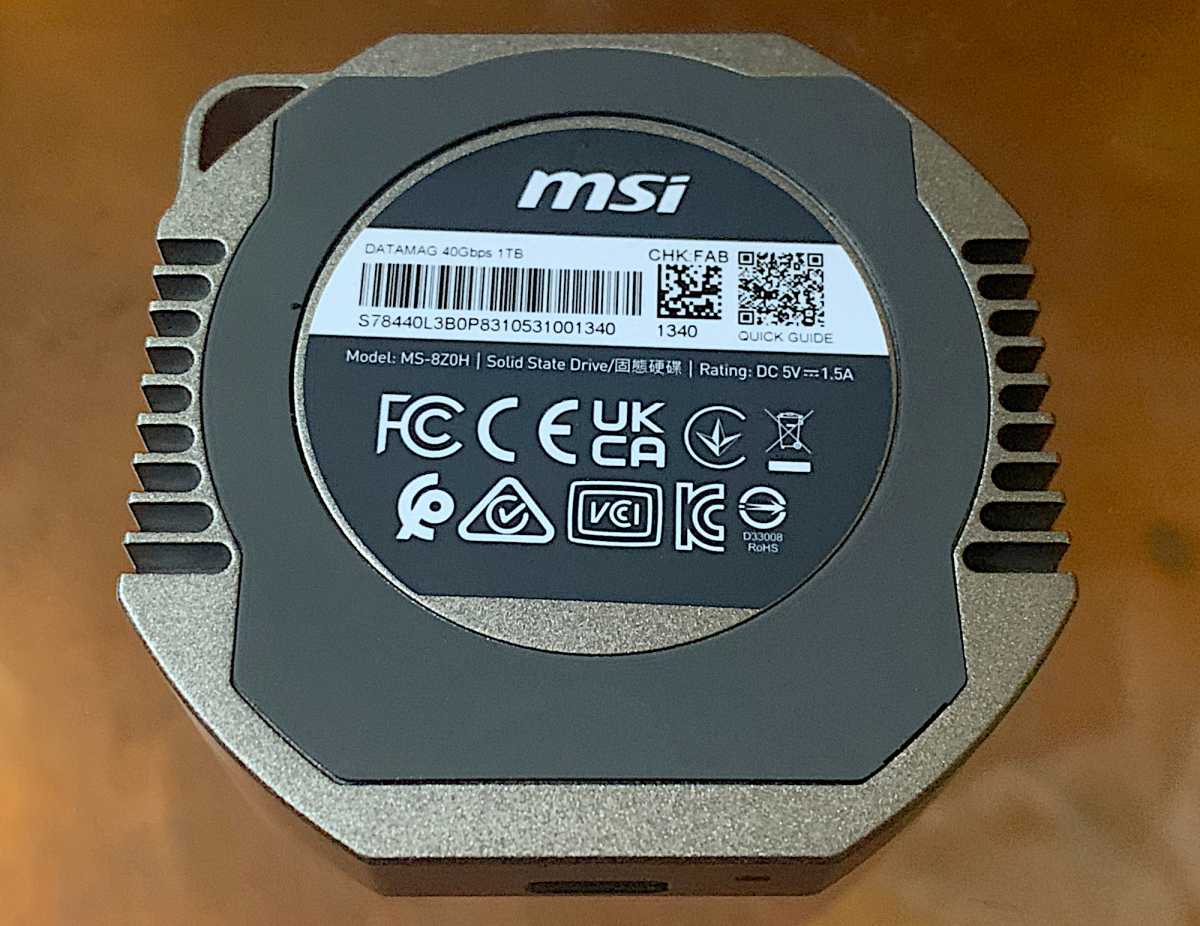
The DataMag 40 Gbps is equipped with a Phison U21 controller and stacked/layer/3D TLC (Triple-Level Cell/3-bit) NAND. The company guarantees the drive for five years or until the TBW rating is achieved.
This rating is 750 TB (terabytes writable) per terabyte of capacity. That’s pretty generous for an external SSD. The standard is three years and 600 TBW or less depending on the NAND involved.
How much does the MSI DataMag 40Gbps cost?
The DataMag 40Gbps is currently available in 1TB/$170 and 2TB/$296 capacities – these prices come from the company, which also promises that a 4TB version is on the way. It’s a little expensive for USB4, but not outrageously so.
The drive also hasn’t appeared on Amazon as of this writing, so there may be discounts in the near future.
How fast is the MSI DataMag 40Gbps?
Short answer: Very fast, although there were areas where the ride wasn’t quite up to par with the competition. Part of the problem was undoubtedly that the drive MSI sent us is only 1TB, meaning it had exactly half the NAND to play with as the Adata SE920, and a quarter the NAND of the top-rated LaCie Rugged SSD4.
Less NAND means less secondary cache and a faster transition to NAND’s native write rate. That said, the native write rate of around 830MB/s will still get the job done in an appropriate amount of time in many cases.
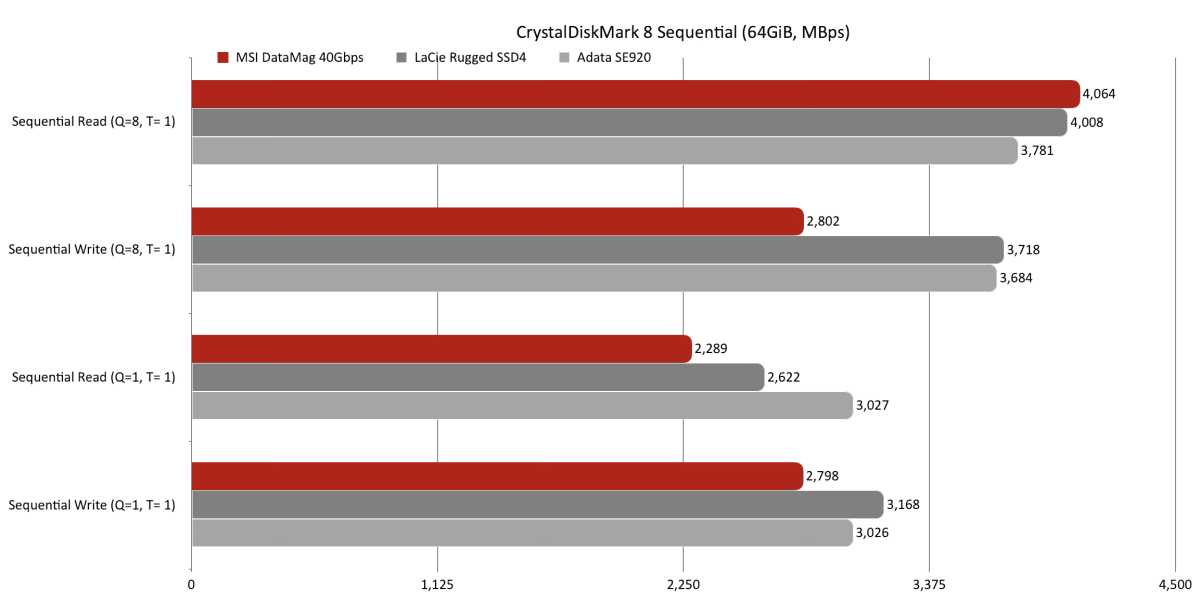
Less secondary cache or not, the DataMag 40Gbps was in no rush to reach its native write throughput. In fact, it actually delivered an exceptional sequential queue read score in CrystalDiskMark 8 before slowing down.
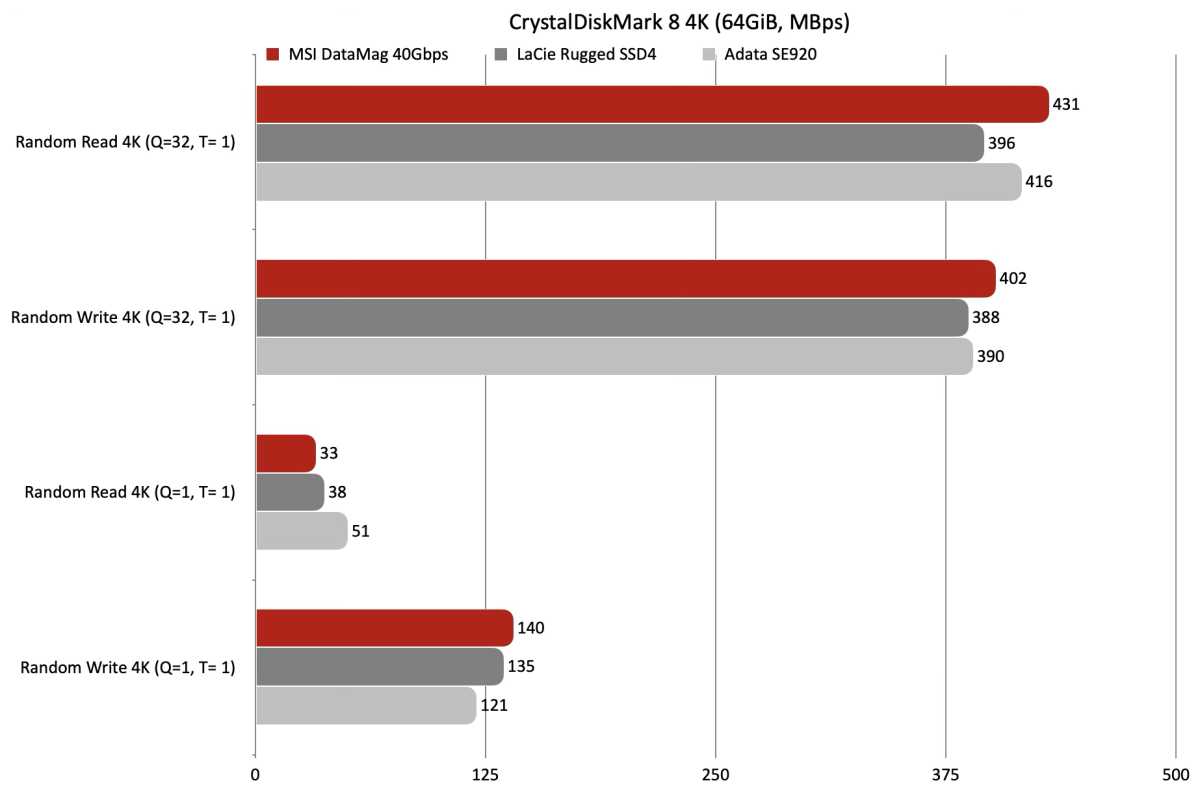
The DataMag 40 Gbps also performed exceptionally well in CrystalDiskMark 8 4K testing. Especially with multiple queues in play. Queues aren’t a very functional thing (Windows isn’t), but…
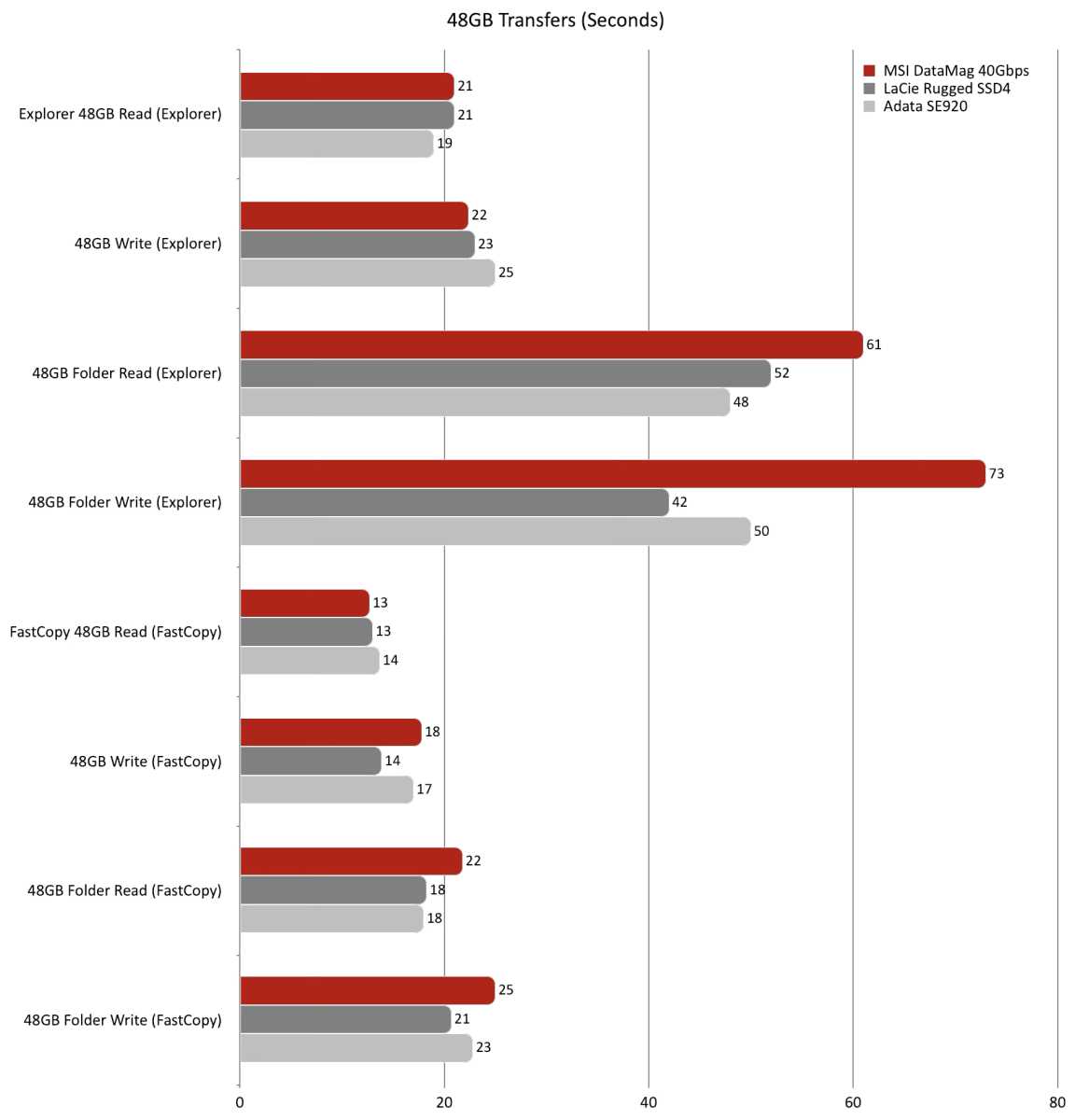
It was in our actual 48GB transfers that the DataMag 40Gbps started to lag a little further. I didn’t expect this to happen with small file and folder operations; Generally, a good CrystalDiskMark 8 4K score translates to good performance with smaller files and folders.
Being “only” a 1TB drive undoubtedly hurt the DataMag 40Gbps’ 450GB write time, which is double that of the competition.
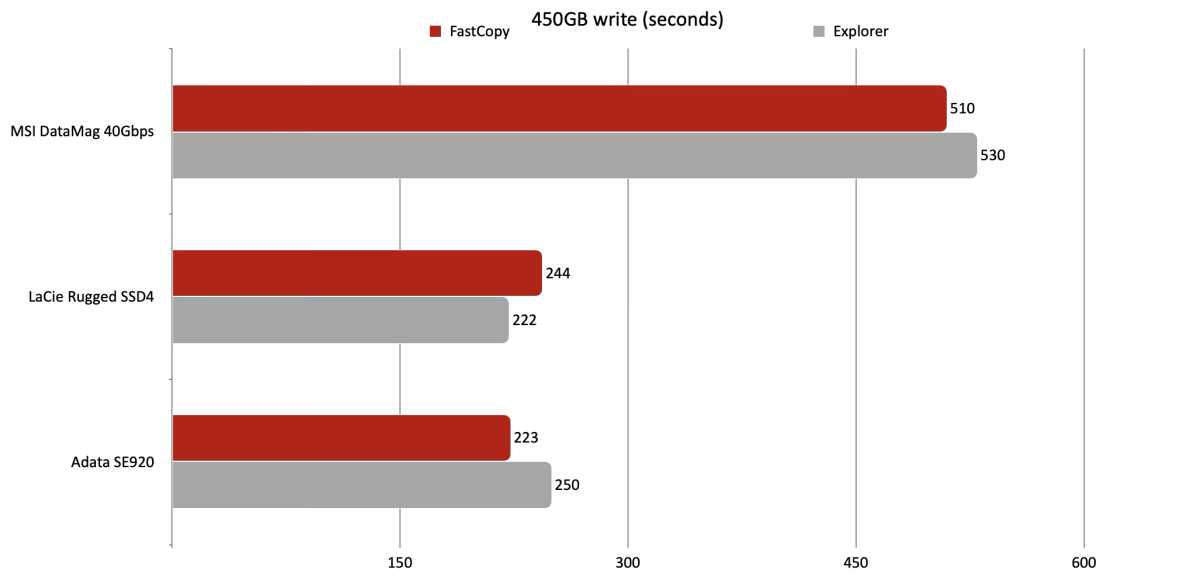
Here you can see where the lag in writing 450 GB started. At around 50GB, the DataMag 40Gbps write speed dropped to USB levels of 10Gbps, or around 830MB/s.
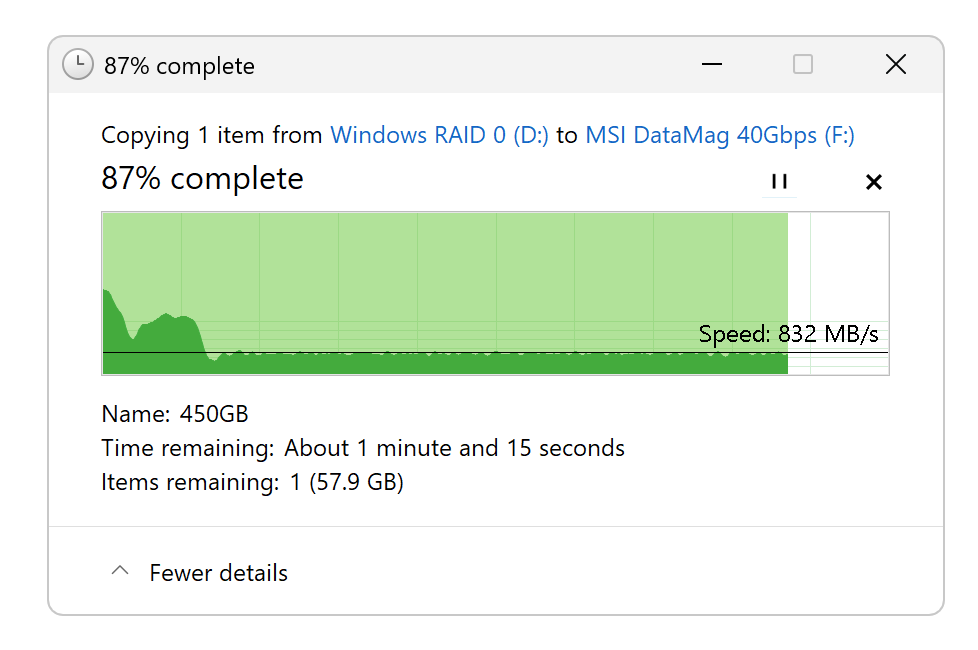
If MSI had sent us the 2TB version of the DataMag 40Gbps, it probably would have performed better in real-world transfer tests.
Regardless, it offers a nice increase in sustained throughput over the soon-to-be-reviewed (but already tested) MSI DataMag 20Gbps and other 3.2×2 (20Gbps) USB SSDs.
Should you buy the MSI DataMag 40Gbps?
I love the look, the performance and I appreciate this magnetic attachment. Given the competitive pricing, I’d give it the nod, but as always, read our other reviews and shop around.
How we test
Drive testing is currently using Windows 11 24H2, 64-bit running on a Samsung 990 Pro PCIe 4.0 in an Asus Z890-Creator WiFi (PCIe 4.0/5.0) motherboard. The CPU is a Core Ultra i5 225 powered by two Crucial 64 GB DDR5 5600 MHz modules (128 GB of memory in total).
20Gbps USB and Thunderbolt 5 are integrated into the motherboard and Intel CPU/GPU graphics are used. The internal PCIe 5.0 SSDs involved in testing are mounted in an Asus Hyper M.2 x16 Gen5 adapter card located in a PCIe 5.0 slot.
We run the CrystalDiskMark 8.04 (and 9), AS SSD 2, and ATTO 4 synthetic benchmarks (to reduce article length, we only report the first) to determine the potential performance of the storage device. Next, we run a series of 48GB transfer and 450GB write tests using Windows Explorer drag and drop to show what users will see during routine copy operations, as well as running FastCopy much faster as administrator to show what’s possible.
A dual 25GB/s SSD RAID 0 array on the aforementioned Asus Hyper M.2 x16 Gen5 is used as the second drive in our transfer tests. Previously, 48 GB tests were performed with a RAM disk used for this purpose..
Each test is performed on an NTFS and newly TRIM formatted drive so that the results are optimal. Note that in normal use, as a disk fills up, performance may decrease due to less NAND for secondary caching, as well as other factors. This problem has eased somewhat with the current generation of SSDs using more mature controllers and much faster latest generation NAND.


