MSI Prestige Flip 14 AI+ review: 30+ hours (!!!) of battery life


At a glance
Expert’s Rating
Pros
- Impressive battery life
- Colorful OLED panel
- Strong performance (with the right settings)
- Great connectivity
- Sleek, lightweight design
Cons
- Display could be brighter, faster, and sharper
- Keyboard feel is inConsistent
- Battery takes a hit in practical use
Our Verdict
The MSI Prestige Flip 14 AI+ has a solid formula. It’s fast, efficient, built well, lightweight, and not exceedingly expensive. There are a few areas it could have improved, but the bargain it strikes is a good one that lets it prove a great value.
Price When Reviewed
This value will show the geolocated pricing text for product undefined
Best Pricing Today
Price When Reviewed
$1299
Best Prices Today: MSI Prestige Flip 14 AI+
$1299
$1699.99
The MSI Prestige Flip 14 AI+ is one of the first few laptops in the new slate of machines running on refreshed Intel hardware, bringing some exciting bumps to graphical performance and efficiency. It also gets fitted into a new design that’s sleek, slim, and a step away from the gamer aesthetic that many prior MSI machines exhibited.
In our testing, the hardware held up well and the internals held up even better. With that, the MSI Prestige Flip 14 AI+ proves a potent option for those looking for sleek performance and excellent longevity, though a few weaker aspects ultimately leave me more excited for updated models from different brands.
MSI Prestige Flip 14 AI+: Specs and features
- CPU: Intel Core Ultra X7 358H
- Memory: 32GB LPDDR5x-8533
- Graphics/GPU: Intel Arc B390
- Display: 14-inch 1920×1200 OLED touchscreen, 60Hz, Glossy, Stylus included
- Storage: 1TB PCIe 4.0 SSD – Micron 2500_MTFDKBA1T0QGN
- Webcam: 1080p + IR
- Connectivity: 2x Thunderbolt 4 / USB-C with Power Delivery and DisplayPort Alternate Mode, 2x USB 3.2 Gen 2 Type-A, 1x HDMI 2.1, 1x 3.5mm combo audio
- Networking: WiFi 7, Bluetooth 6.0
- Biometrics: Windows Hello fingerprint, facial recognition
- Battery capacity: 78.6 watt-hours
- Dimensions: 12.42 x 8.74 x 0.55 inches
- Weight: 3.02 pounds
- MSRP: $1299 as-tested ($1,299 base)
At the time of writing, the MSI Prestige Flip 14 AI+ was offered in just one configuration. This included the Intel Core Ultra X7 358H paired with 32GB of memory and Intel Arc B390 graphics. That said, MSI’s product details alluded to both Intel Core Ultra X9 configurations and lower-end configurations that would not include Arc graphics. So, it’s likely more models will join the stack, adding more powerful and more affordable options.
Playing offline video with the display set to 250 nits, the MSI Prestige Flip 14 AI+ ran for an astounding 34 hours and 28 minutes — blowing everything else we’ve tested out of the water.
MSI Prestige Flip 14 AI+: Design and build quality
Foundry / Mark Knapp
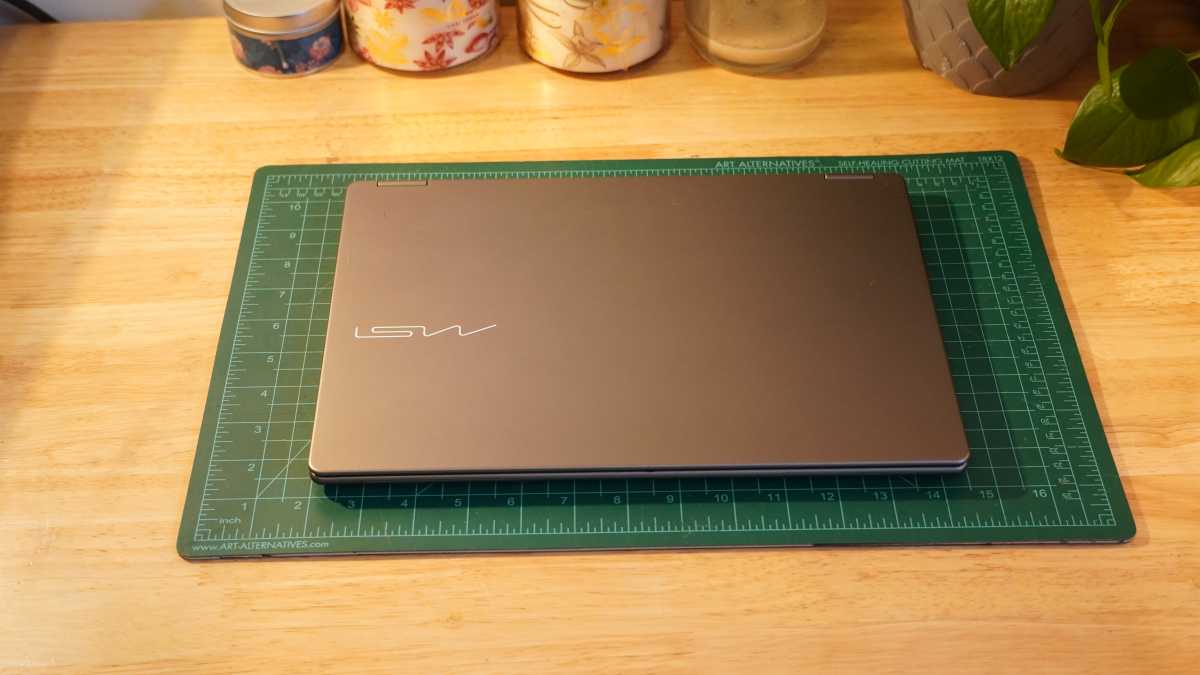
The MSI Prestige Flip 14 AI+ is a sleekly built 2-in-1 laptop. It doesn’t do too much to be flashy or stand out, but it has curb appeal. The aluminum alloy chassis is consistent with its rounded edges and corners, which give it a comfortable feel even when in its tablet mode.
The hinges are the simple 360-degree style we see on most 2-in-1 models, not something more lavish or unique. They’re functional, but they do let the screen wiggle a bit after making adjustments. It can also be a little tricky to open the lid with just one hand.
Even though you’re getting an all-metal construction for the chassis, it does flex a little bit. It’s more than I’d expect, but not a worrying amount. On the flip side, the display lid flexes less than a lot of other laptops. Altogether it’s a fair showing for a laptop this thin.
The screen gets a Gorilla Glass finish that extends all the way to the edges rather than swapping over to plastic for the bezels. Those bezels are thin on the sides but thicker at the top and thickest at the bottom — pretty typical for 2-in-1s. The upper bezel squeezes in a webcam with a physical privacy shutter that’s easy (but not too easy) to slide into place and two mics. MSI actually built in a third mic on the keyboard deck just to the left of the Caps Lock key.
Underneath, the laptop sits on rubber feet with one wide foot stretching across the back, which helps prevent reintake of the hot air exhausted out of the back edge of the system.
Foundry / Mark Knapp
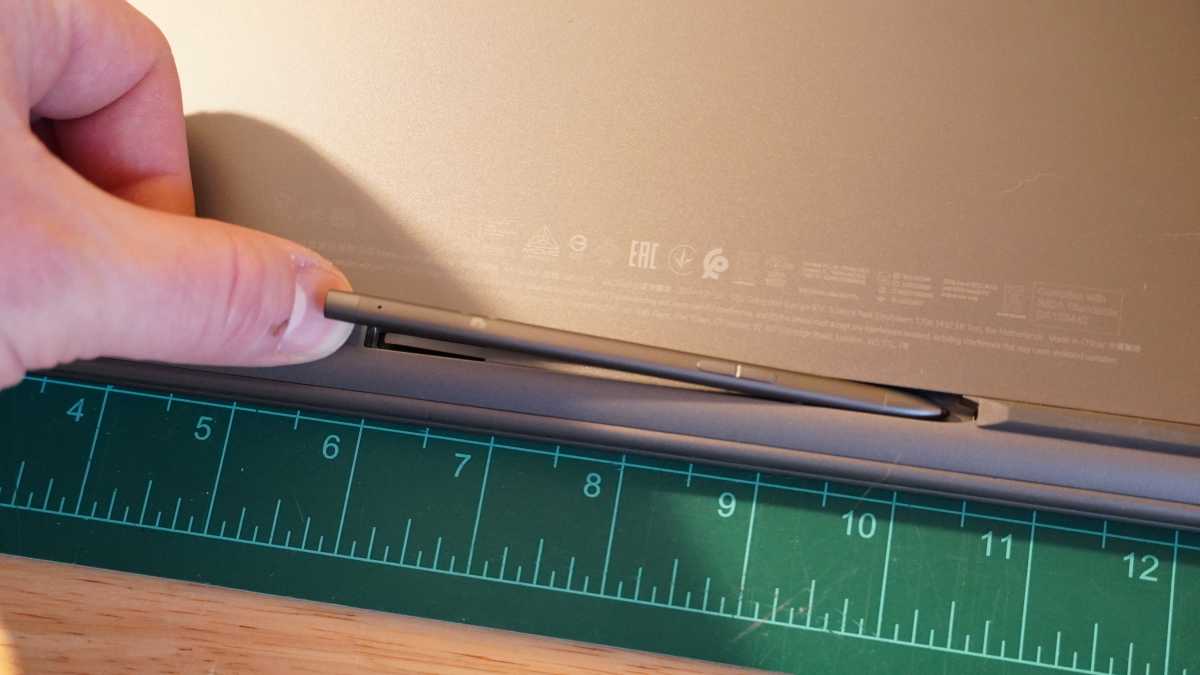
Between the two front feet, there’s a charging slot for the MSI Prestige Flip 14 AI+’s included stylus. The stylus fully tucks away into this slot. It pops out using magnetism when a small latch is pulled out of the way. Unfortunately, this system makes it very fussy to get back into place. The magnets want to push it right back out and rotate it so that the charging pins don’t line up right, and it’s a very fine line between fully inserted and not quite inserted enough to avoid having the laptop pop it right back out.
The stylus is a very thin, akin to the kind you’d find for phones. It tracks accurately and makes for a more precise input than the trackpad or fingers for jotting notes or doodling. But it’s not a high-performance stylus with pressure or tilt sensitivity. At least it triggers hand rejection after it’s been used (but not before).
MSI Prestige Flip 14 AI+: Keyboard, trackpad
Foundry / Mark Knapp
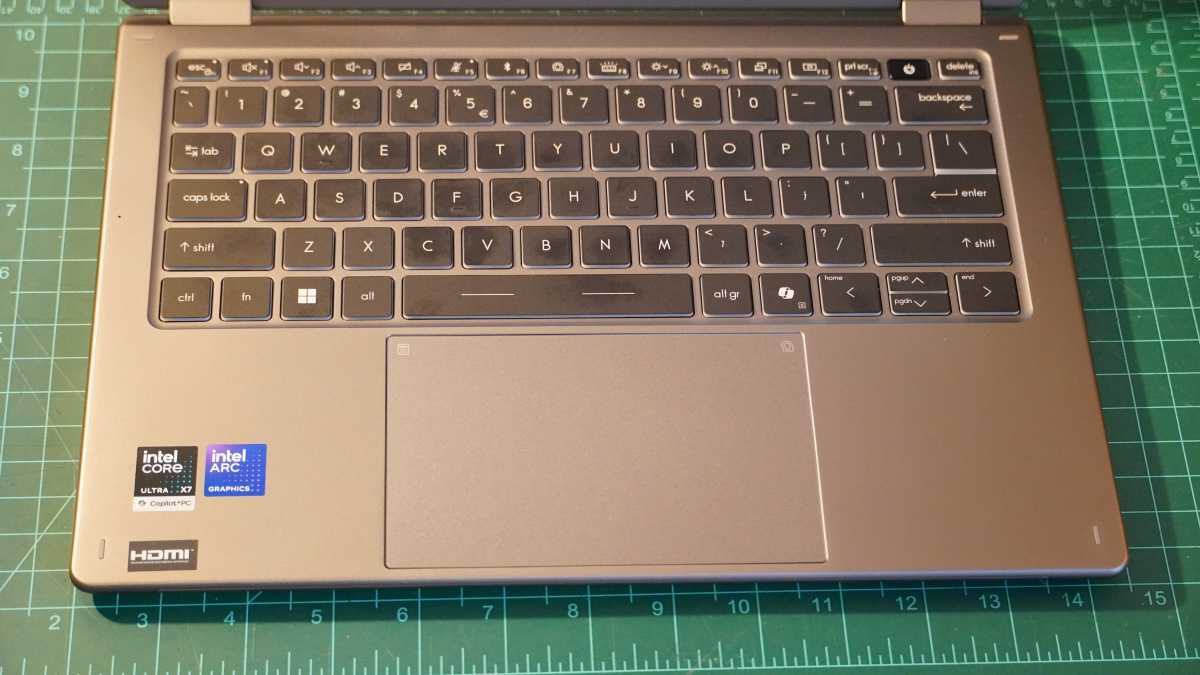
The MSI Prestige Flip 14 AI+ features a decent keyboard that some may like. The keys have a short travel that can make for quick, light-touch typing. The stabilization is also pretty good. But they lack much tactility, and the keycaps are quite smooth and don’t have much contour, which I found held me back as I had a hard time confidently feeling each key and keypress.
I was able to get up to a typing speed of 112 words per minute in Monketype, but struggled to keep my accuracy up above 95 percent. The keys get white backlighting, and thankfully MSI kept the keycaps black and legends white, which helps with visibility, though it can be a little hard to tell the backlighting is on (and wasting battery) in bright conditions.
The trackpad is large and fairly smooth, but it’s otherwise unremarkable. The physical click is light, plasticky, and quickly becomes too stiff above the bottom third of the trackpad. The top corners of the trackpad include shortcuts to the calculator and the MSI Center S software, which is fine, I suppose, but MSI Center S has a second shortcut on the F7 key.
The trackpad also supports several other gestures and users can set up three additional gestures. But, crucially, MSI has locked the defaults — no customizing those — and made the whole system all-or-nothing, forcing you to either enable all of its gestures or disable all of them.
MSI Prestige Flip 14 AI+: Software note
The system comes with Norton pre-installed, which normally I would say isn’t too big a deal. I don’t care for it personally, but a freebie is a freebie. However, in this case, Norton created issues.
I found many webpages failing to load frequently with no clear reason why. I’d go to Amazon, LinkedIn, or Facebook — common websites — and the loading wheel would just spin and spin even as I ran a speed test in a different tab that showed a fast connection. After having had enough, I tried uninstalling Norton and as soon as it finished, those pages finished loading.
Norton also appears to have been responsible for another annoying behavior where instead of going to sleep when the lid was shut, the MSI Prestige Flip 14 AI+ would simply power down. It was plenty fast to boot back up, but this still closed all my browser tabs. As soon as I uninstalled Norton, this behavior went away. It’s all the more curious that any of this happened in the first place, as I had at least disabled Norton from the start.
MSI Prestige Flip 14 AI+: Display, audio
Foundry / Mark Knapp
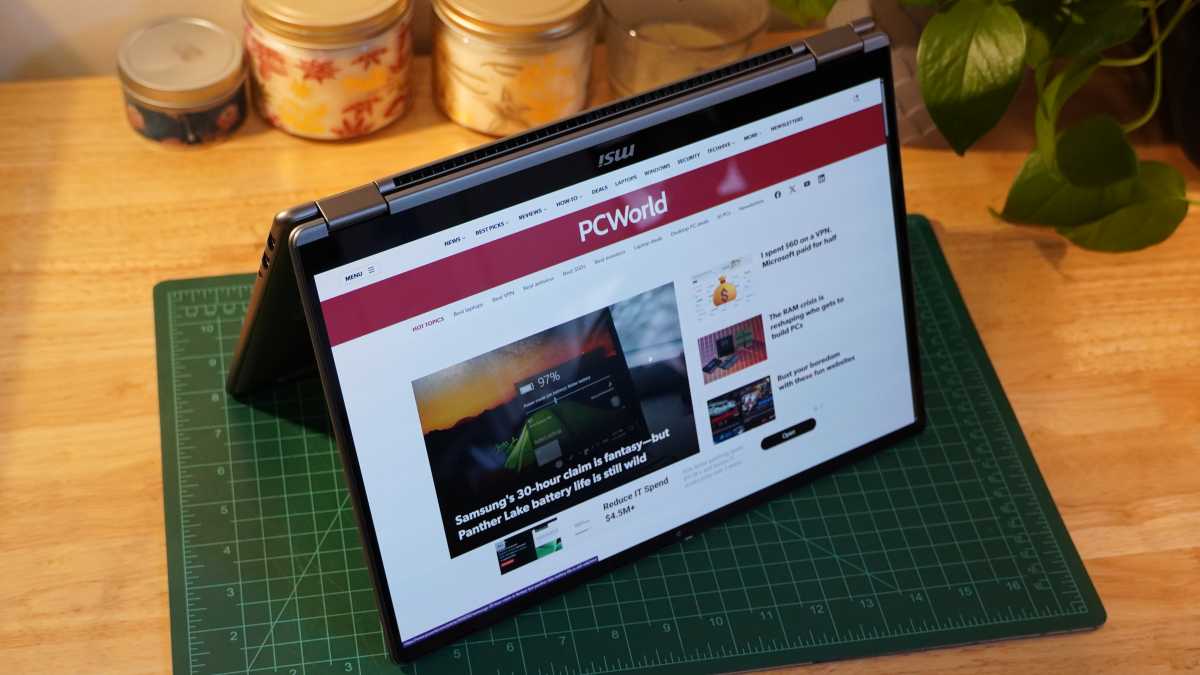
The MSI Prestige Flip 14 AI+’s display is a mixed bag. On the one hand, it has some lovely qualities. It achieves 100 percent coverage of the DCI-P3 color space and it even proved quite accurate with a measured average dE1976 of 0.57 and a max of 1.41. Those are great results. As an OLED panel, it’s also naturally responsive and has an infinite contrast ratio.
But the display is just 1920×1200, which is decent but not super sharp next to the glut of 2880×1800 competitors in this space. The display is also not impressively bright. It maxed out a surprisingly low 294 nits. In an office space or dimmer interiors, it’s not an issue, but that combined with the glossy display makes it harder to use effectively in bright spaces even with the screen dialed up to its max brightness.
There’s a definite downside to the support for touch and the stylus: You can see the digitizing layer. On areas of the screen that are one solid color like the white background or a word document, the little dots that comprise the digitizing layer are readily visible, looking like tiny little speckles on the screen. It’s subtle and hides away better on darker and non-uniform backgrounds, but it gives a softness to visuals that impacts fine details. It may not irk everyone, and it naturally becomes more subtle the further away you view the screen, but I still find it hurts the overall experience even at reasonable viewing distances.
The laptop combines a pair of two-watt woofers and a pair of two-watt tweeters, which give it a pleasant sound without being too harsh in the mids or lacking fullness. The bass is still mild at best, and you’ll miss out on plenty of impact if you’re listening to music or watching movies. But you’re still getting loud, crisp speakers that more than do the job.
MSI Prestige Flip 14 AI+: Webcam, microphone, biometrics
The webcam on the MSI Prestige Flip 14 AI+ supports Windows Hello facial recognition, which is a quick and convenient way to sign into the system. Beyond that, it’s kind of bad. Even with a 1080p resolution for video, it looks grainy and like everything it captures is smeared in grease, erasing any sort of fine detail. It gets its exposure right, but seeing such poor results even in good lighting conditions is a disappointment.
Thankfully, the triple mic array performs far more admirably. It picks up my voice quite well, providing a clear reproduction of what I say while also suppressing background noise decently. An ambulance siren and a fan (that started squealing due to some fault) during my test recording were both audible in my test, but the siren was hushed and the squealing fan didn’t stop the mics from picking up my voice clearly.
In addition to facial recognition, the laptop includes a fingerprint scanner in the power button, which sits near the top-right corner of the keyboard. The scanner unlocked the laptop quickly after registering my fingerprint, which it did successfully about 50 percent of the time — a pretty good result in my experience using laptop fingerprint scanners.
MSI Prestige Flip 14 AI+: Connectivity
Foundry / Mark Knapp
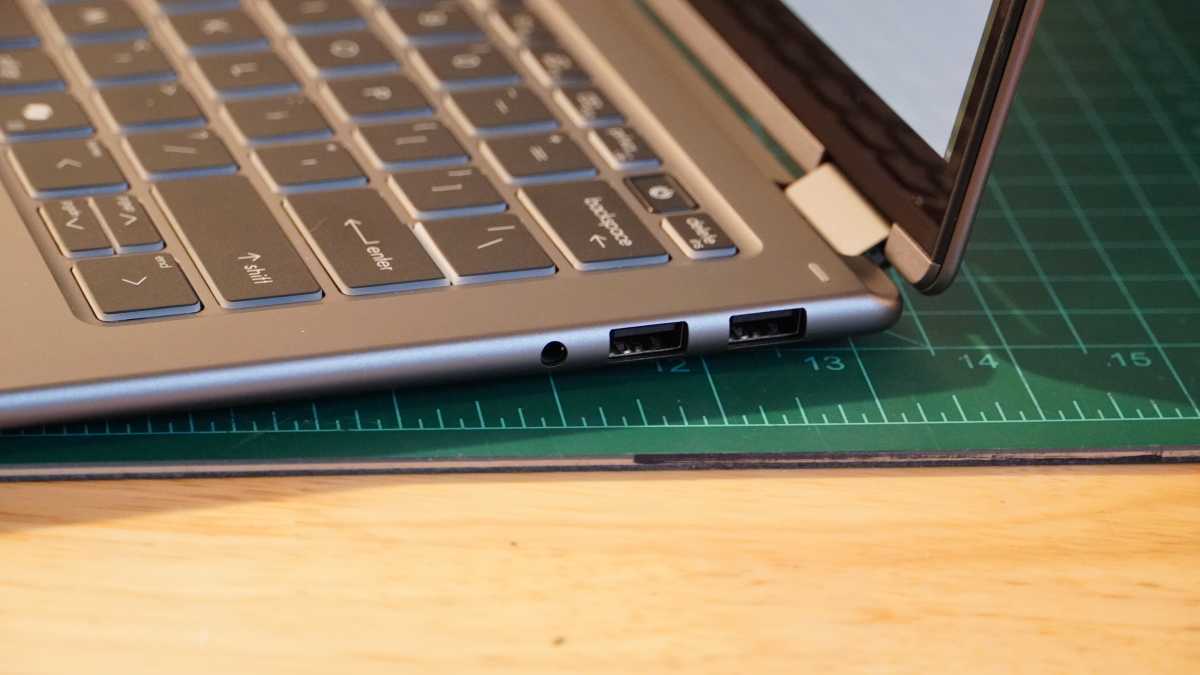
Other thin-and-light laptops have been warned: there’s no excuse for skimping on connectivity. Even with the MSI Prestige Flip 14 AI+ measuring just over a half-inch thick, it squeezes in a pair of Thunderbolt 4 ports, a pair of USB-A 10Gbps ports, a headset jack, and an HDMI 2.1 port. The fact that it even found space to house its skinny little stylus and charge it is icing on the cake. Any small laptop rocking fewer ports looks stingy in comparison. An SD or microSD card slot could have been a good bonus, but the USB ports are good enough for peripheral readers and hubs.
The system goes heavy on wireless connectivity, too, with Intel Killer Wi-Fi 7 and Bluetooth 6.0 connections. Both have worked consistently in my testing, providing fast and reliable wireless connections.
MSI Prestige Flip 14 AI+: Performance
The MSI Prestige Flip 14 AI+ has abundant performance thanks to its new Panther Lake chip, which combines both a very capable CPU and an integrated GPU that goes well beyond what we’re used to seeing. Though, to be upfront, the default power plan for the MSI Prestige Flip 14 AI+ doesn’t let the system put its best foot forward.
With ample memory and fast storage, it’s little surprise to see the MSI Prestige Flip 14 AI+ score high marks in PCMark 10’s holistic benchmark, which examines how well a computer can perform routine office tasks like browsing, web-conferencing, spreadsheets, and media editing. The system gets a strong boost in the photo editing sub-test thanks to its graphics performance.
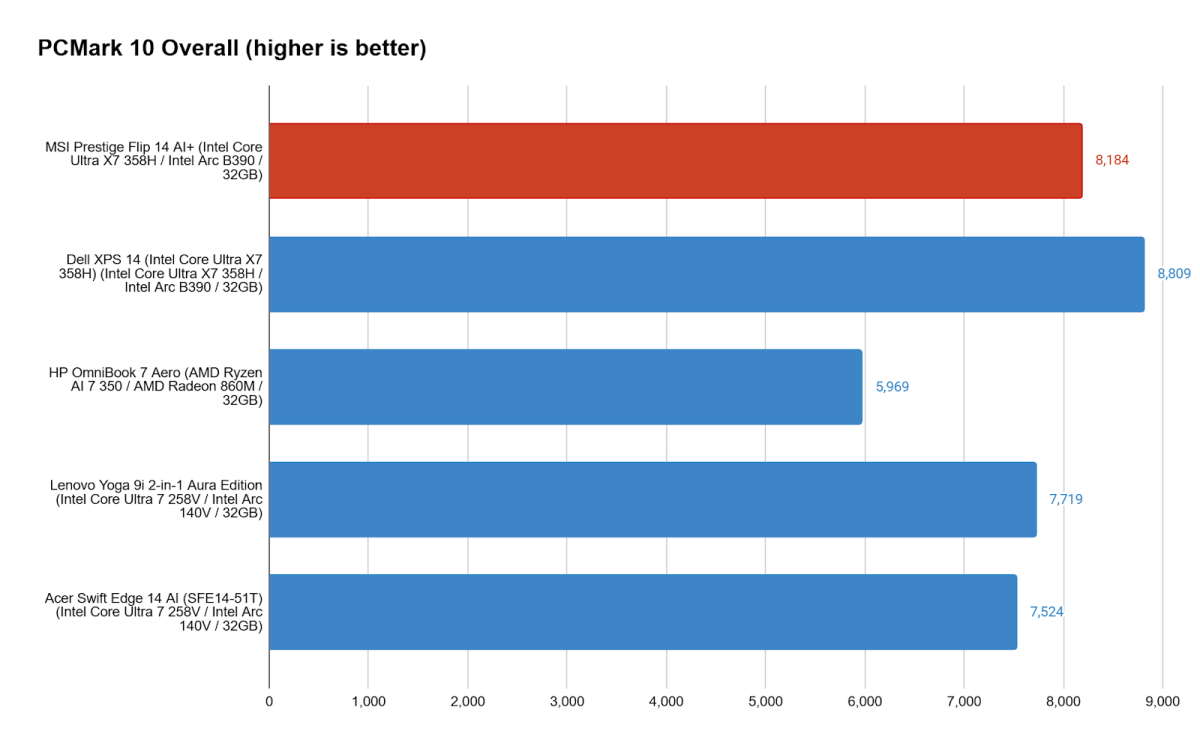
The MSI Prestige Flip 14 AI+ gets well ahead of recent thin-and-light champs like the Acer Swift Edge 14 AI and the Lenovo Yoga 9i 2-in-1 Aura Edition, showing some of the benefit of having newer hardware. But we can also see that the MSI Prestige Flip 14 AI+ isn’t always going to lead the way. By default, the system comes in a balanced power profile, and that conservative setup can be enough to hold it back.
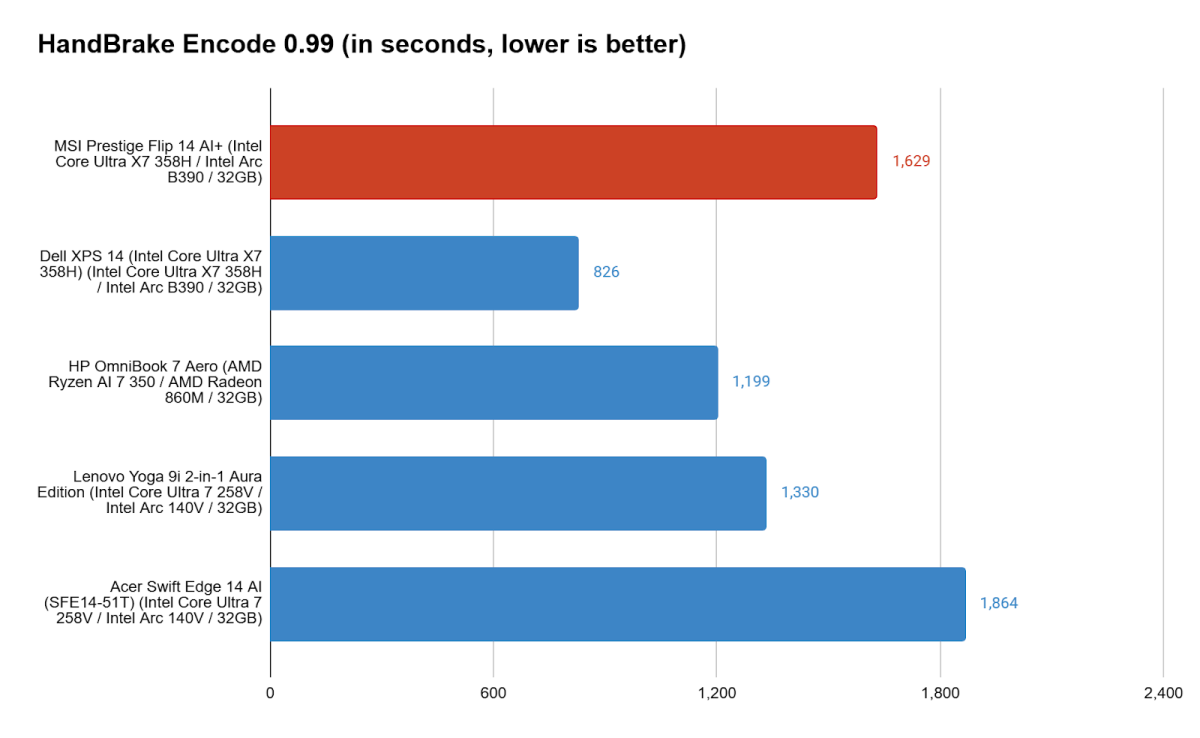
Running our Handbrake test, which tasks the system with a hefty encoding task that slams the CPU long and hard, the MSI Prestige Flip 14 AI+ fell well behind the pack. It took almost twice as long as the Dell XPS 14 running the same CPU and lagged behind even a last-gen CPU in the Lenovo Yoga 9i 2-in-1 Aura Edition. Perhaps the only reason it beat the Acer Swift Edge 14 AI is because that system, too, ran in a balanced power profile by default. You might assume the MSI Prestige Flip 14 AI+ has weak cooling that throttles it during long tests, but that’s not quite it. Instead Handbrake helps demonstrate what a crucial difference simple power settings can make.
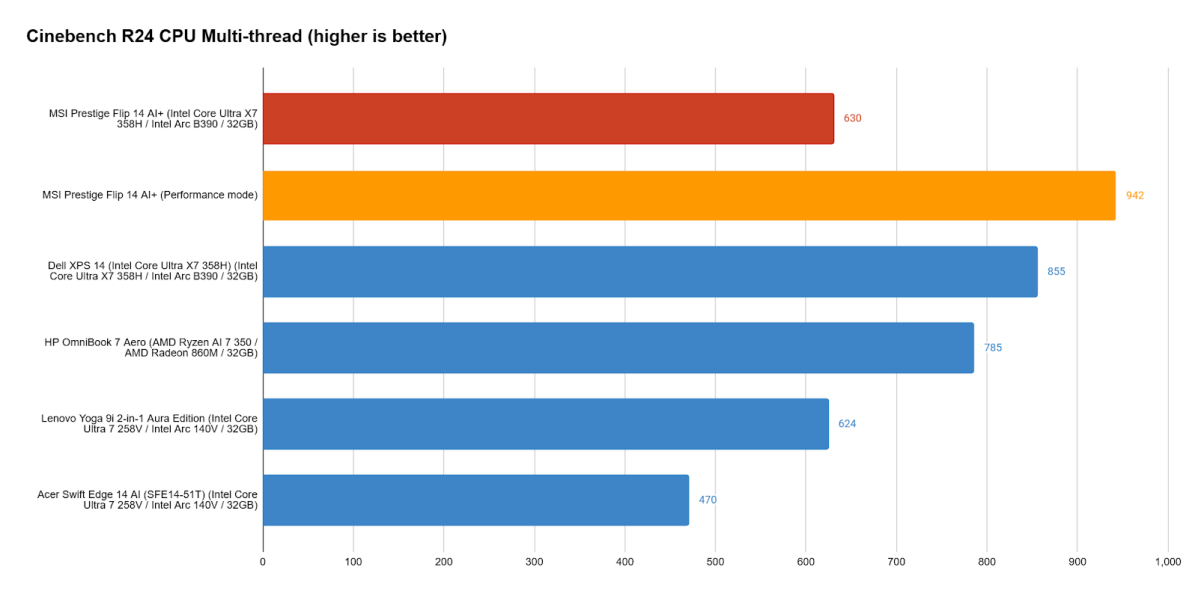
Managing power use is good for battery life, but it’s worth knowing just how much power the MSI Prestige Flip 14 AI+ is willing to sacrifice. So I repeated a few of the tests in a performance power profile and the difference was stark.
The MSI Prestige Flip 14 AI+ actually has plenty of speed to offer and a decent cooling setup that combines a vapor chamber and two cooling fans that work quite well without getting too loud. While its balanced profile again showed so-so results in Cinebench, narrowly beating some last-gen Intel-powered systems, the performance profile was enough to turn it into a leader.
It managed a single-core performance bump of 7 percent in Cinebench R23 and 5 percent in R24, and a multi-core performance bump of 19 percent in Cinebench R23 and 49.5 percent in Cinebench R24. Not only did the system prove willing to boost its performance, but it also sustained longer tasks better rather than quickly throttling under a load.
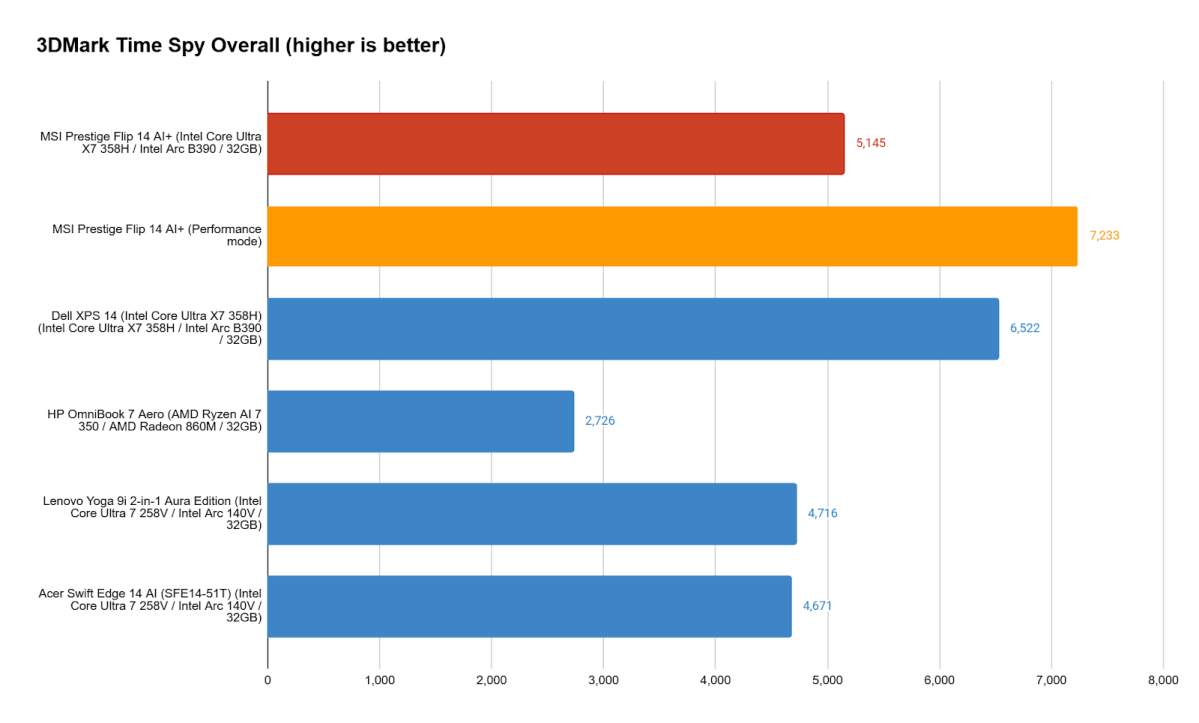
This performance held true for the MSI Prestige Flip 14 AI+’s graphics as well. Even in its balanced mode, the new Intel Arc B390 graphics were enough to give it an edge over earlier Intel Arc 140V systems, but it still lagged well behind the Dell XPS 14 running in performance mode. But as soon as the MSI Prestige Flip 14 AI+ toggled over to performance mode, it leapt ahead. Its performance even puts it in league with some systems running discrete GPUs like the RTX 4050 or RTX 3060, though it tended to fall a little short of those, especially in thicker, higher-wattage systems.
The MSI Prestige Flip 14 AI+ proved capable of some heavier gaming as well. It hit an average of 68fps (49fps in Balanced mode) in Shadow of the Tomb Raider at 1080p and the Highest graphics preset. And it held a steady 30-40fps in Helldivers 2 at Native 1920×1200 (no DLSS/XeSS/FSR) and Medium graphics settings. Even while running hard, the MSI Prestige Flip 14 AI+ doesn’t get too hot or loud. The fans can be a little shrill, but not horrible.
MSI Prestige Flip 14 AI+: Battery life
The flip side of the MSI Prestige Flip 14 AI+’s conservative Balanced power profile is that it can chug along like no laptop I’ve ever seen. We’ve seen laptops leap up in battery life over the last couple years, doggedly trying to catch up to Apple’s first-party silicon, and there have been some huge successes (Lenovo’s ThinkPad T14s Gen 6 breaking records when we first tested it). And the Lenovo Yoga 9i 2-in-1 Aura Edition dazzled with plenty of performance, a gorgeous design and display, and nearly 24 hours of runtime in our standard battery test. Even then, the MSI Prestige Flip 14 AI+ puts it to shame.
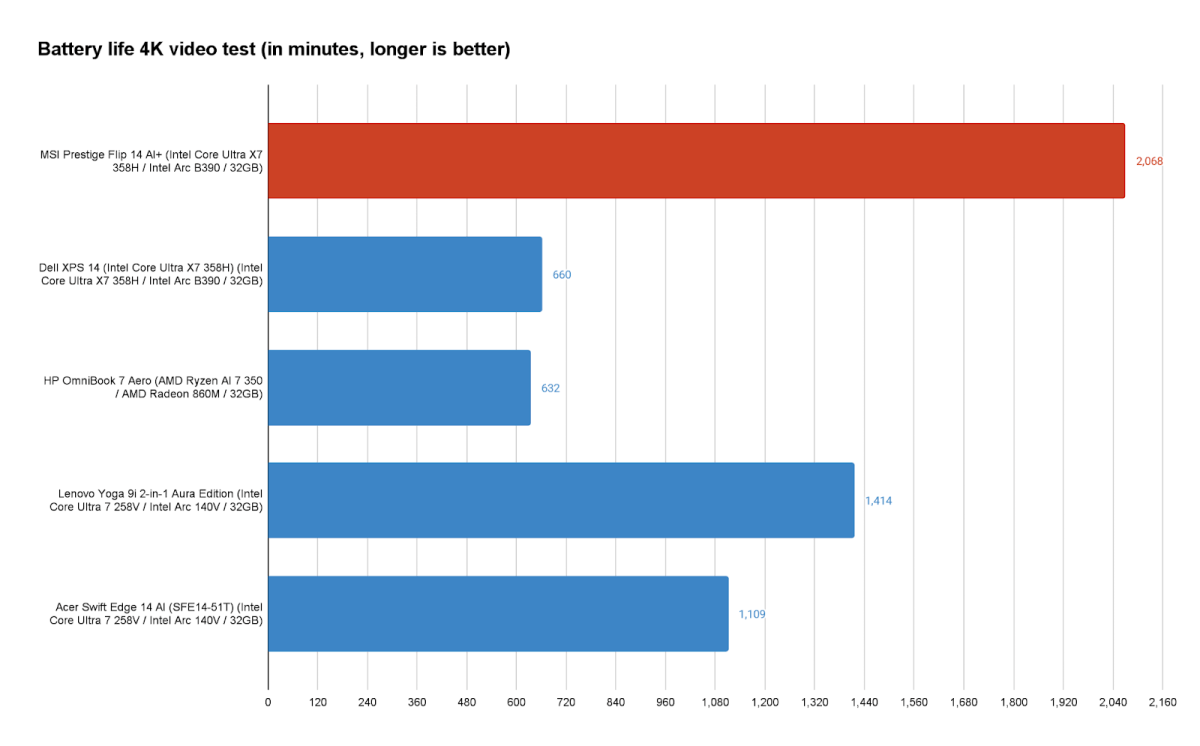
Playing offline video with the display set to 250 nits, the MSI Prestige Flip 14 AI+ ran for an astounding 34:28 (a result so staggering I almost wouldn’t have believed it if I hadn’t already seen the laptop muster 29:45 in the same test when I had started it from 93 percent charge because it was refusing to charge to 100 percent for an unknown reason). This not only blows everything we’ve tested before out of the water but it also trounces the Dell XPS 14 running on the same chip and an only slightly smaller battery.
The MSI Prestige Flip 14 AI+ had still more to offer. Running PCMark 10’s built-in battery benchmark, still at 250 nits and this time with Wi-Fi still on to better simulate real-world use, the MSI Prestige Flip 14 AI+ lasted 18:14. That saw it run nearly as long as the Acer Swift Edge 14 AI managed in its offline video playback test.
All that said, actual battery life can still vary quite a bit. In my regular use, which involves a good few Google Docs and Sheets open in a tab-heavy Chrome browser with side-by-side windows and frequent video or music playback, the MSI Prestige Flip 14 AI+ was on pace for nine to 10 hours of runtime. It’s very respectable, but still shows that scenario and usage play a huge role.
MSI Prestige Flip 14 AI+: Conclusion
The MSI Prestige Flip 14 AI+ has a lot going for it. It’s a nicely built machine and is surprisingly light for all it packs inside. It’s all the more impressive to see the levels of performance it can eke out thanks to Intel’s latest hardware, especially with its graphics solution. To pair all that with battery life that tops the charts in our testing simply makes it an astounding thin-and-light option. It would have been a lot more exciting if it were paired with a sharper, faster, and brighter display. And even with its excellent efficiency, battery life in actual use falls back to earthly lengths. Ultimately, that prevents it from being a truly brilliant machine, but it has enough going for it to be otherwise great.