
Are you still using the slicer that your 3D printer’s company makes? It’s time to upgrade your 3D printing experience with the best slicer out there—OrcaSlicer.
What makes OrcaSlicer different from other slicers?
It started as a Bambu fork, but it’s grown into something much bigger
These days, just about every slicer is a fork of another. OrcaSlicer is a fork of Bambu Studio, which is a fork of PrusaSlicer, which is a fork of Slic3r Prusa Edition, which is a fork of Slic3r from way back in 2011. It’s crazy to see just how far slicers have come over the past 15 years, but most modern slicers trace their roots back to Slic3r in some way or form, and Orca is no different.
So, if Orca has the same foundation as all of the other modern slicers, how is it any different? There’s a handful of things that make Orca stand out from the rest of the slicing crowd. For starters, Orca didn’t just take what Bambu Studio had and put a different logo on it.

9 slicer defaults I consider before every 3D print
Slice, slice, baby.
Instead, the OrcaSlicer devs took basically all of the best features from PrusaSlicer, SuperSlicer, and Bambu Studio and packaged it up in one easy-to-use app. For instance, PrusaSlicer is known for its stability and reliability. Bambu Studio is known for its ease of use. SuperSlicer is renowned for its tuning capabilities—and OrcaSlicer integrated all of that into one program.
Not only does OrcaSlicer take the best features from all of the other slicers and put them under one roof, but there’s often times that OrcaSlicer gets a feature or function weeks, if not months, before other slicers get it. New wall generation patterns, new infill patterns, and more often show up in OrcaSlicer before any other slicer.
Either way you slice it, OrcaSlicer takes the best of the 3D printing community’s favorite slicers and puts them under one roof.
OrcaSlicer works with basically any 3D printer
No vendor lock-in

While PrusaSlicer is designed to work with Prusa printers, and Bambu Studio is designed to work with Bambu printers, both pieces of software “work” with brands outside of their own ecosystem. OrcaSlicer, however, is specifically designed to work well with all printers, instead of specializing in a single brand.
You won’t find any vendor lock-in within OrcaSlicer. Simply select your 3D printer brand and the filament brand you want to use, and you’ll be off to the races. As OrcaSlicer is maintained by the community, these profiles are updated more frequently than first-party profiles are.
OrcaSlicer is also compatible with files from all other brands. This means you can take a 3MF file designed for Bambu Studio or PrusaSlicer and open it in OrcaSlicer without a problem—it just works.
That’s really the mantra of OrcaSlicer—it just works. You name it, OrcaSlicer does it and does it well, all without tying itself to any specific vendor.
OrcaSlicer’s developers do take this quite far, however. When Bambu Lab made the move to block third-party apps from sending files wirelessly to its printers, OrcaSlicer lost compatibility and refused to implement the tool that Bambu wanted them to for continued cooperation.
While I applaud OrcaSlicer for sticking their ground, it does mean that OrcaSlicer no longer natively works with Bambu Lab printers unless you’re on older firmware, you manually transfer your print files, or you enable developer mode to authorize connections from third-party applications—though doing so removes the printer from Bambu Cloud so certain features might not work as you’d expect anymore.
Proper calibration is the difference between good prints and great ones

OrcaSlicer’s best feature isn’t the fact that it works with any 3D printer, it’s the built-in calibration tools that it offers. These calibration tools are taken out of the SuperSlicer handbook and modified to fit the modern era.
Within OrcaSlicer, you’ll find a number of calibration options at the top of the screen, ranging from temperature and max flow rate to pressure advance, flow ratio, retraction, input shaping, and so much more.
When I was running non-Bambu printers, these calibrations came in clutch for dialing in my print settings. Even on my Bambu printers, I’ll sometimes still use Orca to run tests for flow ratio and max flow rate to dial in specific filaments if I want to get the best performance I can out of them.
Really, if you want to take your 3D prints to the next level and have them come out as clean as possible, then OrcaSlicer’s built-in calibration tools can’t be beat.
-
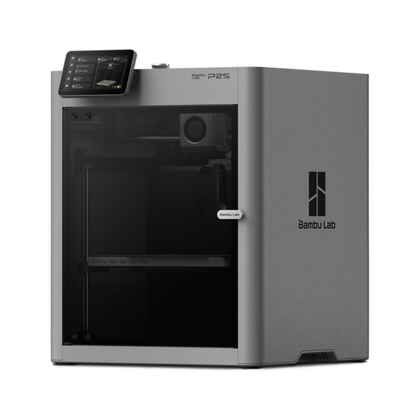
- Build Volume
-
256x256x256mm
- Printing Speed
-
600mm/s
The Bambu Labs P2S 3D printer is ready to go out of the box and can have you printing within 15 minutes. It features up to 20-color printing with the AMS unit, has an upgraded built-in camera for remote monitoring and time lapses, and has an enclosed body for printing even high-temperature filament.
-
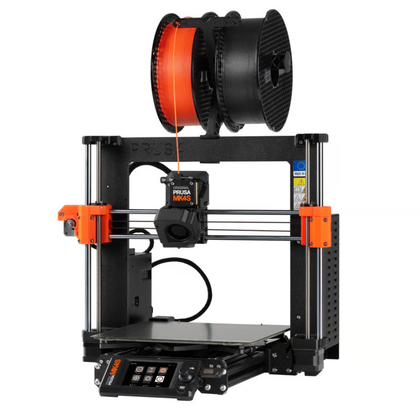
- Build Volume
-
250 x 210 x 220 mm
- Printing Speed
-
170mm/s
The Prusa MK4S 3D Printer is one of the most well-known and well-loved 3D printers on the market. As one of the main companies behind the open source initiative of 3D printing, the Prusa MK4S still supports open-source software and firmware when other companies are building their own closed-source alternatives. As the 2025 iteration of the classic Prusa 3D printer, you’ll get all the modern amenities including fast and reliable printing, easy setup, and Prusa’s proven reliability.
-
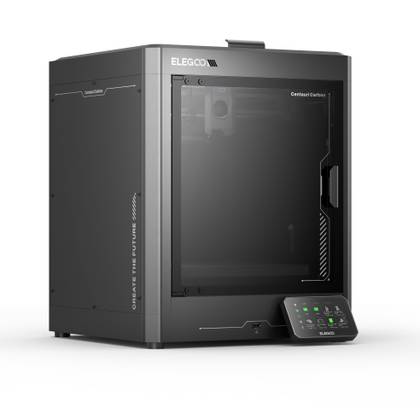
- Build Volume
-
10.4in x 10.4in x 10.4in
- Printing Speed
-
500mm/s
The Centauri Carbon is Elegoo’s first core XY printer, going up against printers like the Creality K1C, Bambu Lab P1S, and Bambu Lab X1 but at half the price in many cases. This would seem like a joke if the printer itself wasn’t so competent and well put together.


Your 3D prints are only as good as their slicer
The way your 3D print is sliced is directly related to how well it actually prints, and OrcaSlicer is just one of the best slicers around. The calibration tools set it apart for printing next-level models, and the fact that it works with basically every printer is just the cherry on top.
If you haven’t given OrcaSlicer a shot yet, download it today and try it out—it’s free, you’ve got nothing to lose, and everything to gain.


