Privacy like this comes at a cost


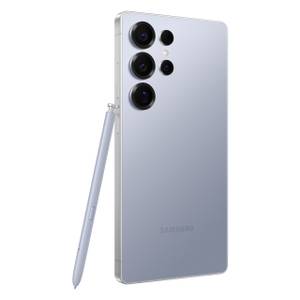
It’s easy to think the Samsung Galaxy S26 Ultra is more of the same, seeing as how it looks just like the last three or four models. In a lot of ways, it is. No surprise, this is a big, fancy, excellent smartphone. It’s still expensive, but this year we received meaningful upgrades and an innovative new feature, making it a return to form for Samsung.

8/10
- SoC
-
Snapdragon 8 Elite Gen 5
- Display
-
6.9-inch Dynamic Super AMOLED 2X
The Samsung Galaxy S26 Ultra is better than ever. Packed with AI smarts, an all-new 6.9-inch Privacy display, Snapdragon 8 Elite Gen 5 for Galaxy processor, faster charging, and more.
- Sleek and more rounded design that’s comfy to use
- The Privacy display works and is genuinely useful
- Meaningful camera hardware improvements
- Now Brief is still useless (as are other AI features)
- It’s still pretty big and expensive
- Qi2 magnets are nowhere to be found

How We Test and Review Products at How-To Geek
We go hands-on with every product to ensure it’s worth your time and money.
Price and availability
The Samsung Galaxy S26 Ultra is available in six colors: Violet, Sky Blue, Black, and White, with two being online exclusives: Silver Shadow and Pink Gold. The phone starts at $1,299.99 with 256GB of built-in storage, 12GB of RAM, and the Qualcomm Snapdragon 8 Elite Gen 5 Galaxy processor, and goes up to $1,799 with 1TB/16GB.
As usual, Samsung and all of its partner carriers are offering lucrative trade-ins, discounts, and other deals.
- SoC
-
Snapdragon 8 Elite Gen 5
- Display
-
6.9-inch Dynamic Super AMOLED 2X
- RAM
-
12 or 16 GB
- Storage
-
256GB, 512GB, or 1TB
- Battery
-
5,000 mAh
- Operating System
-
Android
- Colors
-
Violet, Sky Blue, Black, White, Silver Shadow, Pink Gold
- Dimensions
-
163.6 x 78.1 x 7.9 mm (6.44 x 3.07 x 0.31 in)
- Weight
-
214g
- Rear camera
-
200MP f/1.4 main, 50MP f/1.9 ultrawide, 10MP f/2.4 telephoto, 50MP f/2.9 telephoto
- Front camera
-
12MP f/2.2
- Charge speed
-
60W wired Super Fast Charging, 25W wireless
- Stylus
-
S-Pen
Another year, another similar yet refined design
The Galaxy S26 Ultra is thinner, lighter, and easier to hold
Last year, the Galaxy S25 Ultra finally adopted a flat design with slightly rounded corners to match the rest of the lineup. Gone are the curved screen and huge square corners that stab your hand. Some loved it, others hated it.
The new Galaxy S26 Ultra is still a huge brick in your hand, and feels as premium as ever, even with a downgrade to aluminum, but now the design is even more refined. Samsung made it a hair thinner, a little lighter, and rounded the corners even more, all while keeping the same package that Ultra (and Note) fans love. It’s 0.3mm thinner, and roughly 214g vs 218g, has the same 5,000mAh battery, and keeps the powerful cameras and 6.9-inch display.
All the ergonomic issues from the S24 Ultra are long gone. It’s substantially thinner, lighter, and easier to hold and use. Those curved corners do mean the S-Pen doesn’t sit flush and actually has a curved head, so if you store it the wrong way, it’ll stick out a little.
This thing is wobbly
It’s not all good news in terms of the design. For one, it’s nearly identical to previous generations, making it a hard sell for many potential buyers. Samsung also made the camera bulge on the back bigger, and it’s noticeably bigger.
More importantly, even with a case, this phone doesn’t sit flat on a table and wobbles like crazy.
Sure, this is a bit of a nitpick, but I’m constantly tapping on things or checking notifications while my phone is lying on my desk. With the S26 Ultra, that’s almost impossible. Even unlocking the screen with a fingerprint will cause it to wobble, and it rocks back and forth so much that it’s highly frustrating. The sound of the metal and glass was so bad that I bought a case right away. It still wobbles a ton.
Google and Apple both figured this out, yet Samsung is still stuck in its old design ways and could easily solve it with horizontal cameras or less pronounced bumps.
The other “downside” in the design is that Samsung went back to aluminum after two years of using Titanium. It’s lighter, but might not be as durable, either. Thankfully, the Corning Gorilla Armor 2 on the front should keep that screen safe and scratch-free.
The Privacy Display is genuinely useful
But not without a few caveats
The star of the show this year is the stunningly bright and beautiful 6.9-inch QHD+ 120Hz Dynamic AMOLED 2X display. Not because it’s big and bright up to 2,000 nits, but because it can get incredibly dark and slash viewing angles, giving you complete privacy from shoulder surfers.
By now, you’ve probably seen and heard all about Samsung’s Privacy Display technology. And while everyone is complaining about the design being the same as always, hiding under that screen is a genuinely useful and all-new innovation. The privacy display is something every smartphone should have, and I’m willing to bet it’ll arrive on more phones soon.
Samsung’s secret sauce this year is that with the tap of a button, you can essentially give your phone a privacy screen protector. The Privacy Display mode instantly kills viewing angles, preventing anyone around you from seeing what’s on the screen. For, well, whatever reason you want them stopped. And unlike a film privacy screen, this mode works from any angle, both from the side and up and down.
It’s actually pretty impressive, and Samsung does this by using two physical sets of subpixels. You have your usual pixels that look great from any angle, like every other phone, then a secondary set with a narrow light path. When you enable Privacy mode, it turns off half the pixels, leaving only the narrow ones lit.
The Privacy display works incredibly well, but there are downsides. For one, you’re only using about half the pixels now, so the screen is noticeably dimmer. For two, even with this mode disabled, the S26 Ultra’s viewing angles are a little worse than those of previous generations, though not enough to be much of a concern.
There are a few reports online about the Privacy screen causing headaches and such, but I’ve experienced no such issues. If you don’t want to turn it on all the time, and you probably won’t, Samsung made it completely customizable in a really smart way.
You can set it up to enable the Privacy display under certain conditions, like when you’re using a banking app, authenticator apps, entering a password, or receiving incoming notifications. That way, you get protection and privacy when you want it, without the small drawbacks of using it all the time.
There’s even a “maximum” mode that cranks things up more and adds a grayish-white filter over everything, further tightening privacy. Again, this is genuinely useful, powerful, and cool, and could be a big selling point for many.
Performance and software
More AI than ever, but One UI 8.5 is polished

If you’ve owned or used a phone with Samsung’s One UI 7, or the more recent One UI 8 (based on Android 16), you know exactly what to expect. Samsung’s software experience is as fast, smooth, and polished as ever. That’s even more apparent with One UI 8.5.
Thanks to the powerful Qualcomm Snapdragon 8 Elite Gen 5 for Galaxy and 12GB of RAM, this phone is fast. We could get into all the nitty-gritty specs, post benchmarks, and compare against the competition, but these days, we all know what to expect from Samsung. With the Snapdragon 8 Gen 5 for Galaxy, everything is fine-tuned to handle real-world daily usage, multitasking, gaming, and all the AI goodies scattered throughout the phone.
The NPU is 39% faster than the previous generation, mainly for using all the AI slop. Either way, this phone flies!

I Bought a Galaxy S25 and Immediately Changed These 5 Settings
Samsung, I don’t want the iPhone’s notification system.
Aside from Samsung still opting for a horizontal app drawer and changing the notification system to something similar to iOS, which most Android fans hate, I have absolutely no complaints. Just like last year, as soon as you get it, you’ll want to change these 5 settings to fix the Quick settings pulldown bar and put notifications back where they belong.
Samsung’s Now Bar remains one of my absolute favorite features for sports alerts, navigation directions, and music controls. All while the Now Brief is still as useless as ever.
The Now Brief gives you a rundown of your day, showing the same weather information and offering silly prompts unless you have a jam-packed calendar all the time. I disabled it.
All sorts of Galaxy AI goodies
Photo Assist and Call Screening are cool
In what should come as no surprise, Samsung added even more AI features to this phone. Circle to search is still a thing and works great, but the amount of stuff you’ll find in the AI section is mind-boggling. Photo Assist is great, but more on that in a moment. Like Samsung of old, they’re throwing everything at the wall to see what sticks.
However, there are a few that are actually worth using. Similar to Google Pixel devices, the Galaxy S26 series and One UI 8.5 have a new Call Screening mode that uses AI to answer calls for you and such, and it’ll even give you a live transcription of the call.
Samsung also introduced an agentic AI assistant type of feature called Now Nudge. The goal of this feature is to provide information and photos before you need them, as a contextual shortcut. It’ll recognize text or info on the screen, find relevant things, and serve them up in the Samsung keyboard. Now Nudge sounds a lot like Google’s Magic Cue, which wasn’t all that great.
After two weeks of using this phone, Now Nudge only appeared once for a calendar reminder, even when I tried multiple times to force situations where it could be helpful. It’s another forgettable feature, and I happily went back to Google Keyboard.
The S-Pen is still a thing, and it’s still a downgrade from previous generations without Bluetooth support. You can’t use it as a remote shutter, and it has some genuinely useful features for those who rely on the pen. I’m not one of them, and usually forget it’s there.
Battery life is good
Battery life remains great, even with the same 5,000 mAh battery as previous generations. Samsung’s relying on chipset gains and software tweaks, and so far it’s doing quite well. I’d love to see a silicon-carbon battery like OnePlus and other brands are using, but I’m still getting nearly 2 days of battery life. As a result, I’m not going to knock Samsung here.
On the plus side, the Ultra now offers faster 60W wired charging and 25W wireless charging, which is nice. You’ll need to buy a faster wall plug to actually enjoy those speeds, but at least it’s an option.
You know what’s not an option—Qi2 charging and accessories out of the box. Again, these phones are “Qi2-ready,” but the Ultra doesn’t have magnets built in, so you’ll have to rely on a case and other third-party accessories. Bad form, Samsung.
A familiar and solid camera experience
Some larger apertures help in low light

On paper, and if you’re looking at the megapixel count, the cameras are the same as the Galaxy S25 Ultra from last year. However, there are two notable changes.
First off, the periscope zoom lens disappeared and was replaced with Samsung’s newer and upgraded All Lenses on Prism (ALoP) technology. This reduces the sensor’s physical size inside the phone and improves performance, especially in low light. Speaking of lighting, that’s the main area where the S26 Ultra is better.
On back, you’ll find the familiar 10-megapixel 3x telephoto, 50MP ultra-wide, and 12MP selfie cam. But the 200MP main camera and 50MP 5x telephoto lens have larger apertures at f/1.4 and f/2.9, which is a pretty big increase from f/1.7 and f/3.4 on older models. Basically, the camera experience is almost the same as the S25 Ultra (and maybe the S24 Ultra to a degree), but it handles poor lighting environments better than ever.
The zoom continues to impress, with decent saturation and colors. Details remain fairly crisp while zooming in until you get to anything beyond 30x. Here are my seats at a hockey game, yet I can zoom in on the coach putting something in his suit pocket.
Photos are consistently great out of the Galaxy S26 Ultra, but that’s nothing new. Whether I’m taking photos of the moon, a grain silo in town, the night sky, or portrait mode of the baby or a glass of whiskey, I always enjoy the results. It’s worth mentioning that the new aperture on the zoom lens requires a further distance than before, so macro photos aren’t as easy, but the results are still great.
Next, I want to talk about two huge improvements to the Galaxy S26 Ultra camera experience. Those are the new “Horizon Lock” mode on the camera that essentially replaces the need for a gimbal. The second one is Photo Assist, which is part of the AI stuff mentioned earlier. It’s shockingly easy to use, and the results are so good that I don’t even know what a real photo is anymore.
In the video below, I recorded the same video twice, rocking my phone back and forth while recording. On the left, you see the obvious result from all that motion, but on the right, I have “Horizon Lock” enabled, which uses the camera sensors to lock onto the subject. This works in any situation, not just a horizon, and it’s wildly impressive.
Photo Assist is better than ever
You can still use Samsung’s Galaxy AI tools to tweak photos, like removing objects or reflections, improving shadows, etc. But now we can use natural-language prompts to completely transform a photo. Below you’ll see a photo of my dirty truck. With Photo Assist, I added a beautiful sunset, and the results are stunning. I took it a step further and asked it to “remove the dirt from my truck,” and it did a pretty good job.
You can go wild with Photo Assist, too. I turned a night photo of the backyard into a daytime photo, and a moon photo into a solar eclipse blood moon, because clouds obscured my view when it was supposed to be visible on March 3rd. And yes, it watermarks the photo with an AI text in the bottom left, but that’s easy to crop out.
The Galaxy S26 Ultra has an excellent set of cameras, but they’re big fingerprint magnets and are prone to dust and lint.
Should you buy the Galaxy S26 Ultra?
It’s a solid upgrade as long as you don’t have an S24 Ultra or newer

By itself, and when compared to the rest of the competition, the Galaxy S26 Ultra is great. It is an excellent and well-rounded phone that absolutely checks all the boxes—and then some.
The Privacy display feels like the first real innovation in years, aside from folding screens, and you’ll absolutely love the hardware, software, cameras, and battery life. There are no major flaws or reasons not to recommend this phone immediately. It might be too big for some hands, but that’s nothing new for the Ultra line.
Is this an “Ultra” phone, though? That’s hard to say. Sure, it’s the best you’ll get from Samsung, but it’s also just like the last 3–4 models. If you’ve used one of Samsung’s flagship phones from the past handful of years, you’ll feel right at home. That’s a good thing, as consistency is great, but it also means there’s no huge reason to upgrade quite yet. It makes the upgrade decision a bit wobbly. Not enough has changed, and it’s not pushing any boundaries. If you’re coming from a base model or even a Galaxy S24+, it’ll be a welcome improvement.
The privacy display is great, the cameras are capable, and the AI stuff is fun. Unless you absolutely need the new privacy screen, those with a Samsung Ultra from the last few years won’t benefit much from the upgrade. Privacy like this comes at a premium. If you want silicon-carbon batteries or a unique design, you’ll need to look elsewhere.
If you’re looking for a consistently great experience and a time-tested phone, the Galaxy S26 Ultra is for you.
8/10
- SoC
-
Snapdragon 8 Elite Gen 5
- Display
-
6.9-inch Dynamic Super AMOLED 2X
- RAM
-
12 or 16 GB
- Storage
-
256GB, 512GB, or 1TB
Get the new Galaxy S26 Ultra with AI smarts and an all-new privacy display.


