
Despite a ton of competition from companies big and small, the Steam Deck remains the go-to recommendation for anyone who wants PC games in a handheld form factor—and Windows being a clunky option is a big part of that. But the Lenovo Legion Go S has arrived with SteamOS built in. So, now which one is better? Certified handheld fanatic Adam Patrick Murray breaks it down for us.
Specifically, we’re talking about the base model Lenovo Legion Go S SteamOS Edition (wow, what a mouthful) with a Ryzen Z2 Go processor. This can be found on sale for around $500 at times, versus the Steam Deck OLED at $550. The first-step upgrade over the $400 version is more directly compatible with the new Lenovo model, with its upgraded screen, battery, and 512GB storage drive.
That OLED screen is obviously a big improvement over the cheaper one, but the Legion Go S’s screen is very high-quality for an LCD, and it’s also bigger, sharper, faster, and has a variable refresh rate. So, which one you prefer will likely come down to personal preference (or a need for competitive speed) rather than a flat “this one is better” determination. Will Smith is torn on the options.
What about the specs? While these are very similar devices, the biggest differentiator is that the Legion Go S has a much newer processor. The Ryzen Z2 Go isn’t an earth-shattering powerhouse by any means, and it’s got a similar AMD 4-core setup. But its newer Zen 3 architecture means more power and breathing room in the integrated GPU, especially on high-end PC games with that denser screen resolution. The Legion Go S’s 16GB of RAM is the same as the Steam Deck, but it’s slightly faster.
The bottom line is that you’re going to get considerably more performance on the Z2 Go version of the Legion Go S, by a margin of about 20 to 40 percent based on games. (The Z2 Extreme version has an even bigger gap, but it’s more expensive.) Crucially, that’s matching the Steam Deck’s 1280×800 resolution. So, if you’re looking for pure performance, Lenovo is winning with the newer hardware.
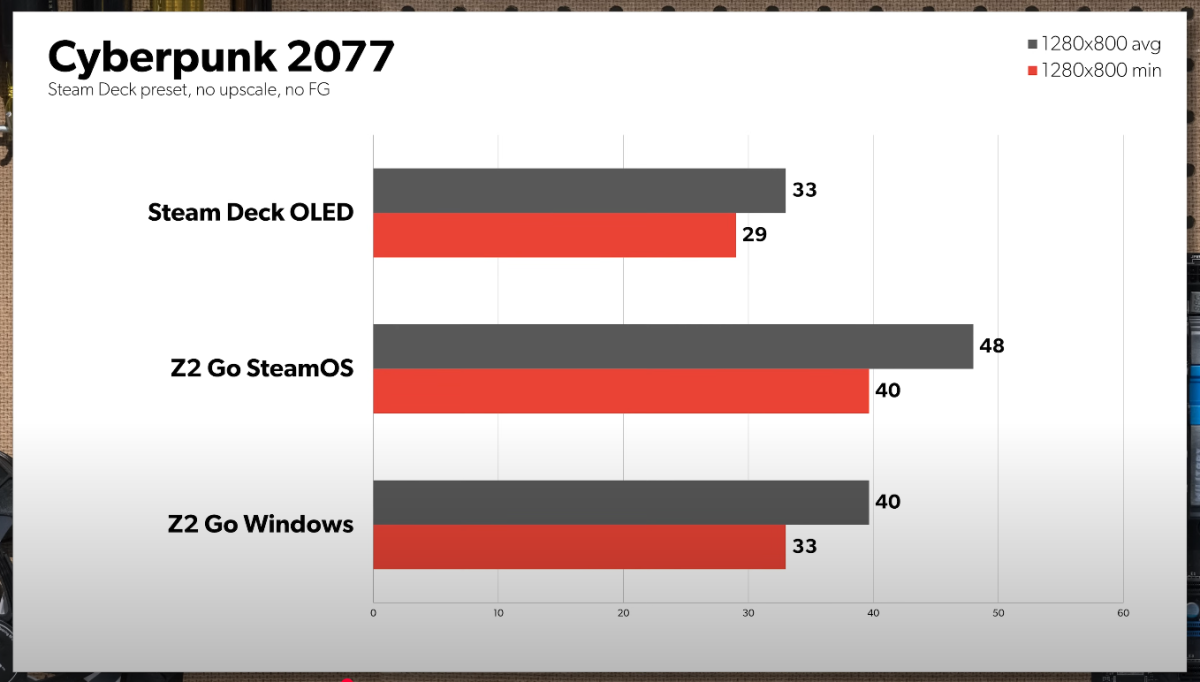
Foundry
What about the physical layout of the device and how it feels in your hands? The Legion Go S is bigger and chunkier, mostly thanks to its bigger and taller screen. Adam says that it feels better in the hands, but Will notes that Lenovo goes with just one rear “paddle” button on each side while the Steam Deck has two. The Steam Deck’s two larger trackpads are also much better for general navigation and give you more options in-game. The Legion Go S is heavier, louder, and Adam says the vibration motors aren’t as nice.
The Steam Deck has its own downsides, though. Those who are used to Xbox-style controls might not like the unusual stick placement to the inside of the D-pad and action buttons, and those with small hands might find them difficult to reach. Unfortunately, this will be a highly individual distinction, and you’ll want to get your hands on both of them to make the call for yourself.
Despite the fact that both are running SteamOS, it’s hard to deny that it’s just a smoother experience on the Steam Deck. And it’s not Lenovo’s fault! Rather, Valve has been supporting the Steam Deck for three years now, whereas the Legion Go is almost brand new by comparison. You’ll just get fewer hiccups in games on the Steam Deck, with things like inputting text or screen resolution options or control customizations, than on the Legion Go S. Software support, specifically in the driver support for Linux-based SteamOS, is still a bit of a question mark.
Adam says that despite liking the screen, the increased performance, and the ergonomics, he’d still go with the Steam Deck OLED at the moment. Will is landing at around the same place. For more deep dives into PC gaming, be sure to subscribe to PCWorld on YouTube and check out our weekly podcast The Full Nerd.


