Stop believing these 4 myths about Linux—they’re all outdated now


Linux has been popular with enthusiasts and enterprise users for decades, but it still has a negative reputation among Windows users. However, this negative reputation is largely based on outdated information.
Linux is the best it’s ever been.
Linux is difficult to install and configure
Installing Linux was complicated a long time ago

It used to be true that setting up Linux was a complex process. You had to manually partition your drives, mess with hard-to-understand configuration files, manually compile a few things, and if you were lucky, it still wouldn’t live up to the out-of-the-box Windows or macOS features on offer.
However, this is no longer true. Nowadays, installing Linux on a PC is generally easier than Windows. You plug in your installation USB drive and follow the automated steps: no complicated setup required. The only thing you really need to do is choose your username and password, and if you want to connect to a Wi-Fi network during the installation process, enter the network password.
On the other hand, installing Windows now almost feels like a contradictory process. If your activation key is entered incorrectly, if you have modified your hardware significantly, or if you are unable to connect to the Internet, this will create obstacles that you will have to work around.
Linux works.
It doesn’t have the apps you need
I never need to switch to Windows again

For a long time, the fact that Linux was so specialized actually meant that important applications on Windows didn’t have good equivalents available on Linux.
For most, this is no longer true. In the vast majority of cases, there is a Linux application that is as good as its Windows counterpart.

10 Linux Apps I Tried in 2025 and Still Use Daily
From the utilitarian to the cute and fun, I’ve found several apps that I refuse to uninstall.
There are two notable exceptions: Microsoft Office and Adobe Creative Suite.
The Adobe Creative suite is the hardest to replicate on Linux. There are other apps, like Krita and GIMP, that can replicate some Photoshop features, and DaVinci Resolve can easily hold its own with Premiere, After Effects, and Audition. However, you basically need to build your own suite of tools instead of getting a combined package.
Microsoft Office, on the other hand, faces some pretty stiff competition from the likes of LibreOffice and OnlyOffice. I switched to OnlyOffice on my Linux PC years ago and haven’t really missed Microsoft’s Office suite.
Linux is not suitable for general public uses
My Linux PC has fewer bugs than my Windows PC

I constantly hear: “Linux is not suitable for most people” or “Linux is not ready for mainstream use.” However, nothing could be further from the truth.
Linux already powers most phones (Android is built on Linux), a large portion of all smart TVs, the Steam Deck, and the overwhelming majority of web servers – it’s already common.
Aside from these uses, Linux is more accessible today than ever. Whether you want to game, browse social media, watch videos, or write documents, Linux delivers. This is especially true if you don’t need a niche app.
Today, there are at least half a dozen different distributions that can easily replace Windows on a home PC.
Drivers are not working properly
Even NVIDIA works fine now
Historically, drivers have been a problem for Linux, but it’s not really any worse than Windows today.
In the last year I have installed no less than a dozen different Linux distributions on different devices and they have all worked instantly. Every keyboard, webcam, drawing tablet, USB microphone, GPU, and monitor worked instantly. The only exception was a cheap USB Wi-Fi dongle from TP-Link. This required me to manually download and install something.
My Surface Laptop 4, a device made by Microsoft, actually performs better on Linux than on Windows. Every time I install Windows on the laptop, I have to connect an external mouse and keyboard to complete the installation process, because they are not able to recognize the built-in trackpad or keyboard on their own. Also, since Windows can’t communicate properly with the Wi-Fi card, I have to use a workaround to install Windows 11, because it won’t let you go past a certain point without an Internet connection.

I tried to install Linux on a Surface laptop, this is how it went
I haven’t missed Windows yet.
On the other hand, I was able to install Linux without any frustration because it was able to instantly connect to the laptop’s keyboard, trackpad, and Wi-Fi adapter.
Even NVIDIA drivers now work without any problems. The days when Windows was more user-friendly than Linux are long gone.
Linux is for everyone
Linux is still considered niche, specialist or enthusiast, when the reality is quite different. If you only use your PC for common daily tasks, Linux is as convenient as Windows. If you go with an immutable distribution, like Fedora SilverBlue, then Linux is probably also more stable than Windows.
Of course, you don’t have to take my word for it. Most Linux distributions allow you to run them directly from a USB drive or external SSD so you can try them out without changing anything to your PC.

8/10
- Operating system
-
Kubuntu 24.04 LTS
- Processor
-
Intel Core Ultra 9 275HX (2.7 GHz up to 5.4 GHz)
- GPU
-
NVIDIA GeForce RTX 5070 Ti (dGPU), Intel Graphics (iGPU)
- RAM
-
32 GB 262-pin dual-channel DDR5 SODIMM (5600 MHz)
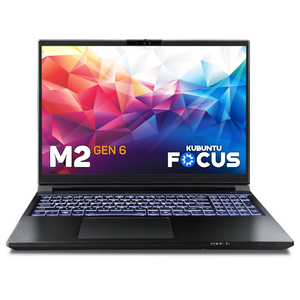
This laptop is specially designed for developers and professionals who want a portable workstation and gaming rig powered by Kubuntu Linux. It has an Intel processor capable of reaching 5.4 GHz, integrated graphics, and a dedicated NVIDIA 5070 Ti GPU for when you need extra power for machine learning or gaming.


