Stop making QR codes by hand. Let Google Sheets do it for you


For long lists in documents, it is usually too tedious to manually create QR codes and then insert them into the list. You can automate this task in Google Sheets and save a lot of time. To do this, use the IMAGE function, which retrieves images from the Internet and inserts them into the active cell.
Enter =IMAGE in a cell; the program will then offer online help with an example. Click the arrow icon on the right to expand the help view. Copy the example with the Google logo, paste it into the active cell and press Enter. Google Sheets automatically fetches the image from the web and displays it in the cell.
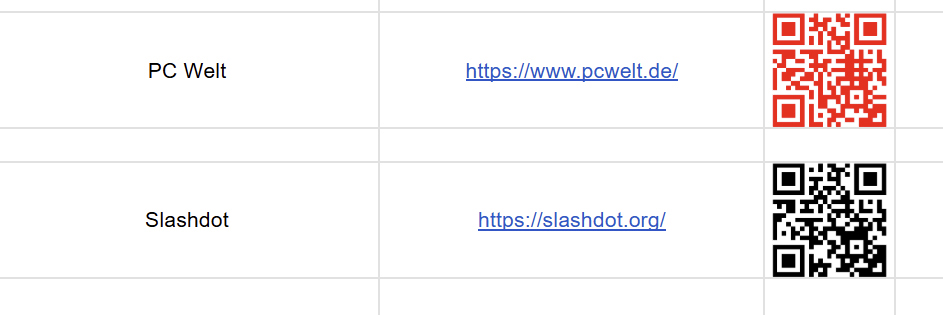
In combination with a request to QRServer, QR codes can be dynamically generated in a Google spreadsheet.
Foundry
The QR Server allows you to generate QR images via an online request. You can use the service directly in Google Sheets and automatically insert the data. To do this, use the IMAGE function again.
A list of entries serves as an example: the first two columns contain the name and web address of the offers, respectively. In the third column, a QR code is generated using QR-Server. When retrieving the image, the address must be constructed as follows:
=IMAGE(“https://api.qrserver.com/v1/create-qr-code/?data=”&(A2)&”&color=000000&bgcolor=FFFFFF&size=200×200”)
The fetch URL starts with the QR Server API access address: https://api.qrserver.com/v1/create-qr-code/
Parameters are added with a question mark and separated by an ampersand. First, the destination address of the QR code is set using “data”. This is read in the column to the left of the QR code.
Next are optional settings for foreground and background colors: “color” and “bgcolor” are formatted in RGB, as is the case in HTML. The last parameter, “size”, specifies the size of the QR code to generate.
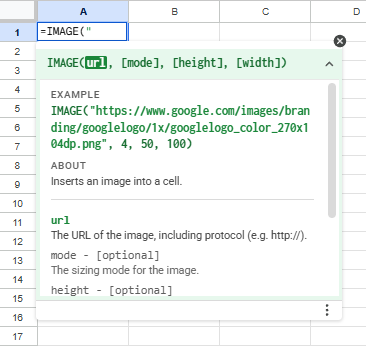
The IMAGE feature in Google Sheets allows you to embed images from various online sources. The help section shows an example logo.
Sam Singleton
Such lists can be used, for example, as a bulletin board or for catalog design: users scan with their smartphone and are thus quickly directed to the web pages of the individual entries. Once the spreadsheet is finalized, you can save the document as a PDF to your PC via the Deposit menu.
QR codes in Google Sheets are retrieved dynamically. This means that the code is queried again every time Google Sheets is opened. As an alternative to Google’s spreadsheet, you can use Microsoft Office 365 or the online version of Excel. These programs also have an IMAGE function, although you will need to adjust the syntax.
This article was originally published on our sister publication PC-WELT and has been translated and localized from German.


