
Do you think that everything about a homelab is expensive? Think again! These are my five favorite cheap gadgets that improved my homelab the moment they arrived.
2.5Gb/s Ethernet switch
Gigabit is so 1999

When I rebuilt my homelab at the beginning of 2025, I was determined to do one thing: move away from standard gigabit networking for my servers. I did a ton of research and landed on Unifi’s Flex Mini 2.5G switch at $49.
The switch was essentially the same price as other 2.5G switches on the market, but offered a fully managed experience when paired with a Unifi network, which I also wanted to build out. By the end of February of last year, I had a full Unifi network and I was very happy with the decision.
The Unifi Flex Mini 2.5G is a great switch not only for its price, but also for the fact that it can be powered over Ethernet. I love that I can just run a cable from my Dream Router 7 to the PoE port on the switch and have that handle both power and network connection.
This relatively cheap switch allows my servers to communicate at 2.5x the speed of normal gigabit Ethernet. This might not sound like a big improvement, but it’s actually fairly substantial for large data transfers, making this one of my favorite cheap homelab upgrades I’ve ever done.
Ethernet cable tester
Is it a bad cable or a bad switch?

Whether I’m running Ethernet in the walls of my house or just feel like I have a bad cable, my Ethernet tester has come in handy quite a few times.
The way an Ethernet/RJ45 tester works is to test both ends to make sure the pairs line up properly. You simply plug one end of the cable into the receiver and the other end into the transmitter. The transmitter end sends a signal down each wire of the cable and listens for what wire responds on the other side. This allows it to tell you if wires (or ground) are flipped or simply not connected at all.
My cable tester has helped me several times find when I had a bad crimp and one of the wires simply made no connection. It’s also found a few times when I flipped similar colors, like orange stripe and brown stripe, which, when not printed well, are easy to mix up.
An Ethernet/RJ45 tester is one of those must-have gadgets that you need in your homelab, especially for how affordable they are.
Flush cutters
Leaving zip ties untrimmed is not the way

I’ve owned flush cutters since well before I started homelabbing. Flush cutters are basically wire snips but designed to cut more flush then a traditional pair of wire cutters.
I use flush cutters in my homelab all the time when doing cable management (which I’m far overdue for a session of actually). They’re great for trimming zip ties or cutting old zip ties off without damaging cables.
With flush cutters, you’re able to get pretty close to the end of the zip tie or whatever else you’re working on. They also work great for stripping cables and many other aspects. In fact, I use my flush cutters with my 3D printers all the time.
Since flush cutters are a cheap and versatile tool, you definitely need a pair in your homelab.
Dedicated USB drive for Ventoy
Installing operating systems has never been this easy

While I advocate for running Proxmox as a main operating system inside of a homelab, it still needs to be installed on whatever computer you’re going to run it on. There might also be times when you need to install an operating system bare metal. Just the other day, I retired one of my Proxmox nodes as I replaced it with a more powerful system and needed to put Windows back on the retired node.
Instead of burning a Windows installer, I have a dedicated Ventoy USB drive that I keep in my drawer. I just threw the latest Windows 11 ISO on it and plugged it into the desktop to install Windows on it. Likewise, when I was installing Proxmox on my new node, I put the latest Proxmox ISO on the drive for that.
Ventoy is a fantastic tool that belongs in any homelab, no doubt. But, it really needs a dedicated flash drive. I’m using an older 128GB USB-C/USB-A flash drive that I’ve had for years for Ventoy, but any decently sized flash drive would work well. Even a 32GB drive would be fine if you only plan to have a handful of ISOs on it.
USB to Ethernet adapter
Not all devices have built-in Ethernet ports

Everything works better over a wired network, your homelab included. That’s why I typically have at least one, if not a few USB to Ethernet adapters on hand.
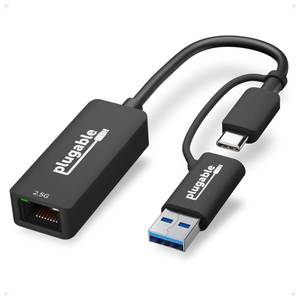
Take my MacBook Pro, for instance. While I use it with an external Thunderbolt 5 docking station, the dock doesn’t have 2.5Gb/s Ethernet on it, so I have a USB-C to Ethernet adapter for that purpose. My laptop bag also almost always has a USB to Ethernet adapter in it so I can hook up to Ethernet while traveling.
However, that spare USB to Ethernet adapter has come in handy a handful of times at the house in my homelab, too. Having a USB to Ethernet adapter helps to diagnose if a computer’s onboard network adapter has gone bad or not. It also works well if you’re troubleshooting a wireless device, like a Raspberry Pi Zero 2 W, that doesn’t have an Ethernet port and doesn’t seem to be connecting to a network.
There are many reasons to have a USB to Ethernet adapter around, and they’re cheap enough to just pick one up to have on hand for whenever the need arises.
- Brand
-
Plugable
- Connection
-
USB-C/A
Plugable’s universal plug-and-play USB-C/A 2.5G Ethernet adapter brings multi-gig networking to any computer you plug it into. Compatible with macOS, Windows, ChromeOS, and even iOS, this Ethernet adapter is perfect for adding Ethernet to a computer that doesn’t have it, or simply upgrading your system with multi-gig networking. It also is compatible with everything from Thunderbolt 5 all the way down to standard USB 3.0.
Not all homelab upgrades have to be expensive
As you can see, some of my favorite homelab upgrades are as cheap as $10. While I do have some expensive equipment in my homelab, not everything has to cost an arm and a leg. Some of my most-used tools are budget-friendly ones, so make sure you have a few of these affordable gadgets around for whenever you need them.


