
Are you ready to take your Raspberry Pi out of the house for some outdoor adventures? This weekend, I’m taking a look at three fun Raspberry Pi projects that can track wildlife in your yard, capture star trails in the sky, and even let you know when a lightning storm is nearby.
Document birds by their sounds with BirdNET-Pi
All you need is your Pi and a microphone.

It’s fairly easy (and fun) to build a wildlife camera with a Raspberry Pi. Did you know that there was an even simpler project that’s capable of telling you what birds are singing in the morning?
My wife has made comments to me before about the birds singing in our yard, wondering what type of birds we have. I had no idea that with one of my spare Raspberry Pi’s and a simple microphone module, we could easily detect what type of bird was out there.
This is all possible because of the BirdNET-Pi project, which offers 24/7 recording and automatic identification of bird songs, chirps, and peeps using BirdNET machine learning. It’ll automatically extract and catalog the birds it hears, and even give you a live audio stream of your yard.
To get started with BirdNET-Pi, you just need a Raspberry Pi (a Pi 3B or Pi Zero 2 W at a minimum) and a microphone. That’s it. You can use the GPIO pins to attach a microphone module, or even just use a USB mic; it all depends on what you have on hand and how much of a project you want it to be.
From there, you use a simple installation script, and everything gets set up for you. This project should be up and running in a matter of minutes, leaving you the rest of the weekend to enjoy seeing what birds your system has identified.

- Brand
-
Raspberry Pi
- CPU
-
Cortex-A72 (ARM v8)
With the Raspberry Pi 4 Model B, you can create all kinds of fun projects, and upgrade gadgets around your home. Alternatively, install a full desktop OS and use it like a regular computer.
Capture the stars with an AllSky camera
Who knew recording star trails was so easy?

I’m a huge space nerd. I love looking at the stars and seeing what’s up there. That’s why I have no idea how I didn’t know that an AllSky camera was a thing until right now.
While I don’t necessarily plan to build one just yet (as I don’t care to deal with waterproofing an enclosure and figuring out power in the backyard), building an AllSky camera with your Raspberry Pi is actually pretty straightforward. All you need is a Raspberry Pi and a camera to get started. The AllSky team recommends a few specific models of cameras depending on what quality you want, but nearly any camera will do. There’s even an AllSky map you can submit your camera to and check out other cameras from around the globe.
Once you figure out your Pi setup (which can either be in an enclosure outside or just mounted to your window), installing AllSky is simple. Just clone the GitHub repository, then run the install.sh file. That’ll take care of all the initial setup for you. During the installation, though, you might be asked some questions, like your latitude and longitude.
From there, you just go into the new AllSky web UI on your computer at either http://allsky.local or http://allsky.locahost, depending on your system. Now you can easily start working on configuring your AllSky setup to capture exactly what you’re after, be that keograms, star trails, or time lapses.
Know when a storm is coming by building a lightning detector
It’ll be an electrifying experience.
I not only love space, but I also love weather. Growing up, I watched Storm Chasers, and now my wife and I own the official board game. I even plan to design and build my own weather station with an ESP32 at some point to put in my backyard.
When looking for fun Raspberry Pi projects to do, I stumbled across a sensor that I’ve never seen in most mainstream weather stations, but that I’ll absolutely include in mine—lightning detection.
There are two main lightning detectors to choose from that I’ve found: the Grove Lightning Sensor and the SparkFun Lightning Detector, both of which are based on the AS3935 module.
These lightning sensors can detect lightning strikes up to 40km (~25 miles) away, with up to 1km (~0.6 miles) accuracy. Through whatever system you hook these modules up to, you’re able to tune how sensitive you want the detector to be. Do you really want to know when lightning is 25 miles away? Or would being notified when it’s 10 miles away be better for greater accuracy?
Setting up the lightning detection module is definitely a bit more of an advanced project. You’ll need to solder header pins to the module itself, find the proper GPIO pins to use on your Pi, wire everything up, and write your own code.
It’s a bit more of a hands-on experience, but the great part is, this module uses very little electricity to run. In fact, you could even power it with a Raspberry Pi Pico. SparkFun had the idea of building a little battery-powered module with an LED that lights up whenever the detector senses lightning near you, great for hiking, going to the golf course, or even a day at the beach.
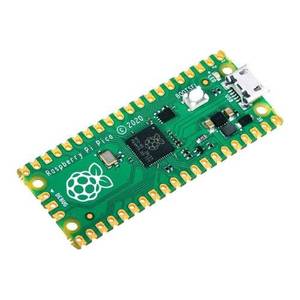
- Brand
-
Raspberry Pi
- CPU
-
RP2040
The Raspberry Pi Pico offers a custom-built dual-core RP2040 processor, making it the ideal affordable microcontroller for a wide range of projects. It features UART, SPI, I2C, I2S, and much more, making it a solid option when you need more power and capabilities than a traditional Arduino.
There are so many fun projects to do with Raspberry Pi’s, especially now that there are microcontroller Pi’s alongside the normal single-board computer Pi’s that we’ve all come to know and love. I’m slowly building my repository of Pi projects to do myself, with a few of these landing pretty high on my list.
However, if you’re trying to do something a bit simpler that doesn’t require outdoor enclosures or soldering, why not host a few services on your Pi? While the projects above might take a while, there are plenty of Raspberry Pi tasks that take less than an hour to complete.


