You’re Using This Powerful Tech Constantly and Didn’t Know It


Have you ever seen the term “optical character recognition” or OCR and wondered what it means? Well, I’m here to help you understand what OCR is. It is very possible that you have used OCR without knowing it. You may have even used it today. Here’s everything you need to know about optical character recognition.
The difference between OCR and scanning
When you scan a document, you simply take a photo or snapshot of the piece of paper. Nothing is done with this analysis; it is simply a photo of the paper that was placed on the scan bed (or fed through the document feeder).
OCR, or optical character recognition, is performed after scanning a document. OCR happens on the software side and takes that photo and turns it into digital characters.
Some scanners have “built-in OCR”, but this usually just means that they come with software that can read the scanned document so that it can be searched for later.
Your phone already does OCR

Now that you know what OCR is, did you know that most modern phones already do it? Take the iPhone, for example. If you point an iPhone’s camera app at text, phone numbers, addresses, or even websites, the app offers the ability to copy or act on the characters. This is OCR in action, and Apple calls it Live Text. Android phones do this through the Google Lens app, allowing you to take a photo and extract text from the image.
Not only can you act on text (like phone numbers), but you can also copy and paste. Many times I took a photo of a document with text I needed to type and simply copied it. I opened business documents saved as PDFs and copied details such as addresses and phone numbers.
This isn’t the only place OCR takes place on your phone, however. The photos application, on iPhone and Android, uses OCR. If you search for the word “dog”, your app will display photos of dogs, but it will also display photos with the name “dog”. word “dog” in them. I’ve used it many times before when I needed to find something.
Once I was looking for a photo of a Logitech mouse. I knew I had a photo of the box from the same day, so I simply searched for the word “Logitech” and found the photo of the box, which told me the day the photo was taken, and let me find the mouse.
You can also get third-party cameras and apps that offer OCR and document storage, if you want more than your phone’s camera or photos app is capable of.
-
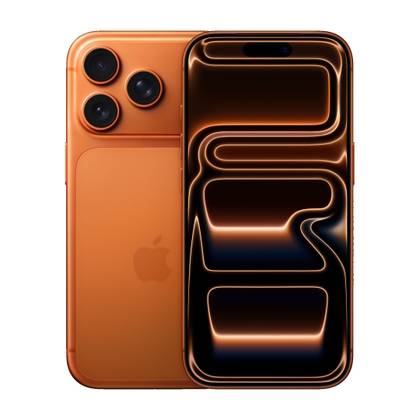
- SoC
-
A19 Pro chip
- Display
-
6.3 inches
- Storage
-
256 GB, 512 GB or 1 TB
- Ports
-
USB-C
- Operating system
-
iOS
- Colors
-
Silver, cosmic orange, deep blue
The Apple iPhone 17 Pro is the company’s most powerful smartphone yet, offering impressive cameras and the A19 Pro chip. It lets you do practically everything, including shooting quality videos.
-
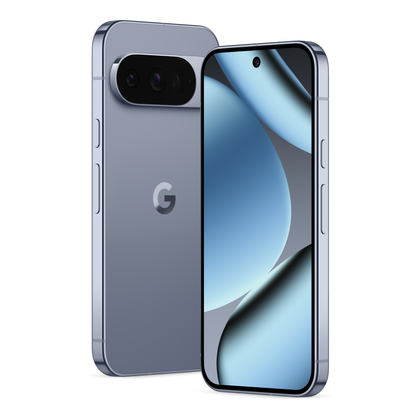
- Brand
-
Google
- SoC
-
Google Tensor G5
- Display
-
6.3-inch Super Actua, 20:9
- RAM
-
16 GB of RAM
- Storage
-
128 GB / 256 GB / 512 GB with zoned UFS / 1 TB with zoned UFS
- Battery
-
4870mAh
The Pixel 10 Pro offers an upgrade over the base model with the powerful Google Tensor G5 chip, more RAM, and more storage (if you need it).


Some scanners come with software that supports OCR

Although it is very rare to find a scanner that has OCR integrated, many modern scanners come with software that supports OCR in one way or another.
For example, I have an OCR compatible Epson scanner. This means it scans at a high enough resolution for OCR software to work with it. This also means that Epson provides software with the scanner that handles the OCR side.
However, I don’t use the software that came with my scanner for OCR. Instead, I use paperless-ngx, a free, self-hosted document manager. I need to use my document manager more than I do, but it’s nice to have it available when I need it. Otherwise, I just use macOS’s built-in OCR in Preview, as it lets me copy text from an image without any additional software.
Neat is another scanning software that integrates OCR. Years ago I used Neat when it was much more affordable. Now it’s $200 a year and that’s out of my price range. However, it is one of the most well-known scanner organizers.
You can also use Adobe’s free PDF OCR website. Simply upload a scanned document to the website and Adobe will perform the OCR for you. Adobe’s option is probably the worst of the ones I’ve tried, but it’s free, web-based, and works quite well with typed documents, although handwritten words are a little harder to parse.

- Brand
-
Epson
- Connectivity
-
Wireless, wired
- Automatic feeding
-
Yes
- Resolution
-
300 DPI
The Epson Workforce ES-400 II Color Duplex desktop scanner can scan both sides of paper at the same time. Offering color scanning, the ES-400 II scans at up to 300 DPI. The automatic document feeder automatically inserts pages one after the other for scanning. This scanner supports everything from receipts and credit cards to IDs and traditional pages.
Did you know that you can skip the physical scanner altogether and just use your phone to scan? It’s actually very simple and a lot of apps support scanning a document with your phone.
In fact, OneDrive allows you to scan documents with your mobile device and store them in the cloud. This gives you OneDrive’s OCR capabilities, cloud storage, and helps you avoid having to purchase additional technology to use only occasionally.


