
The iPhone 17, fancier Pro version, and an all-new slim model are just slightly better iterations of the iPhone you already have in your pocket. While everyone loves an upgrade, not everyone needs an upgrade.
If that sounds like you, you might just be looking for a pick-me-up to make the most of what you already have. In this case, you can spend that cash on a cheaper upgrade instead.
1
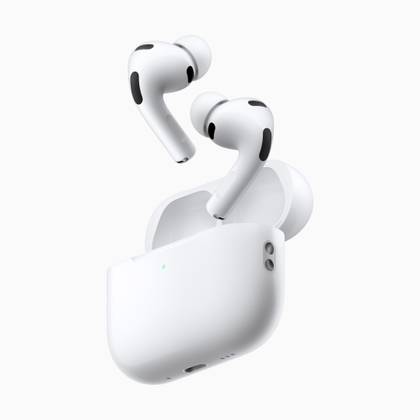
AirPods Pro 3

It’s iPhone upgrade year for me, but part of me wishes it wasn’t. The main reason I have reservations is that Apple has announced an upgrade that I’ve been patiently waiting for out of necessity for a number of months now: the AirPods Pro 3. I currently have a pair of original AirPods Pro (having skipped the second-generation), which are slowly and inelegantly falling apart. That means September is an expensive month.
If your iPhone is already good enough but your headphones are nothing special or, like me, you’re holding on to a set that should probably be responsibly recycled sooner rather than later, the $249 AirPods Pro 3 are around a third of the price and will still give you a big quality of life improvement.
The new AirPods Pro feature better noise cancelling than ever before, are equipped with a heart rate monitor, and have seen a design overhaul to improve fit (not to mention foam tips). Everything’s just a little bit better, with improved battery life offering two extra hours of listening while using Noise Cancellation compared to the previous version.
If you’ve yet to jump aboard the wireless earbud bandwagon, now could be the perfect time. The AirPods Pro 3 launch at the same price that the previous model ($249) was recently selling for, plus they come with a three-month Apple Music membership. If you’re not sure, you can always return them within the 14-day return window if you buy from Apple directly.
- Battery Life
-
Up to 8 hours
- Charging Case Included?
-
Yes
The newest generation of the AirPods Pro has an enhanced ANC, more comfortable foam tips, and live language translations.
2
A Fast Wireless Charger

It’s fair to say that wireless charging stalled out of the gate for many people. Yes, it’s ultra-convenient to be able to put your phone down and have it charge, but it’s only within the last few years that the technology has become something of a must-have. Apple’s MagSafe implementation is the king of wireless charging, and if you haven’t got one yet, then now’s a good time.
The iPhone 16 can handle up to 20W wireless charging, whereas the latest iPhone 17 family (including the Air) can do 25W with the right charger. Apple makes a simple MagSafe wireless charger that’s up to the task, while you can get third-party options like the UGREEN 25W MagFlow wireless charger. If you have an older iPhone 13, 14, or 15 then you’ll max out at 15W with a compatible Qi2-certified MagSafe charger.
These speed improvements bring wireless charging out of the dark ages. If you have an older model that lacks magnetic positioning then it likely caps out at 5W, which is about as slow as charging gets. An updated charger like Apple’s puck or an all-in-one stand for your iPhone, Apple Watch, and AirPods can make charging a bit less of a hassle.
This is especially true if you use your iPhone in the car as a navigational aid, since you can mount and charge in one fell swoop by dropping your iPhone onto a MagSafe charger. If you have wireless CarPlay, a MagSafe charger is a must-have since you probably forget to plug your phone in on longer journeys.
- Charger Type
-
Wireless
- Brand
-
UGREEN
The UGREEN Qi2 magnetic wireless charger is a compact, foldable silver charger offering ultra-fast 25w wireless power. Its secure magnetic grip supports recent iPhone models and AirPods, and has smart temperature protection and a convenient 2-in-1 design for simultaneous charging.
3
MagSafe Accessories

Sticking with the MagSafe theme for a moment, you can teach an old iPhone new tricks using Apple’s magnetic fastening system. Perhaps the most common use for the technology is to attach snap-on batteries to the back of your iPhone, potentially doubling or tripling your battery life without needing to connect a cable. Best of all, you can simply peel the MagSafe charger off your device when you want your slim iPhone back again.
Charging via MagSafe can also turn the iPhone into a handy little bedside gadget. By using StandBy mode, you can have your iPhone with always-on display (introduced with the iPhone 14 Pro) behave like an alarm clock and show various information when your device is connected to power in landscape mode.
Charging aside, MagSafe has made its way into cases and wallets, too. Apple’s own cases are MagSafe compatible, which means they snap on and pass through charge from compatible chargers. Wallets allow you to carry your cards and various other forms of ID that can’t be stored in a digital manner, and separate the two easily if ever you need to.
On top of this you can get MagSafe notepads, tripod mounts that use MagSafe for photography, mounts for cycling or driving, grip mounts like PopSockets, and some utterly bizarre accessories like mini retro handhelds, solid state storage, a digital-to-audio converter (DAC) headphone amplifier, and even fidget spinners.
Every iPhone since the iPhone 12 (barring the iPhone SE 2) is compatible with MagSafe, so even if your device is getting on in age you can still spruce it up a little.
4
A New Case

Christian Zibreg / How-To Geek
Rather than a brand new iPhone, sometimes all you need is a new case. This can make your existing device feel like new, without the expense and hassle of replacing it and trading it in. It also gives you an opportunity to make a change that can reflect the way you use your device.
For example, I always buy the same Quad Lock case for my iPhone and have done so since I started cycling almost everywhere. But now I’ve moved and I don’t tend to cycle half as much as I used to since I can walk almost everywhere. Though I’m still keen on my bike, my Quad Lock case doesn’t spend much time attached to it anymore.
So I’m thinking of moving away from this case, exploring what else is out there. I want a case that will provide adequate protection for my device, but I also have an opportunity to pick something that really shows off the elegance of the device that’s usually completely hidden by a piece of matte black plastic. I’m looking at everything from Apple’s official transparent MagSafe cases to other leading brands that strike a balance between aesthetics and performance.
I upgraded my case only last year, after briefly considering an iPhone 16 Pro. Spending $30 rather than $1000 was the right call, and the small lift I got from the case was enough to make my iPhone feel reinvigorated without denting my bank balance.
Maybe your tastes have changed since you bought your iPhone, and you no longer want a case that doubles as a wallet, or you want to upgrade to a housing that adds support for those MagSafe accessories you’ve been eyeing. Now’s the time, since you’ll be getting at least another year out of it before Apple tries to tempt you into upgrading all over again.
-

- Brand
-
Beats
- Material
-
Polycarbonate
- Wireless Charging Support
-
MagSafe/Qi2
- Weight
-
0.85oz (24g)
- Camera Control Support
-
Sapphire crystal with a conductive layer
The Beats iPhone Case with MagSafe is a polycarbonate hard shell case compatible with MagSafe wireless charging. It is available in four colors, costs $49.99, and features a sapphire crystal and conductive layer to work with the Camera Control button.
5
Apple One

I’ll be the first to admit that I’m not a fan of ongoing subscriptions, but some feel more necessary than others. I’ve had an iCloud+ subscription for as long as I can remember, and I’m currently paying for 2TB of storage (1.5TB of which I don’t actually need, thanks Apple). Despite the $120 yearly cost, I’m happy to know that my devices, media, and personal files are safely backed up.
I’m also happy to pay for Apple Music, which is currently the only ongoing media subscription I have. I listen to the service all day while I work, in the gym, and while I have complaints, I have no plans to jump ship. But there are other Apple services that I have a passing interest in from time to time, like Apple Arcade and News+.
While I barely have enough time to play games on competing platforms, mobile gaming serves a slightly different purpose. I’m not going to break out Hades 2 while I’m lying in bed trying to sleep, but an addictive and dopaminergic puzzler? Yes please. I get a lot of my news from a public service broadcaster, but sometimes I am tempted to pay for a News+ subscription so I can read those subscriber-only stories too.
But I never quite feel the pull enough from these to actually sign up. Which is what makes Apple One so tempting. For just a little bit more than I’m already paying, I can have pretty much everything Apple is offering, including TV+ and Fitness+ too. I already pay just shy of $17 for iCloud+ and Music, I can throw Arcade in there for $19.95 all-in. If I want News+, it’ll cost $37.95, but I can share the subscriptions with my partner and effectively halve the total bill.
If you want a little more from your device—including the new Apple News+ Food recipe collection—and you’re already paying for a few of these things separately, you might want to consider how much extra you’d need to pay to add these services to your account. Just be sure to add up the yearly total to get a good idea of the true cost, and whether this is worth it to you.
6
A Quality of Life Upgrade

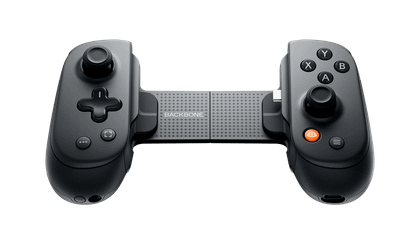
You don’t need to spend a lot, we’ve already got a list of cheap iPhone accessories you should know about that I won’t rehash here. But there’s probably a loose link in the chain that you can target to improve your overall iPhone experience. That might be a snap-on game controller, a USB-C power adapter with enough throughput and ports to power all of your devices when traveling, or a braided charging cable to replace the failing, frayed one you’re using now. It might be a premium iPhone app that justifies its price tag, like a task management app or focus timer.
- Wireless?
-
Yes
- Compatible Systems
-
Android phones and iPhone 15 and above
The Backbone Pro takes mobile gaming (and beyond) to the next level of comfort with two full-sized joysticks, Hall-effect triggers, and two customizable rear buttons for a console-quality experience. You can use it wired with a USB-C connection or go wireless with Bluetooth to play on PC, console, iPad, or any other compatible screen.
Or it might be something that costs you nothing at all, like a Shortcuts automation that yells at you to stop procrastinating.


