iOS compatibility checker: Find the latest iOS version for your iPhone


You don’t know which version of iOS your iPhone can work? Here is a quick guide so you can know if your iPhone is compatible with the most recent iterations in the iPhone operating system and, if not, which version you can install on your iPhone.
Apple gives iOS a major update each year, generally introducing new features and some stability upgrades to the previous version, as well as many smaller updates between the two. The current version of iOS is iOS 26, arrived on September 15, 2025.
IOS 26 is the successor of iOS 18 (the jump from 18 to 26 is that Apple has re -aligned the numbering to match the year) will bring a brand new design and many new features to iPhones. But will iOS 26 work on your iPhone? Unfortunately, the compatibility list for iOS 26 is slightly smaller than that for iOS 18. If your iPhone is older than the iPhone 11, you miss the new iOS.
Even with an iPhone 11, you will not get all the new features with iOS 26. For the features fueled by Apple Intelligence, you will need the iPhone 17, 17 pro, 17 pro, Max or iPhone Air, iPhone 16, 16th, 16 Plus, 16 pro or 16 pro Max, or iPhone 15 Pro or iPhone 15 Pro Max.
If you want to see a brief story of iOS, take a look at our guide for each version of iOS published so far.
Latest iOS version supported by Apple
If your iPhone cannot run the most recent iOS, this does not mean that you should upgrade your iPhone. Although you cannot take advantage of the latest features, Apple continues to make software updates to approach security vulnerabilities in the most recent iOS versions. Even with the arrival of iOS 26, Apple will continue to support iOS 18 with safety updates (and with the iPhone XS and XR).
In some years, Apple supports more than an older iOS with security updates, but because all the phones that run iOS 17 can be upgraded to iOS 18, it is likely that iOS 17 is no longer supported. Indeed, the last update of iOS 17 was iOS 17.7.2 in November 2024.
However, Apple has published security updates for iOS 16 and iOS 15 on September 15, 2025, which should maintain the 2015 iPhone 6s to the iPhone X 2017 for a while. We do not expect new updates from these iOS versions.
It is when your iPhone cannot run an iOS support version that you must really consider upgrading for your safety. We explain how long Apple takes care of the iPhone in a separate article and you can see which iPhones support which version of iOS in the graph below.
Latest iOS version supported by each iPhone
To show you which version of iOS that your iPhone can work, we have broken down each generation of iPhone so that you know with which version it initially dispatched (because it will be as soon as possible) and the last iteration it currently supports – including if this iPhone supports iOS 26.
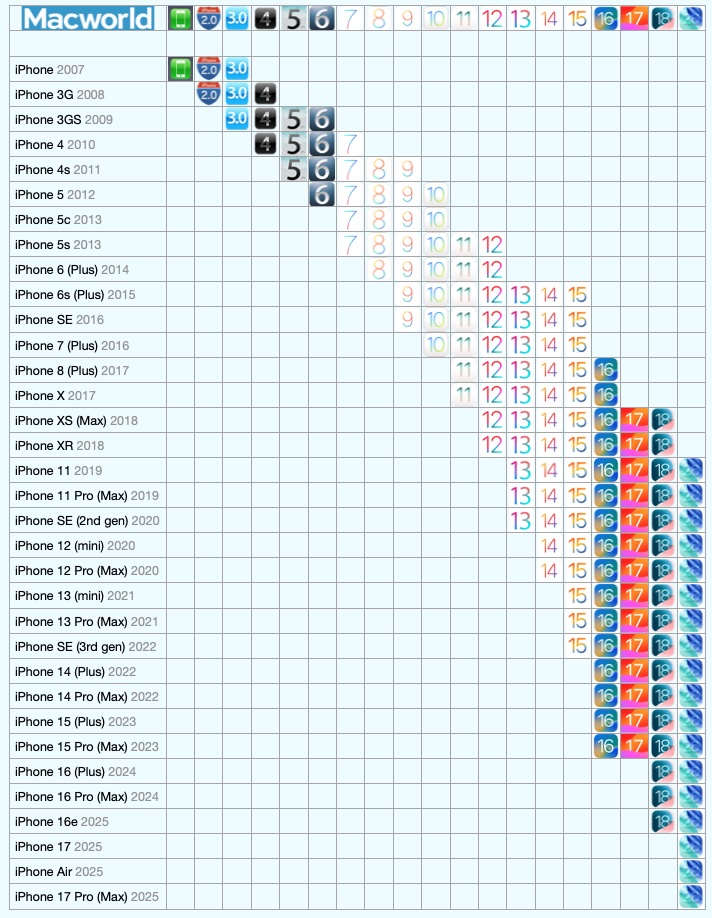
Each version of iOS and the phones it supports.
Foundry
Air iPhone
- Original iOS version: iOS 26
- Does it work iOS 26: yes
iPhone 17, 17 pro, 17 pro max
- Original iOS version: iOS 26
- Does it work iOS 26: yes
iPhone 16, 16th, 16 plus, 16 pro, 16 pro max
- Original iOS version: iOS 18
- Does it work iOS 26: yes
iPhone 15, 15 Plus, 15 pro, 15 pro max
- Original iOS version: iOS 17
- Does it work iOS 26: yes
iPhone 14, 14 Plus, 14 pro, 14 pro max
- Original iOS version: iOS 16
- Does it work iOS 26: yes
iPhone 13, 13 mini, 13 pro, 13 pro max
- Original iOS version: iOS 15
- Does it work iOS 26: yes
iPhone SE (3rd generation)
- Original iOS version: iOS 15
- Does it work iOS 26: yes
iPhone 12, 12 mini, 12 pro, 12 pro max
- Original iOS version: iOS 14
- Does it work iOS 18: yes
iPhone 11, 11 pro, 11 pro max
- Original iOS version: iOS 13
- Does it work iOS 26: yes
iPhone SE (2nd generation)
- Original iOS version: iOS 13
- Does it work iOS 26: yes
iPhone XR, XS, XS Max
- Original iOS version: iOS 12
- Does it work iOS 26: no
- Latest compatible version: iOS 18
iPhone X
- Original iOS version: iOS 11
- Latest compatible version: iOS 16
iPhone 8, 8 Plus
- Original iOS version: iOS 11
- Latest compatible version: iOS 16
iPhone 7, 7 Plus
- Original iOS version: iOS 10
- Latest compatible version: iOS 15
iPhone 6s, 6s plus
- Original iOS version: iOS 9
- Latest compatible version: iOS 15
iPhone SE (1st generation)
- Original iOS version: iOS 9
- Latest compatible version: iOS 15
iPhone 6, 6 Plus
- Original iOS version: iOS 8
- Latest compatible version: iOS 12
iPhone 5S
- Original iOS version: iOS 7
- Latest compatible version: iOS 12
iPhone 5C
- Original iOS version: iOS 7
- Latest compatible version: iOS 10
iPhone 5
- Original iOS version: iOS 6
- Latest compatible version: iOS 10
iPhone 4S
- Original iOS version: iOS 5
- Latest compatible version: iOS 9
iPhone 4
- Original iOS version: iOS 4
- Latest compatible version: iOS 7
iphone 3GS
- Original iOS version: iOS 3
- Latest compatible version: iOS 6
iphone 3G
- Original iOS version: iOS 2
- Latest compatible version: iOS 4
iphone
- Original iOS version: iOS 1
- Latest compatible version: iOS 3
If your iPhone is not supported by iOS 24 or 18, you may want to consider going to a more recent device. Take a look at our best iPhone deals, where we share the most recent money saving offers. Read our best iPhone guide for advice.
How to say which version of iOS you use
If you are not sure of the iOS version you are currently using, it is very easy to discover.
- Open the parameters.
- Press General.
- Press and search for the iOS version number.

Screenshot
Foundry
How to upgrade iOS
Now that you know the latest version of iOS that your iPhone supports, it’s a good idea to make sure you are running on this platform. We have a guide on how to update iOS on your iPhone, so take a look at that and follow the simple instructions to update your iPhone.


