Forget wall-mounted tablets—an E-Ink dashboard is what your smart home really needs


Smart home forums are full of posts from people showing off the incredible dashboards they’ve created, often displayed on wall tablets. While these dashboards can show you a lot of information about your smart home, there are many ways in which a simple E-Ink dashboard is a better option.
Why a Tablet May Fail as a Smart Home Dashboard
Too much screen, too many options
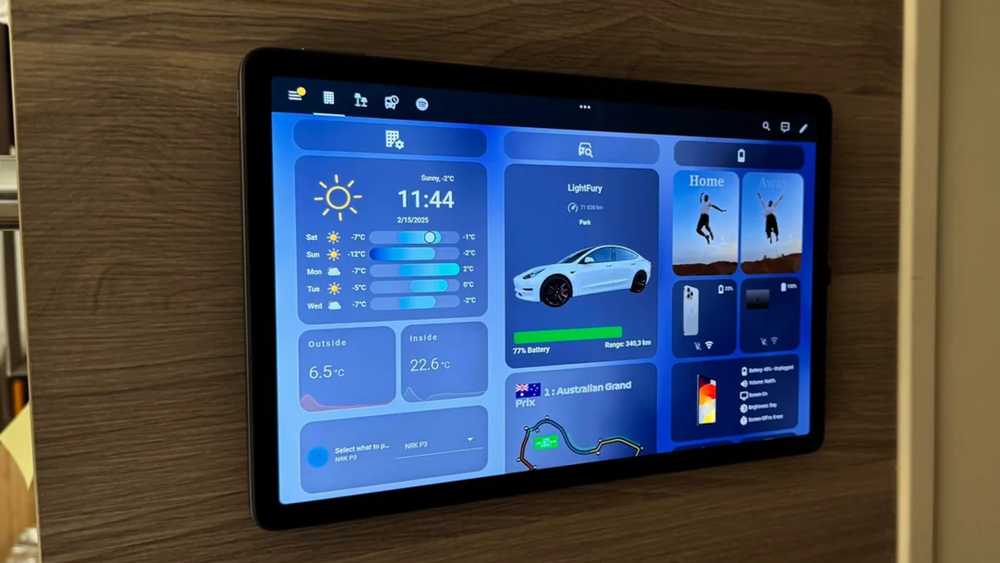
A tablet seems like the perfect way to display a dashboard in your smart home. There is a large, high-resolution color display and the touchscreen is perfect for interacting with the screen controls. Its flat form factor makes it an ideal choice for wall mounting as a smart home central control panel.
The problem is that these so-called benefits encourage complexity. With so much screen space to fill, it’s tempting to cram as much information in as possible, adding tiles for every device in your home, graphs of your energy usage, feeds from smart cameras, media controls, and more. This can lead to thinking that you need to include everything you can.
If you succumb to this urge, you end up with a smart home dashboard that is so full of information that it’s almost impossible to grasp any of it. It’s a wall of information in which nothing stands out and nothing can be discerned at a glance. If you want to know what the temperature is, for example, you have to scroll through the screen to find where that information is.

- Compatibility
-
Amazon Alexa
- Colors
-
White
The Amazon Echo Hub is a centralized unit designed to help you take full control of all the home automation in your home. Connect with brands like Philips, Sengled, Govee and Ring to manage individual apps, set scenes or schedule device activation. The Echo Hub has an 8-inch touchscreen that serves as the control panel for your smart home.
Why an E-Ink display is better
Low consumption, beautiful and always active

An alternative option for a smart home dashboard is an E-Ink display. Unlike an LCD or OLED screen which uses a light source to create an image, E-Ink uses tiny microcapsules containing charged white and black particles suspended in a fluid. When an electric field is applied, the black or white particles move toward the surface, thereby printing an image.
The beauty of E-Ink is that once the capsules are set, they no longer need any energy to stay there. You could cut power to an E-Ink display and the current image would stay there for a very long time. Power is only used when the display changes, giving these devices incredible battery life.

3 DIY E-Ink Projects for Beginners
Not every DIY project requires a full weekend.
This is ideal for a smart home dashboard. One of the biggest problems with a wall-mounted tablet is finding a way to keep the device powered without having to run unsightly cables along the wall or drill holes everywhere. You can stick a battery-powered E-Ink display to the wall without the need for a permanent power cable.
An E-Ink display also looks great. It’s easily readable in ambient light, without the glare you can get from a tablet. The paper look gives it an analog aesthetic, and it’s always on, so you don’t have to worry about finding a way to wake the dashboard when you’re near it.
What to Show on an E-Ink Dashboard
Six things rather than sixty

Another key benefit of using an E-Ink display is that it forces you to create a much more focused dashboard. A small, simple monochrome display isn’t suitable for holding all the information you can possibly display on your smart home. This is much better for displaying some key information, which you can see at a glance.
The real challenge is choosing what to display. There’s no point including control tiles if your E-Ink display doesn’t support touch, but it’s perfect for displaying key information. You may want to include data such as current weather conditions, upcoming calendar events, indoor air quality, battery levels, home security status, or commute times.
You don’t want to include items that need to be refreshed quickly, as this will significantly reduce battery life. The beauty is that you don’t have to get it right the first time. If you discover that some information is not very useful and other information is more deserving of its place, you can simply modify what is displayed until it perfectly suits your needs.
Build your own E-Ink display
Start from scratch or reuse what you have
An E-Ink screen is not ideal for all uses. You wouldn’t want to try using one to view a live video feed, and if you don’t have a touchscreen, you can’t use it to control your devices. If you’re just looking for a simple, elegant source of information, you may want to create your own E-Ink display.
There are two main routes. You can buy an E-Ink display and connect it to a small microcontroller or single-board computer, such as an ESP32 or Raspberry Pi Zero 2W, and have it pull data from your smart home system, such as Home Assistant. This gives you more flexibility to create exactly what you want, but requires more configuration.
The other option is to reuse an E-Ink display you already own, like an old Kindle or E-Ink picture frame. There are many ways to make these devices display your dashboard, such as providing snapshots of your smart home dashboard from your server to the Kindle’s web browser or jailbreaking the Kindle and making it display your dashboard on the screen.
For example, my old Kindle now shows my smart home dashboard as a screen saver. When I’m not using it, my smart home dashboard shows up, but when I want to read, I can open the KOReader app and immerse myself in a good book.
Create a truly useful dashboard
A wall-mounted tablet dashboard may look impressive, but if it displays too much, it loses its usefulness. An E-Ink dashboard is sleeker, can run on battery power for a long time, and can let you see the information you want without having to play a board game. Where is Waldo?


