How to add more USB ports to an iPhone or iPad


That single Lightning or USB-C port on your iPhone or iPad is a bottleneck, plain and simple. These devices are literally computers, but they have far fewer ports. What if you need more? Well, what are you waiting for, just add some.
Don’t worry, I’m not going to tell you to grab a Dremmel and a soldering iron. We don’t need to perform any surgery on your iPhone or iPad to add more ports. Thanks to the vast world of Apple accessories, there are plenty of simpler options.
Start with a simple USB dongle
If you’re fully into the Apple ecosystem, you may already know too much about your MacBook’s dongles. The iPhone and iPad can equally benefit from a similar accessory. Sometimes even the exact same products will work. These compact USB-C or Lightning dongles and hubs give you more connectivity options.
When looking for a hub, you should prioritize a handful of ports. If you frequently work with media or photography, a full-size microSD or SD card slot will allow you to move files directly from your camera to your device. You should also look for a mix of additional USB-C and standard USB-A slots. The USB-A port is essential for peripherals such as USB drives, external hard drives, mice and keyboards.
Yes, a mouse and keyboard! iPads and even iPhones can be turned into pseudo-desktops, especially with features like Stage Manager on the iPad. Of course, Bluetooth is always an option for mice and keyboards, but be aware that wired is possible if you prefer that.
-
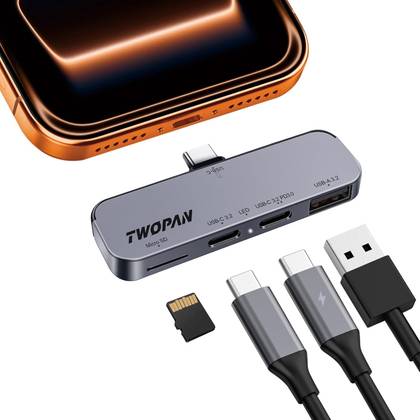
- Connection
-
USB-C
- Ports
-
1 USB-A, 2 USB-C, 1 microSD
- Power supply included
-
No
This lightweight USB-C hub for iPhone 16/15 enables high-quality video recording, including 4K ProRes, by connecting external SSDs/hard drives via its USB 3.2 port. It has a microSD slot for file transfer and a dedicated USB-C port for PD charging, allowing you to power your iPhone while filming. Featuring versatile ports, it simplifies professional video workflow on the go.
-
- Connection
-
USB-C
- Ports
-
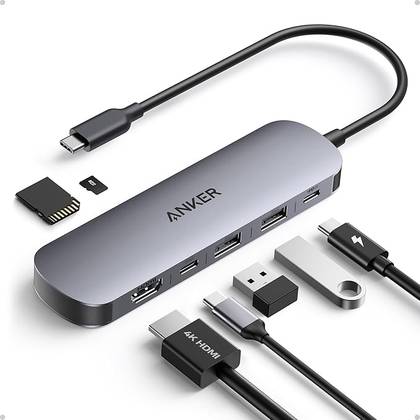
2 USB-A, 2 USB-C, 1 HDMI, 1 SD card, 1 TF 3.0
- USB-C power delivery
-
Maximum power output of 85 W
- Weight
-
67g
- Dimensions
-
5.17 x 1.46 x 0.47 inches
The Anker 7-in-1 USB-C Hub expands your laptop with HDMI, two USB-A ports, a USB-C PD port, a USB-C data port, and SD/TF card slots. It supports up to 85W of power for fast charging, all in a compact and sleek design.


Magnetic is a more elegant solution
While a larger dongle or hub might be fine with an iPad, you can get a little fancier with your iPhone, especially if you have MagSafe. These magnetic hubs are essentially the same as other hubs, but they are a neater option.
MagSafe USB hubs snap directly into the side of your iPhone and connect via a short, flexible USB-C cable. They can include all of the same port options: microSD slots, USB-C, USB-A, and even HDMI or DisplayPort. A major advantage of this style of connection is that there is much less strain on the single port of your device, as the main body of the accessory is supported by the magnetic frame of the device rather than being cantilevered from the port itself.
The iPhone (and iPad) is a modular device
Several Android manufacturers have attempted to make “modular” phones, but only Apple has succeeded with MagSafe. However, modularity is not just about magnets. You have the power to make your iPhone or iPad modular using any of these accessories.
It all depends on what suits your personal needs. Maybe it’s just a simple dongle for quickly backing up photos or connecting a presentation screen. A more powerful hub to turn your device into a full-fledged workstation with multiple peripherals might seem more useful. And a magnetic hub for a convenient, secure and long-lasting connection when using your iPhone on the go is always a good choice. You have options.

A USB-C hub is one of the best cheap upgrades for your phone
Our phones were once limited by their power, but now they offer all the power of a larger PC. What they lack more than ever are ports. But it’s a problem that a USB-C hub can solve, and it’s one of the easiest ways to upgrade your phone. USB-C hubs come in different shapes. Most are wired dongles that plug into a USB-C port. Some phone-specific models hold your phone vertically and are geared toward desktop modes like Samsung DeX. No matter which variety you choose, they are all suitable for the tasks on this list.


