YouTube’s AI Deepfake Detection Tool Is Now Available To All Creators 18 And Older


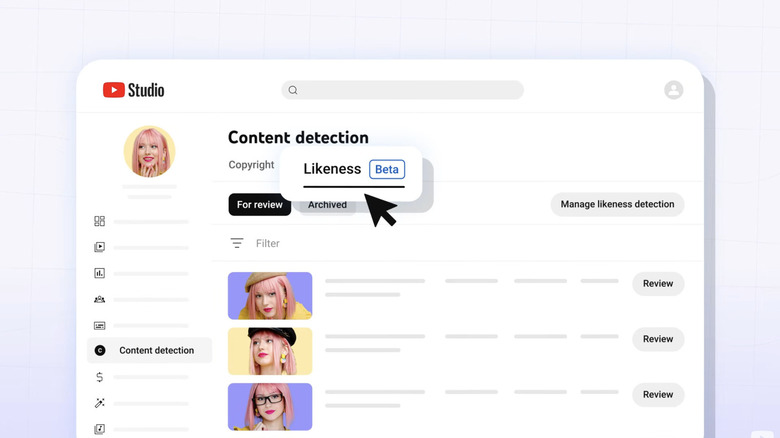
In the coming weeks, YouTube will give all creators 18 and older access to a tool that can detect if their image has been copied and used in AI videos uploaded to the website. The YouTube team made the announcement on the platform’s community page, explaining that its “goal is to provide [users] with more peace of mind by giving [them] Easy access to request removal of unauthorized content. Although the Lookalike Detection tool is technically only available to creators, spokesperson Jack Malon said The edge that anyone can use it.
“With this expansion, we’re making it clear that whether creators have been uploading to YouTube for a decade or are just getting started, they will have access to the same level of protection,” Malon said in a statement. It’s increasingly difficult to tell the difference between real videos and AI videos these days, and the tool’s wider availability could end up helping even ordinary people who suddenly discover their faces are being used in potentially malicious or misleading AI videos. For creators, this could help them spot brands and companies using their image without permission to promote products and services.
YouTube first previewed the tool in 2024 before rolling it out in late 2025. It launched exclusively for Partner Program members, creators who monetized their channels after gaining 1,000 subscribers and accumulating enough watch hours or short audience views within a certain time frame. YouTube then made the tool available to journalists and politicians before this expansion.
Users who want to access the new tool will need to sign up from YouTube Studio on their computer. They can start the process by going to “Likeness” under “Content Detection,” scan a QR code with their phone, submit a government ID, and complete a selfie video verification. Once set up, YouTube will scan uploaded videos for possible matches to their face, and they will see any videos potentially using their image under the same tab. They can then view the video and submit a removal request, in which they can provide YouTube with information about how their image was used. YouTube will also ask if the video copied their voice for evaluation, but the tool itself cannot make detections based on voice alone.


